M1
M2
M3
PARALLEL
OFF
ON
M1
OFF
ON
PARALLEL
M2
OFF
ON
PARALLEL
M3
CH1CH3
ON
OFF
CH2
CH4
ON
OFF
SENSIT IVITY
M1
M2
M3
PARALLEL
OFF
ON
M1
OFF
ON
PARALLEL
M2
OFF
ON
PARALLEL
M3
CH1CH3
ON
OFF
CH2
CH4
ON
OFF
SENSIT IVITY
M1
M2
M3
PARALLEL
OFF
ON
M1
OFF
ON
PARALLEL
M2
OFF
ON
PARALLEL
M3
CH1CH3
ON
OFF
CH2
CH4
ON
OFF
SENSIT IVITY
A
B
+
-
A
+
-
C
BD
C
+
-
D
+
-
08
A
B
+
-
A
+
-
C
+
-
D
+
-
A
A
+
-
C
C
+
-
2+
1-
2-
1+
+ to PIN 1 +
喇叭:
- to PIN 1 -
喇叭:
2+
1-
2-
1+
- to PIN 1 -
+ to PIN 1 +
喇叭:
喇叭:
2+
1-
2-
1+
- to PIN 2+
+ to PIN 1 +
喇叭:
喇叭:
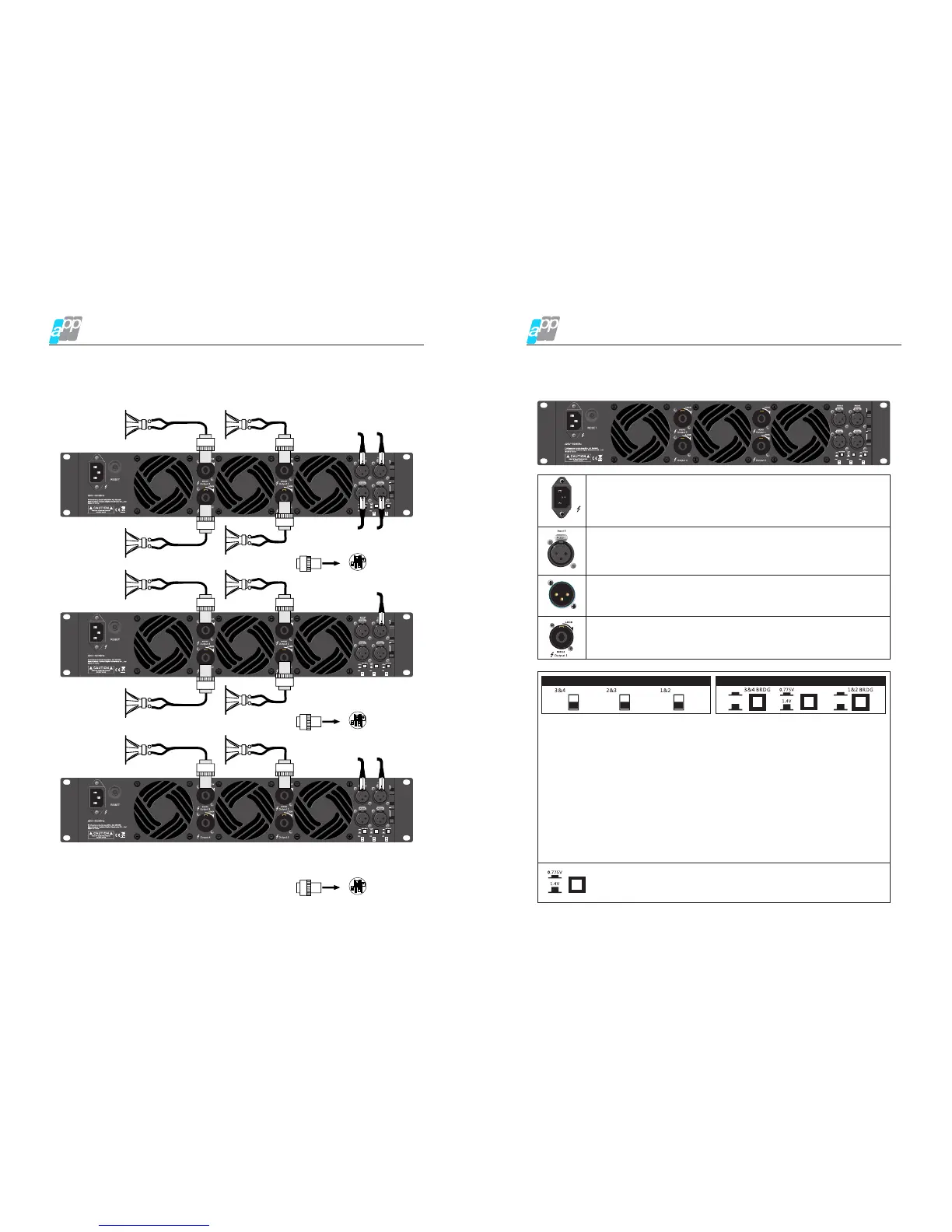
Connection Mode
AK series professional audio power amplifier
Speakon output connection(4CH)
Stereo connection
Mono connection
Bridge connection
Rear Panel
Main Operation & Functions
05
AK series professional audio power amplifier
220V~ 50/60 Hz
Mains socket: Check the selected voltage whether it is correct or not
before using this amplifier If the voltage is not correct, it may damage
the amplifier and cause fire.
Signal input: The input interface connects to the mixer directly. The
input of the corresponding channel and output connector are
connected together to provide the fixed connection, do not need to
consider the power switch setting.
Output connection: Amplifier output channel, it provides the output
by connecting the SPEAKON connector
Parallel output XLR connector: this socket is parallel with the input
XLR socket, input directly output via this socket, AK series 2CH and
3CH models have this function.
M1
M2
M3
PARALLEL
OFF
ON
M1
OFF
ON
PARALLEL
M2
OFF
ON
PARALLEL
M3
CH1CH3
ON
OFF
CH2
CH4
ON
OFF
SENSIT IVITY
PARALLEL
OFF
ON
M1
OFF
ON
PARALLEL
M2
OFF
ON
PARALLEL
M3
Channel mode switching switch:
Mainly complete the switching of MONO mode and BRIDGE/PARALLEL by adjusting.
There are M1/M2/M3 three dial switches on the rear panel, shown as M1 silkscreen,
when M1 dial switch faces up which means CH1 is parallel to CH2, when it faces
down which means it is off. M2 and M3 dial switch are the same principle.
Key switch function: when key switch faces down which means CH1 is parallel to
CH2, when it faces up which means it is off.
ON
OFF
ON
OFF
SENSITIV ITY
Mode Switch:
MONO mode: make the two channel work independently, CH1 input signal by
CH1 output, CH 2 input by CH2 output.
BRIDGE mode: make CH1 input signal from the BRIDGE output socket output,
must use the volume control of CH1 to adjust the volume
PARALLEL mode: make CH1 input signal by CH1 and CH2 output socket output.
The input socket of CH2 is no effect. Channel's volume can be adjusted
independently
SENSITIV ITY
Key Switch Function
Dial Switch
Sensitivity mode: It mainly adjusts the ratio between the input and
output.


 To Next Page