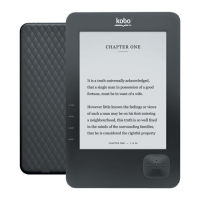
This document is a user guide for a Kobo eReader, published in July 2012 by Kobo Inc. and intended for internal use. It provides essential information on the device's anatomy, basic operation, connectivity, and maintenance, along with legal and safety disclaimers.
Device Function Description
The Kobo eReader is a portable electronic device designed for reading digital books. It supports EPUB and PDF file formats, allowing users to store and access a personal library of eBooks. The device features a front light for reading in various lighting conditions, including low light or darkness, without significantly impacting battery life. It can connect to the Kobo Store and sync libraries over Wi-Fi, enabling users to purchase new books and update their existing collections wirelessly. The eReader also supports adding books via a microSD card or by connecting to a computer.
Important Technical Specifications
- Connectivity: Supports wireless LAN networks (WLAN) for Wi-Fi connectivity. It does not have 3G capabilities.
- Supported File Formats: EPUB and PDF.
- Storage Expansion: Features a microSD card slot to increase the number of books the eReader can hold.
- Charging/Data Transfer: Connects to a computer via a USB cable for charging and adding books.
- Front Light: Integrated front light for reading in low-light conditions.
- Battery Life: Can last several weeks on a full charge. Initial charging for a new device is recommended for up to 3 hours.
- Operating Temperature: Recommended operation between 0°C and 45°C (32°F to 113°F).
- Storage Temperature: Avoid storing in temperatures below -10°C and above 60°C (14°F to 140°F).
Usage Features
- Power Management:
- Turning On: Slide the power switch.
- Turning Off: Slide and hold the power switch down until the "Off" screen appears.
- Sleep Mode: Briefly slide the power switch when the eReader is on to put it to sleep.
- Front Light Control: Press the dedicated front light button to turn the screen glow on for reading in the dark.
- Wi-Fi Connectivity:
- To connect: Press the Home button, tap the Gears icon, tap Sync, select the desired Wi-Fi network, enter the password if required, and tap Join.
- A Wi-Fi symbol indicates a successful connection. The eReader automatically connects to Wi-Fi when accessing the Kobo Store or syncing.
- Adding Books:
- Via MicroSD Card:
- Put EPUB or PDF files on a microSD card.
- Turn off the eReader.
- Insert the card into the slot and push gently until it slides in.
- Turn on the eReader; it will scan the card and update the library.
- Note: DRM-protected books cannot be added this way. Books are read directly from the card, so it must remain inserted.
- Via Computer (Mac):
- Connect the eReader to the computer with a USB cable.
- Tap "Connect" on the eReader screen.
- On the computer, double-click "KOBOeReader."
- Open a Finder window to locate EPUB or PDF files.
- Drag and drop files into the "eReader" window.
- Via Computer (Windows):
- Connect the eReader to the computer with a USB cable.
- Tap "Connect" on the eReader screen.
- When prompted, select "Open folder to view files."
- Open another window to locate EPUB or PDF files.
- Drag and drop files into the "eReader" window.
- Reset Function: A reset pinhole is available; insert a paper clip and hold to reset the eReader if necessary.
Maintenance Features
- Charging:
- Turn on your computer.
- Connect the eReader to your computer using the supplied USB cable.
- Unplug the USB cable when charging is complete.
- Recommendation: Charge for up to 3 hours before first use.
- General Safety and Care:
- Do not open or attempt to repair the device, including battery replacement. Contact Kobo Support for repairs.
- Use only Kobo-designed or approved adapters and chargers. Do not use damaged cords or plugs.
- Avoid exposing the device to fire, direct heat (e.g., hair dryers, microwave ovens).
- The device contains small components; do not open it to prevent choking hazards for small children.
- Do not force objects into device ports (USB, SD slot) or buttons.
- Do not operate the device while driving.
- Do not store the device where it could interfere with airbag deployment in a vehicle.
- Follow flight operator instructions when traveling by airplane; the device has an airplane mode.
- Be aware that flashing lights or similar patterns may cause seizures or eyestrain in susceptible individuals. Consult a physician if concerns arise.
- Recycling Information (WEEE - European Union Only):
- The device should not be disposed of with household waste.
- It must be handed over to a designated collection point for recycling electrical and electronic equipment to conserve resources and protect human health and the environment.
- Contact local city offices, waste disposal services, or the place of purchase for recycling information.
- For further recycling information, contact Kobo at www.kobobooks.com/recycling.
- RF Signal Interference:
- RF signals can interfere with medical devices (pacemakers, hearing aids). Consult the medical device manufacturer if using the eReader near such devices.
- Turn off wireless connections in areas where RF signals are restricted (e.g., healthcare facilities, construction sites).
- Legal Compliance:
- Changes or modifications not authorized by Kobo could void EMC and wireless compliance and the user's authority to operate the product.
- The device complies with FCC Part 15 rules for Class B digital devices, designed to provide reasonable protection against harmful interference in residential installations.
- The device is limited to operation on permissible Part 15 frequencies and cannot be configured by end-users or professional installers to operate outside authorized bands.
- Industry Canada statement: The device complies with RSS-210, subject to not causing harmful interference and accepting any interference received.
- Radiation Exposure Statement: The product complies with portable RF exposure limits in Canada and the USA. Further RF exposure reduction can be achieved by keeping the product as far as possible from the user's body.
- European Union and EFTA Countries: This 2.4GHz wideband transmission system is intended for use in all EU member states and EFTA countries, except France and Norway where restrictive use applies.
- France: Output power is restricted to 10 mW EIRP in the 2454-2483.5 MHz range when used outdoors. Contact http://arcep.fr/ for detailed information.
- Norway: Use of radio equipment is not allowed within a 20 km radius of the center of Ny-Ålesund, Svalbard.
- EU Declaration of Conformity is available at www.kobo.com/userguides.
- Brazil: This equipment operates on a secondary basis, meaning it is not protected against harmful interference, even from stations of the same type, and cannot cause interference to primary operating systems.

 Need help?
 General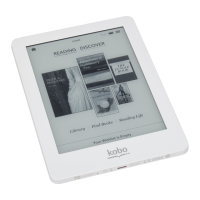

 To Next Page