Need help?
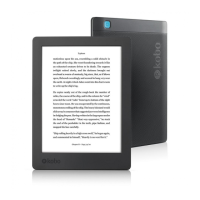
Do you have a question about the Kobo Aura and is the answer not in the manual?
Steps to connect your Kobo eReader to a wireless internet network.
Explanation of why and how to sync your Kobo eReader for updates and content.
Instructions for syncing your device wirelessly with your Kobo account.
Steps to sync your eReader using the Kobo Desktop software on your computer.
Process for downloading books stored in the Kobo Cloud to your device.
Step-by-step guide to purchasing eBooks directly from your eReader.
Basic steps to resolve common issues like unresponsiveness or errors.
Procedure for turning the device off and on to resolve software glitches.
Steps to sign out of your Kobo account and sign back in to refresh settings.
Guide to resetting the eReader to its original factory settings.
Alternative method for performing a factory reset if the standard option fails.
 General
| Color | No |
|---|---|
| Technology | E Ink Pearl |
| Display diagonal | 6 \ |
| Grayscale levels | 16 |
| Display resolution | 1014 x 758 pixels |
| Audio formats supported | - |
| Image formats supported | GIF, JPG, PNG, TIF |
| Document formats supported | CBR, CBZ, ePub, HTML, MOBI, PDF, RTF, TXT |
| Compatible memory cards | MicroSD (TransFlash) |
| Maximum memory card size | 32 GB |
| Internal storage capacity | 4 GB |
| Wi-Fi standards | 802.11b, 802.11g, Wi-Fi 4 (802.11n) |
| USB connector type | Micro-USB B |
| Menu languages | DEU, DUT, ENG, ESP, FRE, ITA, JPN, POR |
| Battery life | - pages |
| Battery life (max) | 1440 h |
| Product color | Black |
 Weight and Dimensions
| Depth | 8.1 mm |
|---|---|
| Width | 114 mm |
| Height | 150 mm |
| Weight | 174 g |


 To Next Page