P.16 P.17
Change fan speed and auto mode
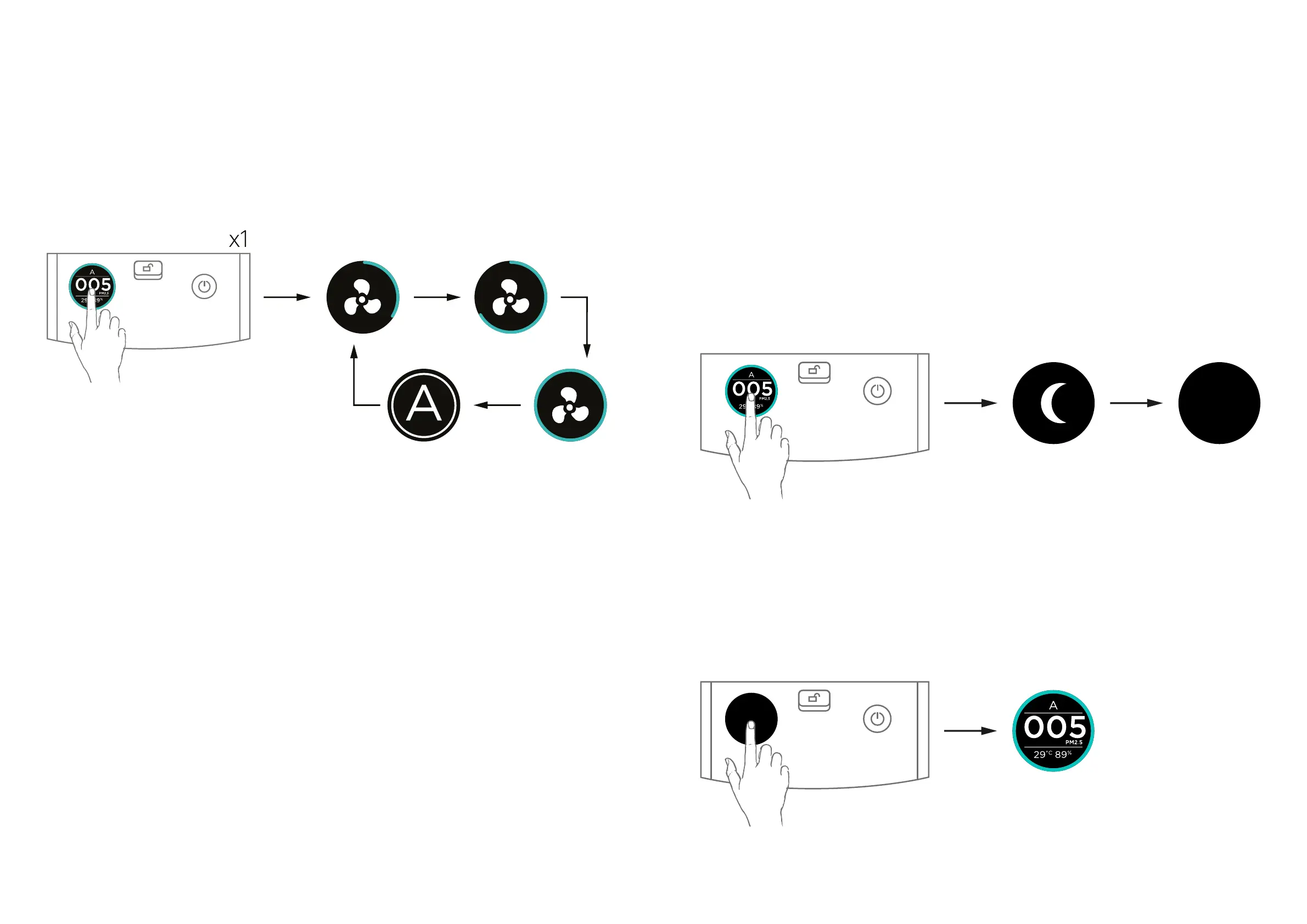
• Press the Screen button to switch the fan speed and
auto mode. The change sequence is Fan Speed 1
-> Fan Speed 2 -> Fan Speed 3 -> Auto Mode -> Fan
speed 1 -> ... (loop) See igure below
Sleep mode
• Press the screen button for 2 seconds, to enter sleep
mode.
• In sleep mode, the LCD display will turn o. And the
fan speed will also change according to PM2.5 read-
ing, just like auto mode, but the power of the fans is
relatively reduced to provide a quieter environment for
sleep.
• Press the Screen button once to exit sleep mode
if the air purifier is in sleep mode.
2 sec
x1
• In auto mode, the fan speed will change according to
PM2.5 reading. If the PM2.5 reading increases, the fan
speed will automatically and progressively increase.
The same will happen if in the meantime the PM2.5
reading decreases, then the fan speed will automat-
ically and progressively decrease according to the
PM2.5 reading.


 To Next Page