46
Note:
• Every press of a button on the control
panel and every successfully transmitted
signal from the remote control is
confirmed by an audible signal.
• All function of the product can be
controlled via the control panel or the
remote control, with exception of the
display illumination LED and SHORTCUT
buttons, which are to be found exclusively
on the remote control.
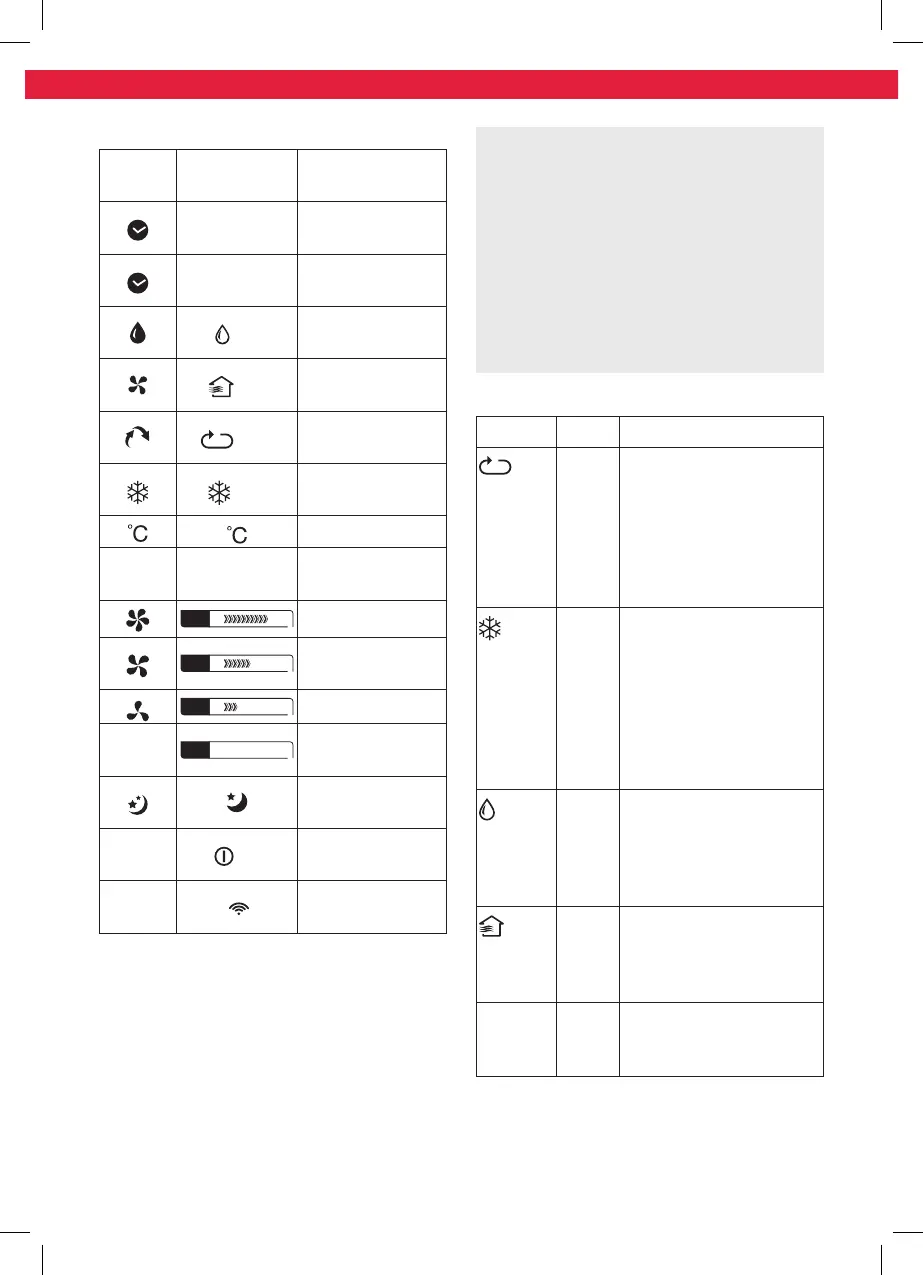
Mode
Mode Application
Auto
Auto-
matic
mode
•products selects the
suitable mode to achieve
the set temperature
•fan speed is controlled
automatically
•temperature can be
adjusted
Cool
Cooling
mode
•cools down the room
temperature
•the compressor runs and
stops in order to maintain
the set temperature
•fan speed and set
temperature can be
adjusted
Dry
Dehu-
midify-
ing
mode
•dehumidifies the room
with the fan
•fan speed and set
temperature cannot be
adjusted
Fan
Fan
mode
•fan only
•fan speed can be adjusted
•temperature cannot be
adjusted
Timer On
Timer O
Timer
mode
•switches the product on
and / or into standby at a
user-defined time
Indicators
Control
panel
Remote
control
Function
TIMER ON
Automatic on
activated
TIMER OFF
Automatic o
activated
Dry
Operating in de-
humidifying mode
Fan
Operating in fan
mode
auto
Auto
Operating in auto
mode
Cool
Operating in
cooling mode
Unit indicator
°F °F Unit indicator
FAN
High fan speed
FAN
Medium fan
speed
FAN
Low fan speed
—
FAN Auto
Fan speed set to
Auto
Sleep mode on/
o
•
/ —
Product on/
standby
—
Transmitting
signal
IM_KAC3232_KAC3352_181220_V04_HR.indb 46 20/12/18 4:15 pm


 To Next Page
 Loading...