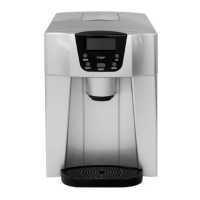
Adjusting the ice cube size
By default, the appliance will form large ice cubes. If you would like small ice cubes, press
the select button on the control panel. The small ice cube indicator ‘ ’ will then illuminate,
enabling the appliance to form small ice cubes.
If both sizes are not suitable, press and hold the power button for 5 seconds whilst the
appliance is making ice. ‘0’ will appear on the display. This indicates the appliance is set to
the default ice-making times.
Press the select button to activate the display to cycle between showing ‘1’ and ‘2’. Based
on the currently set ice cube size, this will add the respective number of minutes to the ice
cube making times, hence changing the size of the ice cubes made. After 5 seconds, the ice
cube making time will be saved and the numbers will disappear.
Ice-making cycles can range from 6–12 minutes.
Dispensing ice cubes
1. Place a container (not included) onto the drip tray cover.
2. Press the ice dispensing button on the control panel. The ice dispensing indicator
‘ ’ on the display will then illuminate and the ice cube pushing spring will start
rotating to push ice cubes out of the appliance.
3. To stop dispensing, press the ice dispensing button again.
Dispensing water
1. Place a cup (not included) onto the drip tray cover.
2. Press the water dispensing button on the control panel. The water dispensing
indicator ‘ ’ will then illuminate and water will begin dispensing from the
appliance.
3. After 10 seconds, the appliance will automatically stop dispensing water.
Adjusting the water dispensing time
To adjust the amount of time the appliance dispenses water, press and hold the water
dispensing button for 5 seconds. The display will show ‘10s’.
Press the select button to adjust the dispensing time (can be adjusted to be between 7–25
seconds). This will be reflected on the display. Once set, wait for 5 seconds to allow the
appliance to save the desired dispensing time.


 To Next Page
 Loading...