-6-
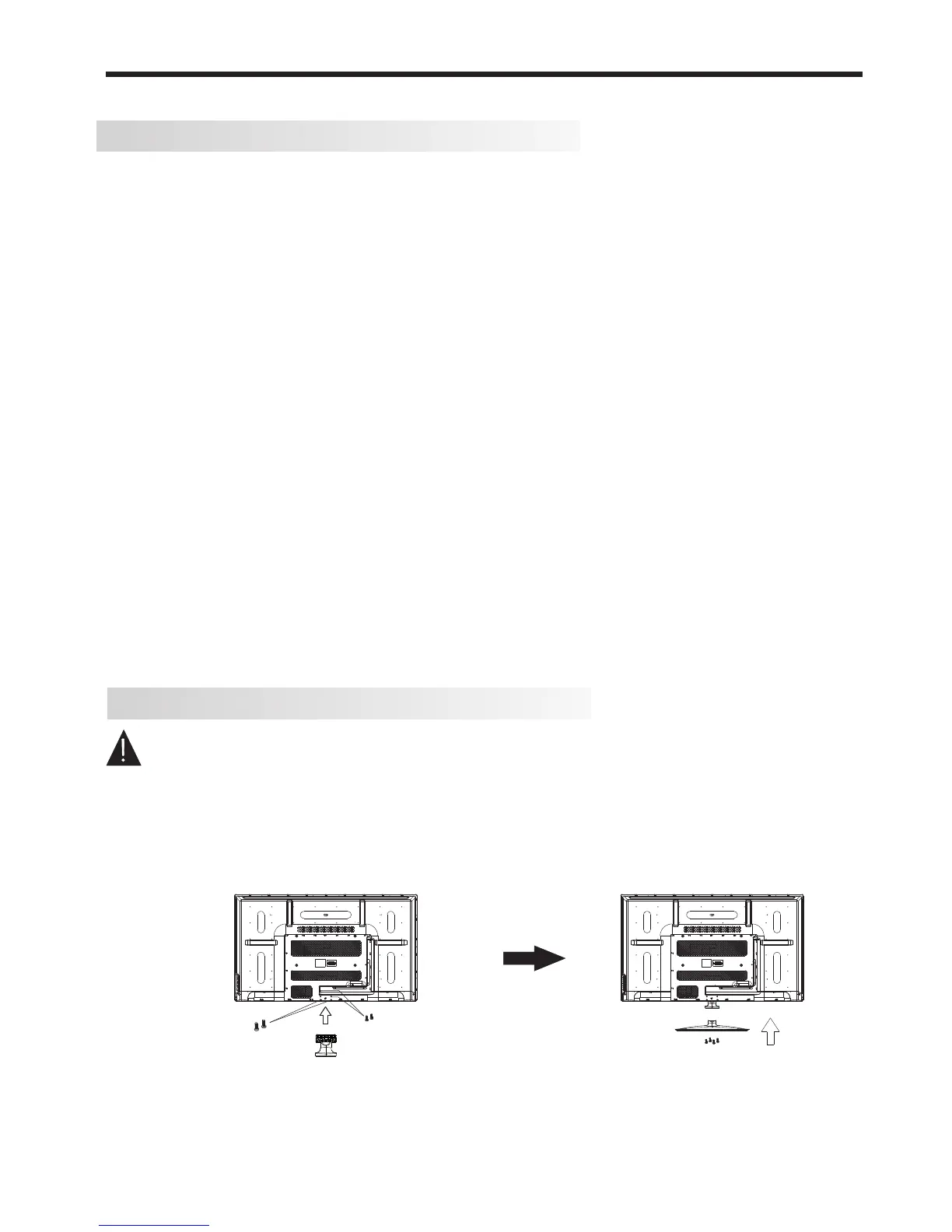
Base Stand Assembly Instruction
Prepare to place the TV with the display side down onto a flat surface. Due to the size and weight of
this TV, the use of 2 people is recommended when moving it. Ensure the table or desk you use provides
a flat, totally clean surface, and use a soft cloth between the face of the TV and the table to help protect
the TV's screen.
1. If not already fitted at the factory, locate the bottom neck bracket into the gap in the bottom of the TV,
and check that it is securely held in place by the 4 long screws, as per a) below.
2. Gently slide the now fitted neck bracket at the bottom of the TV into the slot in the base stand. Secure
the base stand using the 4pcs supplied screws, as per b) below, and check that each screw is firmly
tightened.
Thank you for purchasing the Kogan 55" Full HD LED TV. Before connection and operation of this
product, please read through this User Manual carefully, and retain the manual for future reference.
Remove the TV carefully from its packaging, taking care not to apply any pressure to the front of the LCD
screen. Some accessory items may be located in cut-out sections of the internal packaging, so take care not
to miss these items. Once all items are removed from the packaging, use the list below to check that nothing
is missing. If any items appear to be missing, contact the retail store that supplied the TV.
● 55" LED TV 1 piece
● Desk base stand 1 piece
● Neck bracket (links TV body & base stand) 1 piece
● Quick Start Guide 1 piece
● Remote Control 1 piece
● Pack of 8 screws (4 x long, 4 x short) 1 piece
● Pack of 2 "AAA" size batteries 1 piece
● Pack of 4 M6 screws 1 piece
NB. Some TV models will come with the neck bracket already fitted to the bottom of the TV's body, so there
may be fewer screws supplied separately.
Once all the accessory items have been accounted for, prepare a location where you can attach the base
stand to the body of the TV. You will need to arrange a soft cloth that is large enough to cover the front face of
the TV (for protection of the LED screen), as well as a Philips head screwdriver to attach the neck bracket and
base stand.
Before proceeding to the Getting Started section of this manual, please continue reviewing this Installation
chapter to ensure that your TV is correctly connected to your TV antenna and related AV equipment (eg. DVD
or Blu-ray player, amplifier, sound bar etc).
Unpacking and preparing the TV
INSTALLATION
a) b)
4 x short screws
2 x long
screws
(30mm thread)
2 x longest
screws
(38mm thread)
For holes closest
to the bottom of TV












 To Next Page