INSTALLATION
-9-
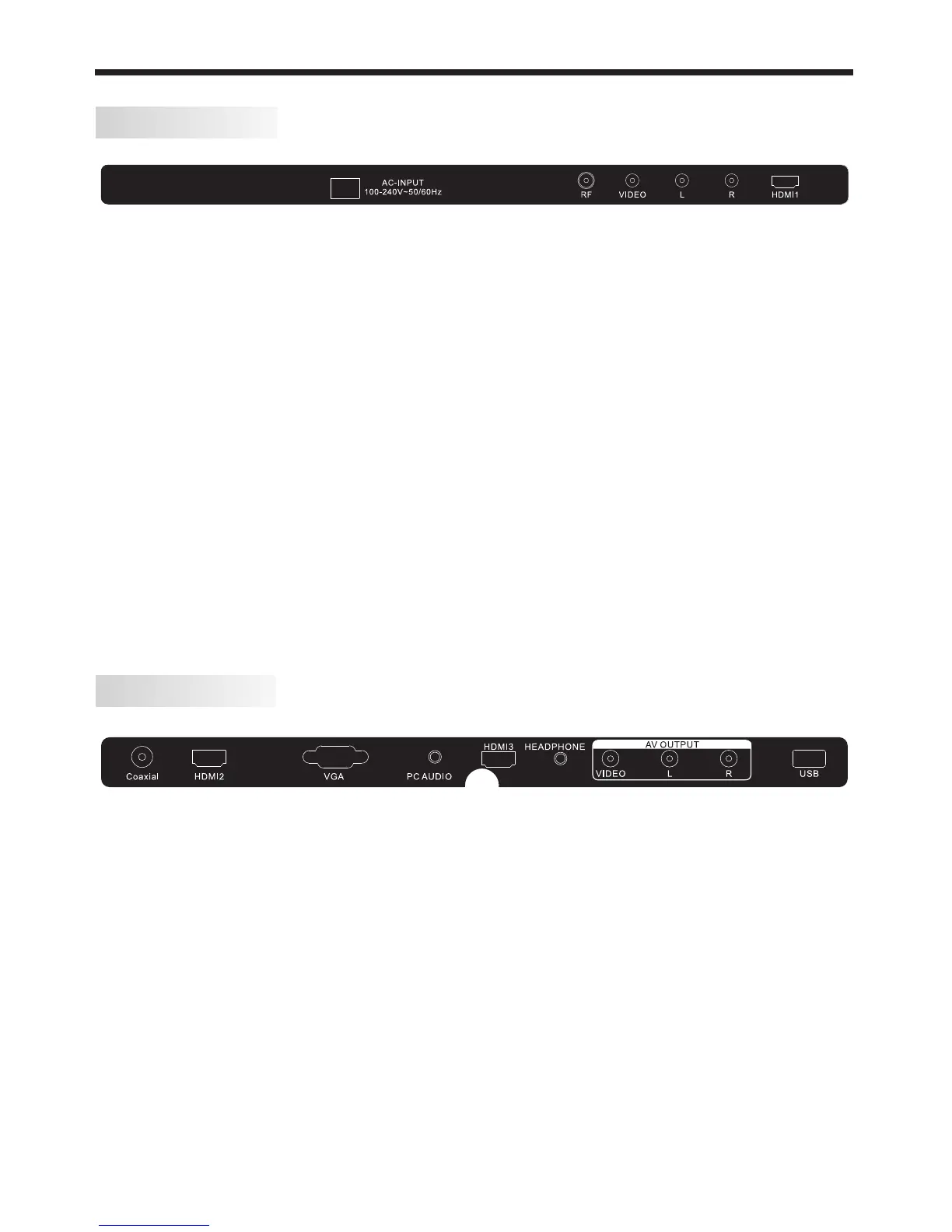
REAR AV Connections
SIDE AV Connections
When viewed from the rear of the TV, the following terminals/connections are visible (from left
to right):
● AC mains power cord
● RF (TV Antenna) Input
● AV INPUT sockets - RCA type socket for Composite type VIDEO input, and RCA type sockets
for Left and Right audio inputs.
● HDMI 1 Input
Note: These input and output sockets provide different functionality based on what mode the
TV is in.
- During ATV reception and AV mode operation, the AV OUTPUT sockets provide both Video
and Audio outputs.
- During DTV reception, USB playback and HDMI input operation, the AV OUTPUT sockets
provide only Audio outputs.
- During AV mode operation, the AV INPUT sockets will disregard the audio inputs unless
they are accompanied by a composite Video input signal.
- Some settings on the TV (eg. the Mute control, Sound Menu settings etc) do not affect the
audio signal from the AV OUTPUT socket.
- Only the HDMI 1 input supports ARC (Audio Return Channel) and you must use an HDMI
cable that supports ARC and CEC operation.
- All HDMI inputs support limited CEC (Consumer Electronics Control) functionality.
When viewed from the side of the TV, the following connections are visible (from left to right):
● Coaxial digital Audio Output (RCA socket)
● HDMI 2 Input
● VGA Input (analogue, 15 pin D-type socket)
● PC Audio Input
● HDMI 3 Input
● Headphone Output (3.5mm stereo socket)
● AV OUTPUT sockets - RCA type socket for Composite type VIDEO output, and RCA type
sockets for Left and Right audio outputs.
● USB socket for HDTV record/playback
Note: When an HDMI port detects a DVI format signal, the matching audio signal is received
through the PC Audio input socket.
- Don't connect both an HDMI and an AV cable to the same device (eg. Blu-ray player).
- Use USB flash-drives or low-power portable USB hard-drives for HDTV recording.












 To Next Page