1. Connect the monitor to the input device via HDMI/DisplayPort or USB-C.
2. Connect the power cable to the monitor, then connect the other end directly to a
power socket.
3. Use the power button to turn the monitor on.
Monitor Control
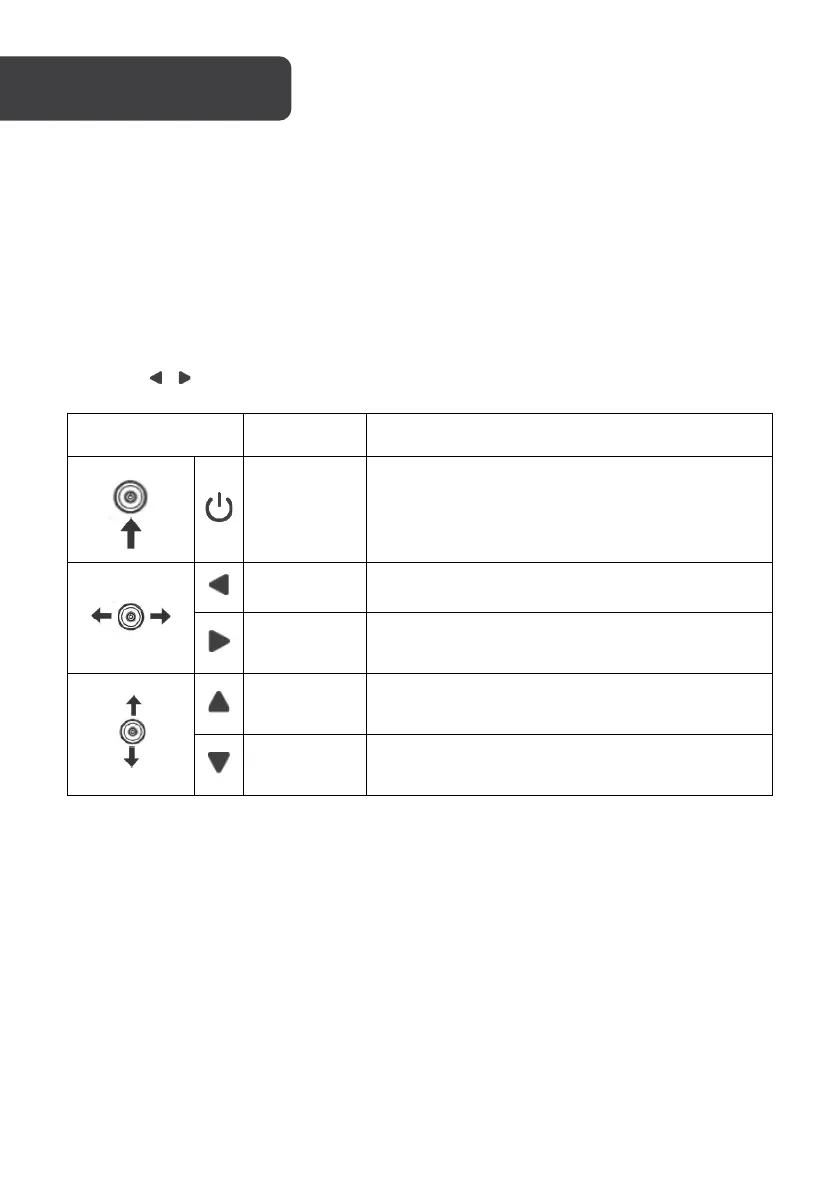
You can easily control the functions of the monitor by pressing the Power button or moving
it left/right ( / ) with your finger.
Enable the main menu or select the menu item.
Exit from the main menu or return to the upper
menu.
Select menu items or increase the setting values
of the selected menu item.
Select menu items or decrease the setting
values of the selected menu item.
FreeSync
• In order to use this feature, ensure your hardware has FreeSync capability and the
graphics drivers are fully up to date.
• After connecting, you may receive a prompt to enable the feature on your
computer. If you do not receive the prompt, you may need to enable the function in
your graphics card menu.
• See your graphics card manufacturer’s documentation for instructions on how to
turn on and/or enable FreeSync.


 To Next Page