Need help?
Do you have a question about the Kogan W6 and is the answer not in the manual?
Short-press button to play/pause music. Press again to resume playback.
Tap twice on the left earbud for volume down, right earbud for volume up.
Tap three times on left earbud for previous track, right earbud for next track.
Answer, reject, or end calls by pressing the earbud buttons.
Long-press either earbud to activate your smartphone's voice assistant.
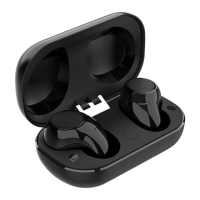
Place earbuds in case; takes approx. 1 hour for full charge.
Connect USB cable to case; takes approx. 2 hours for full charge.
Earphones auto-turn on/off with case, or use button presses.
Turn on, scan for 'Kogan W6 TWS' in device Bluetooth settings to pair.
Charge both the case and the earphones to resolve power issues.
Restart pairing or ensure Bluetooth is enabled on the device.
Check device audio settings; disable equalizers or media key adjustments.
 General
| Driver Size | 40mm |
|---|---|
| Frequency Response | 20Hz - 20kHz |
| Impedance | 32Ω |
| Cable Length | 1.2m |
| Foldable | Yes |
| Connection | 3.5mm |

 To Next Page