Features - Remote Control
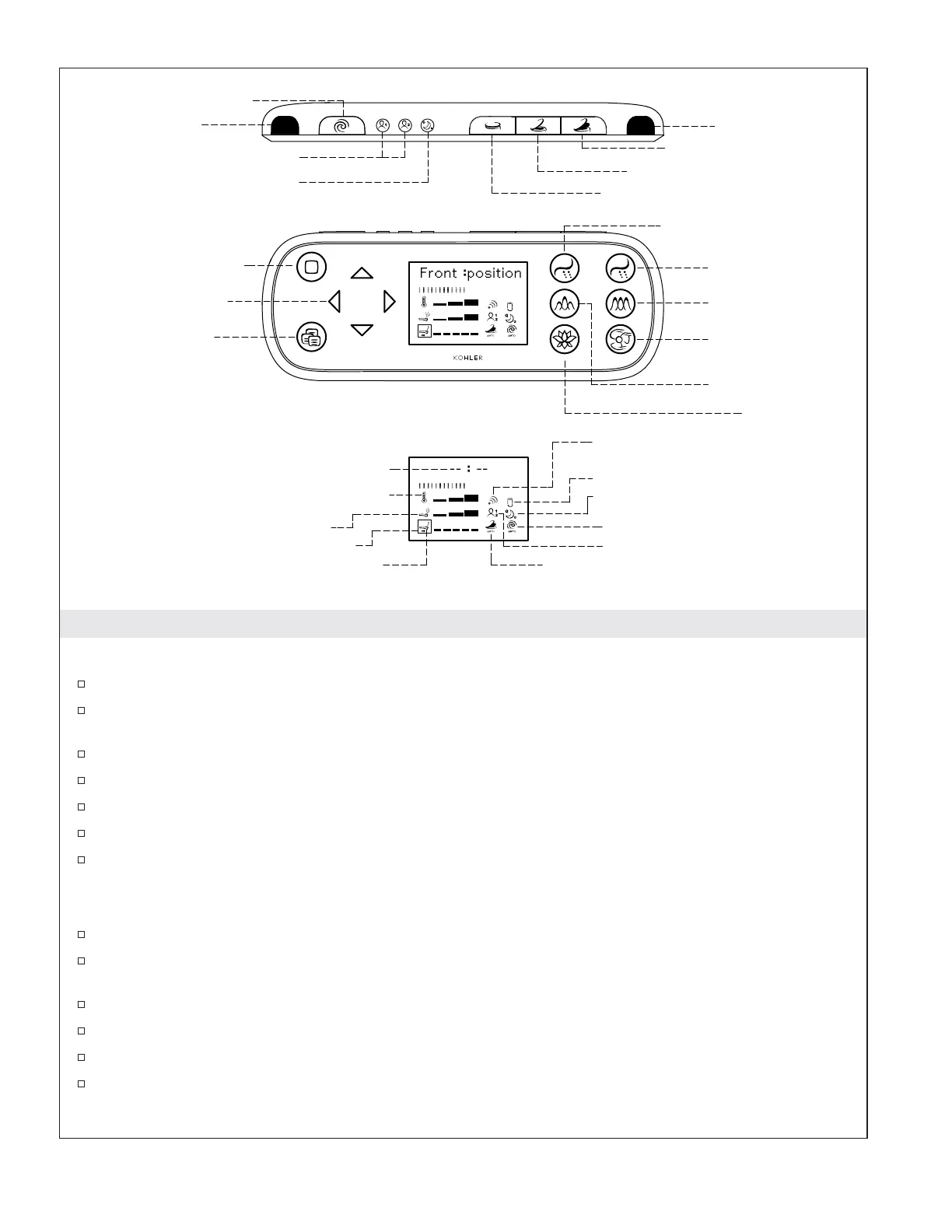
Top of Remote Control
Manual Flush - Press to flush the toilet.
Presets 1 and 2 - Allows two sets of user settings to be saved. Select one of these buttons to use the
settings saved with that preset.
Wake Up - Press to activate the remote control when it is hibernating.
Seat Cover Close - Press to close the cover.
Seat Cover Open/Seat Close - Press to open the seat cover or close the seat.
Seat and Seat Cover Open - Press to open the seat cover and seat.
Signal Window - Signal emanates from this area. The signal window should not be covered when
the remote control is in use.
Front of Remote Control
Stop - Press to stop the cleansing wash and deodorizer.
Selection Adjustment Arrows - Press to change the selections shown in the display window, adjust
settings, or change the options on features.
Menu - Press to activate or deactivate features, program features, and program the clock.
Front - Press to activate the front wash.
Rear - Press to activate the rear wash.
Pulsate - Press to activate pulsating action from the cleansing wand. Water pressure will vary while
pulsating action is activated.
Pressure
Temperature
Wand Position
Time Display
Auto Open/Close
Power Save
Auto Flush
Preset
Battery Low Display
Infrared Sending Indication
Pulsate
Deodorizer
Dryer
Oscillate
Rear Wash
Front Wash
Menu
Selection Adjustment
Arrows
Stop
Preset 1 & 2
Seat Cover Close
Wake Up
Seat and Seat Cover Open
Seat Cover Open / Seat Close
Manual Flush
Menu
Stop
Front Rear
OscillatePulsate
DryerDeodorizer
Selection Box
Signal Window
Signal Window
1221754-5-C 4 Kohler Co.



 To Next Page
 Loading...