34
MAINTENANCE
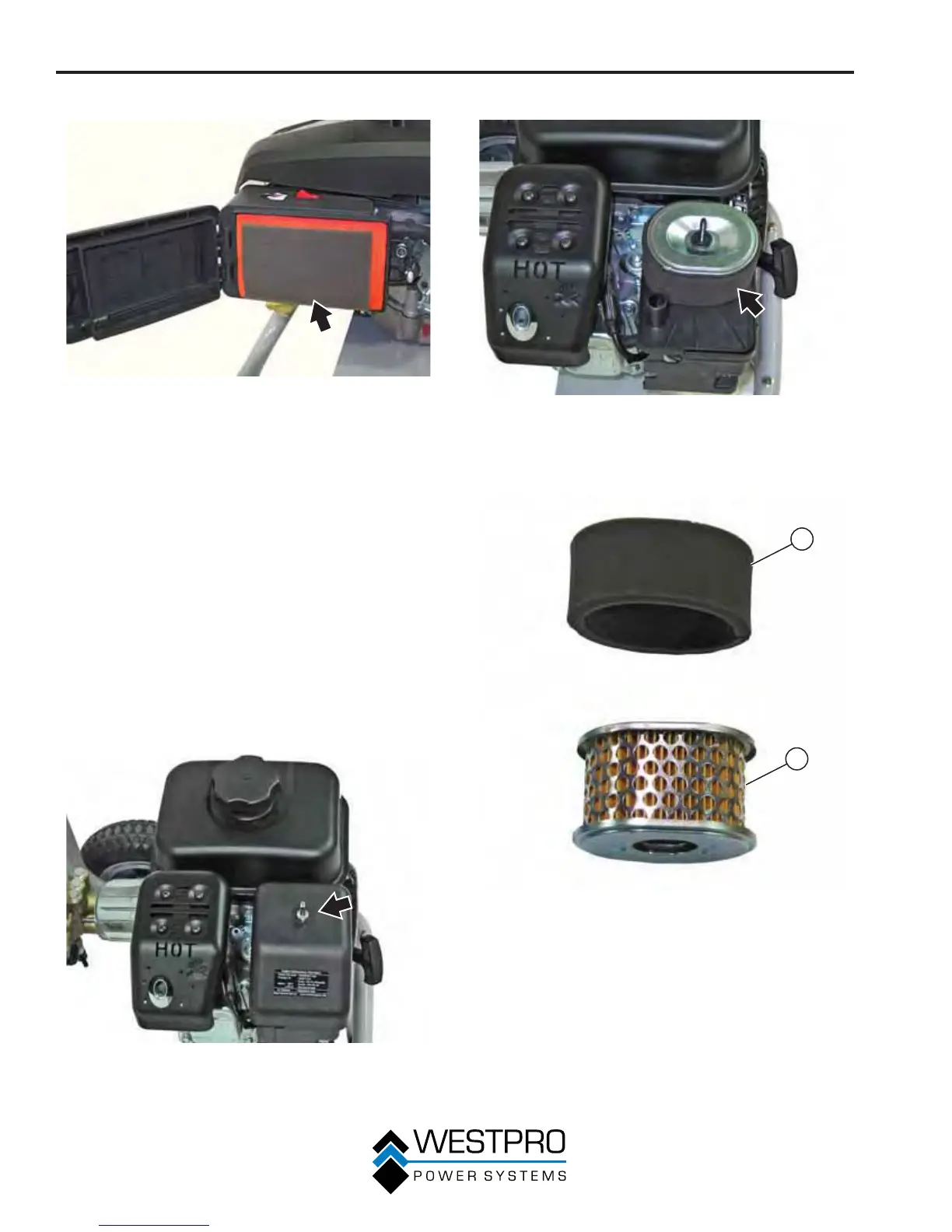
5. Remove the air fi lter element (see Figure 43).
Figure 43 – Air Filter Element
6. Insert the new air fi lter element in the air cleaner
assembly box.
7. Close the air cleaner cover and secure the knob.
Model WP3000
The air fi lter foam element must be cleaned after every
50 hours of use or every year (frequency should be
increased if pressure washer is operated in a dusty
environment). The air fi lter paper element must be
replaced after every 50 hours of use or every year
(frequency should be increased if pressure washer is
operated in a dusty environment).
1. Turn off the pressure washer and let it cool for
se
veral minutes if running.
2. Move the pressure washer to a fl at, level surface.
3. Loosen the wing nut on top of the air cleaner cover
(see Figure 44) and remove the cover.
Figure 44 – Opening Air Cleaner Cover
4. Clean the air cleaner cover with a clean rag.
5. Remove the air fi lter element (see Figure 45).
Figure 45 – Removing Air Filter Element
6. The air fi lter element consists of two components:
the air fi lter foam element and the air fi lter paper
element (see Figure 46).
1
2
Figure 46 – Air Filter Element Components
1 - Foam Element 2 - Paper Element


 To Next Page