EasyManua.ls Logo

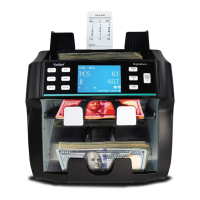
Kolibri KBR-1500 - User Manual

Kolibri KBR-1500
29 pages
Print Icon
To Next Page IconTo Next Page
Loading...

Other manuals for Kolibri KBR-1500

Questions and Answers

  • R
    Ronald GarciaSep 10, 2025
    Why doesn't my Kolibri Banknote Counter detect counterfeit notes?
    • A
      Austin HuffSep 10, 2025
      If your Kolibri Banknote Counter fails to detect counterfeit notes, the sensors may have collected dust. Consult section 5.1 Maintenance for the location of the sensors to address this issue.
  • D
    Debbie HardingAug 22, 2025
    What to do if my Kolibri KBR-1500 shows 'MG SUSPECT'?
    • P
      Patrick MurrayAug 23, 2025
      If the Kolibri Banknote Counter displays 'MG SUSPECT', it indicates that a suspect bill has been detected through magnetic detection, or there may be an issue with the MG detection system. Remove the top bill from the stacker, as it has not been included in the count. Then, press the start button to proceed.
  • P
    Patrick PhillipsAug 25, 2025
    What to do if my Kolibri KBR-1500 shows 'IR SUSPECT'?
    • M
      Mr. David KnappAug 25, 2025
      If the Kolibri Banknote Counter displays 'IR SUSPECT', this means a suspect bill has been detected by infrared detection, or there could be an issue with the IR detection. Remove the top bill from the stacker, as it has not been added to the count. Press start to continue counting.
  • G
    Gerald WeberAug 26, 2025
    What to do if my Kolibri KBR-1500 shows 'IMAGE SUSPECT'?
    • L
      Lawrence BarnettAug 26, 2025
      If your Kolibri Banknote Counter displays 'IMAGE SUSPECT', it means the machine has determined that the image of the bill is not genuine. Remove the top bill from the stacker; it will not be added to the count. Press start to continue.
  • T
    Timothy KnightAug 27, 2025
    What to do if my Kolibri Banknote Counter shows 'DOUBLE SUSPECT'?
    • T
      todd12Aug 27, 2025
      If the Kolibri Banknote Counter displays 'DOUBLE SUSPECT', it indicates that the last counted bill may be a double note or there is a double detection issue. Make sure the top bills in the stacker aren't stuck together. Remove all bills from the stacker and recount, noting that the bills were not added to the count total.
  • M
    Michele OdonnellAug 29, 2025
    What to do if my Kolibri KBR-1500 shows 'DIFFERENT DENOMINATION'?
    • L
      Laura AlexanderAug 29, 2025
      If your Kolibri Banknote Counter shows 'DIFFERENT DENOMINATION', it means that the denomination of the bill does not match the expected denomination. Remove the top bill from the stacker. This bill has not been added to the count. Press start to continue.
  • M
    Malik LozanoSep 18, 2025
    How to fix a Kolibri Banknote Counter that does not turn on?
    • D
      David ShafferSep 18, 2025
      Ensure the power cord is properly connected. Check the fuse in the fuse compartment and replace it if necessary.
  • W
    Whitney ReyesSep 12, 2025
    What to do if my Kolibri KBR-1500 displays 'LOWER LEFT COUNTING SENSOR' error?
    • R
      Ryan Morgan Jr.Sep 12, 2025
      If the Kolibri Banknote Counter displays 'LOWER LEFT COUNTING SENSOR' error, it indicates an issue with the lower left counting sensor. To resolve this, clean the sensor. Refer to section 5.1 Maintenance for the location of the sensors.
  • T
    Tyler GonzalesSep 8, 2025
    What to do if bills are jammed in my Kolibri Banknote Counter?
    • B
      Beverly SchaeferSep 8, 2025
      If bills are jammed in your Kolibri Banknote Counter, turn off the machine. Then, remove any jammed bills by opening the back door. Check for any foreign objects inside the unit, such as paper clips or rubber bands, and remove them. Secure the back door and recount.
  • A
    Ashley PaulSep 5, 2025
    What to do if my Kolibri KBR-1500 Banknote Counter shows 'CHAIN ERROR'?
    • A
      Aaron RussellSep 5, 2025
      If the Kolibri Banknote Counter displays 'CHAIN ERROR', it means that two or more bills passed through the counter as one. Ensure that the bills are loaded properly. Remove all bills from the stacker and recount. Note that the bills were not added to the count total.

Summary

Introduction to Kolibri KBR-1500

Important Safety Notes

Provides crucial safety precautions for operating the currency discriminator to prevent hazards.

Getting Started with Kolibri KBR-1500

Powering Up the Device

Guides on how to correctly power on the Kolibri KBR-1500 currency discriminator and initiate self-checking.

Loading the Hopper Correctly

Provides instructions on how to properly load bills into the hopper to ensure smooth feeding and prevent jams.

Kolibri KBR-1500 Operating Modes

Maintenance and Troubleshooting Guide

Routine Maintenance Procedures

Provides instructions for routine cleaning and preventative maintenance of the currency discriminator's components.

Adjusting the Feed Gap

Explains how to adjust the feed gap to prevent counting errors such as double feeds or jams.

Troubleshooting Common Errors

Lists common error messages, their causes, and solutions for resolving issues with the currency discriminator.

Kolibri KBR-1500 Specifications

General IconGeneral
Stacker Capacity200 notes
DisplayLCD
BatchingYes
Add FunctionYes
Note Size DetectionYes
Power SupplyAC 110-240V, 50/60Hz
Counting Speed1500 notes/minute
Counterfeit DetectionUV, MG, IR
FunctionsCounting, Batching, Adding, Counterfeit Detection

Related product manuals