
 To Next Page


K
Kimberly KennedyAug 13, 2025
What to do if my Kolibri Cash Counter machine does not turn on?
- KKathleen StewartAug 13, 2025
First, check the fuse and replace it if necessary. Also, ensure the power cord is properly connected.

What to do if my Kolibri Cash Counter machine does not turn on?
First, check the fuse and replace it if necessary. Also, ensure the power cord is properly connected.
Why does my Kolibri Cash Counter show TEST-7 UP MOTOR error?
The TEST-7 UP MOTOR error on your Kolibri Cash Counter may be due to a dusty hopper sensor, issues with the main motor, a damaged belt, or a faulty speed sensor. Try cleaning the sensor with a soft bristle brush and compressed air.
What to do if my Kolibri Cash Counter shows TEST-5 Hopper Capacity error?
If your Kolibri Cash Counter displays a TEST-5 Hopper Capacity error, it indicates an issue with the hopper sensor. Remove all bills from the hopper, then clean or replace the sensor.
What to do if my Kolibri Cash Counter shows TEST-5 Stacker Capacity error?
If your Kolibri Cash Counter shows a TEST-5 Stacker Capacity error, this indicates an issue with the stacker sensors. Please remove all bills from the stacker and then clean or replace the sensor.
What does L_U_IR error mean on my Kolibri Cash Counter?
The L_U_IR error on your Kolibri Cash Counter indicates an issue with the upper left counting sensor. Clean or replace the sensor to resolve this.
What does L_D_IR error mean on my Kolibri Cash Counter?
The L_D_IR error on your Kolibri Cash Counter signals a problem with the lower left counting sensor. To fix it, clean or replace the sensor.
What does TEST-4R_D_IR error mean on my Kolibri Cash Counter?
The TEST-4R_D_IR error on your Kolibri Cash Counter indicates an issue with the upper right counting sensor. You can resolve this by cleaning or replacing the sensor.
What does TEST-2R_D_IR error mean on my Kolibri Cash Counter?
The TEST-2R_D_IR error on your Kolibri Cash Counter means there is an issue with the lower right counting sensor. Try cleaning or replacing the sensor.
Essential safety precautions for operating the Kolibri Signature currency discriminator.
Explanation of the buttons and functions on the Kolibri Signature's control panel.
Description of the information displayed on the Kolibri Signature's main operational screen.
Step-by-step instructions for turning on and preparing the Kolibri Signature for operation.
Guidance on correctly loading bills into the hopper to prevent jams and ensure smooth feeding.
Guidelines for daily care, cleaning, and preventative maintenance of the Kolibri Signature.
Procedure for adjusting the feed gap to resolve bill feeding errors and ensure proper operation.
Steps to recalibrate the machine's sensors using the provided calibration card.
Guidance on diagnosing and resolving common error messages displayed by the machine.
Procedure for addressing specific issues like unit not turning on or bills jamming.
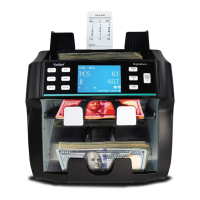
The Kolibri Signature is a professional, two-pocket currency discriminator designed for efficient and accurate value counting and sorting. It features a reject pocket, ensuring continuous operation even when counterfeit bills, incorrect denominations, or improperly faced bills are detected. The device boasts a user-friendly interface and an intuitive control panel, making it accessible for various users. Its robust built-in counterfeit detection capabilities and multiple counting modes contribute to its high level of performance.
The Kolibri Signature offers a variety of operating modes to suit different counting needs:
Regular care and preventative maintenance are crucial for extending the lifetime of the Kolibri Signature and avoiding operational problems.
 General
| Stacker Capacity | 200 notes |
|---|---|
| Display | LCD |
| Note Size Detection | Yes |
| Batching | Yes |
| Add Function | Yes |
| Counterfeit Detection | UV, MG, IR |
| Currencies | Multi-currency |
| Interface | RS232, USB |
| Power Supply | AC 100-240V, 50/60Hz |