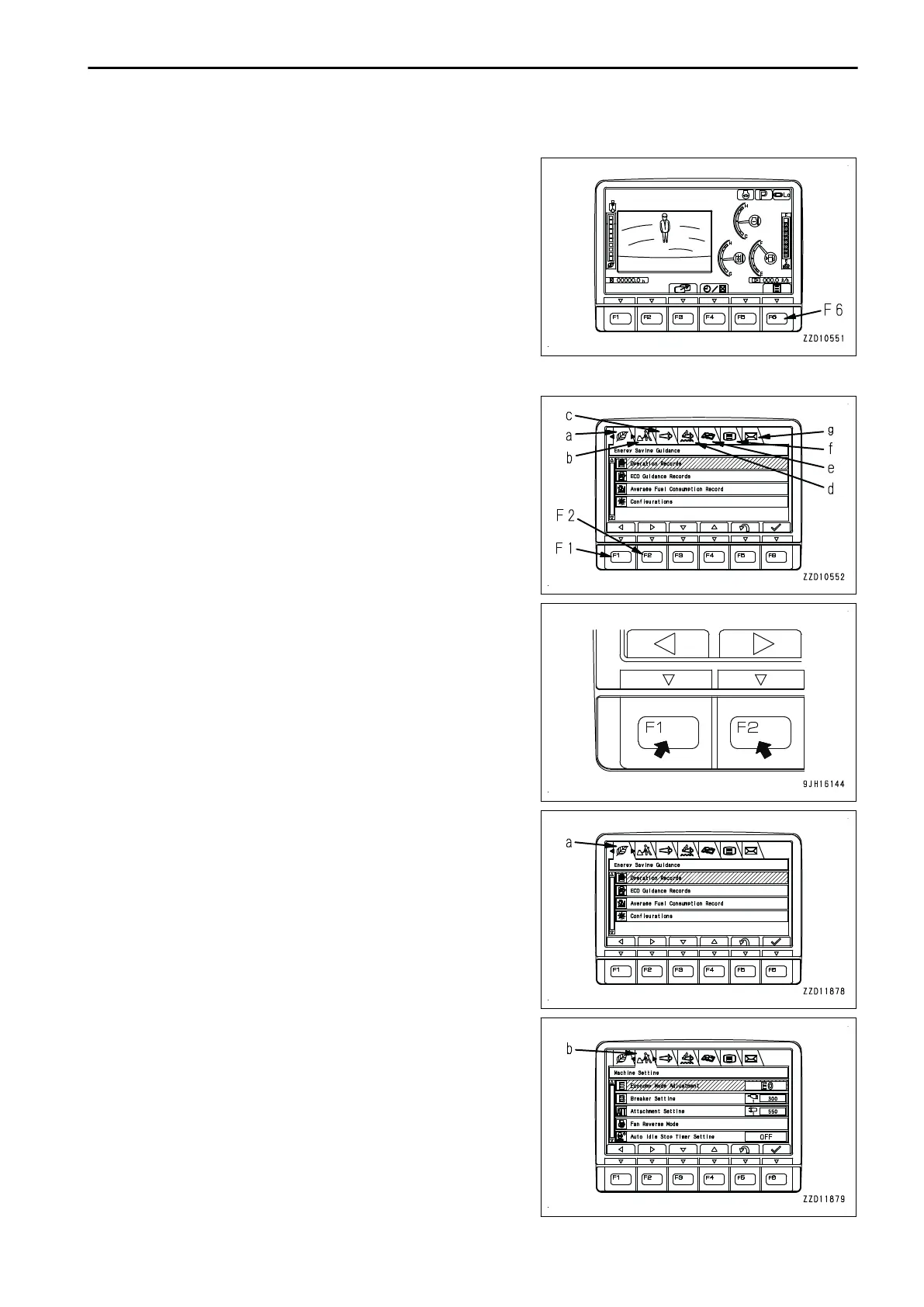
USER MENU DISPLAY SWITCH
On the standard screen, press switch F6 to display the user
menu screen on which you can make various settings for the
machine in the monitor display.
USER MENU
The user menu consists of the following kinds. Press switches
F1 and F2 to move to right and left for selecting menu screens.
(a): Energy Saving Guidance
(b): Machine Settings
(c): Aftertreatment Devices Regeneration
(d): SCR Information
(e): Maintenance
(f): Monitor Setting
(g): Mail Check
These menus (a) to (g) are for setting and confirming the fol-
lowing items:
For operations in each menu, see the detailed explanation pa-
ges of respective items.
(a) Energy Saving Guidance
• Check of Operation Records
• Check of ECO Guidance Records
• Check and reset of Average Fuel Consumption Record
• Configurations
(b) Machine Setting
• Economy Mode Adjustment
• Breaker Setting (if equipped)
• Attachment Setting (if equipped)
• Fan Reverse
• Auto Idle Stop Timer Setting
OPERATION EXPLANATION OF COMPONENTS
3-57










 To Next Page