MAINTENANCE SCREEN SETTING
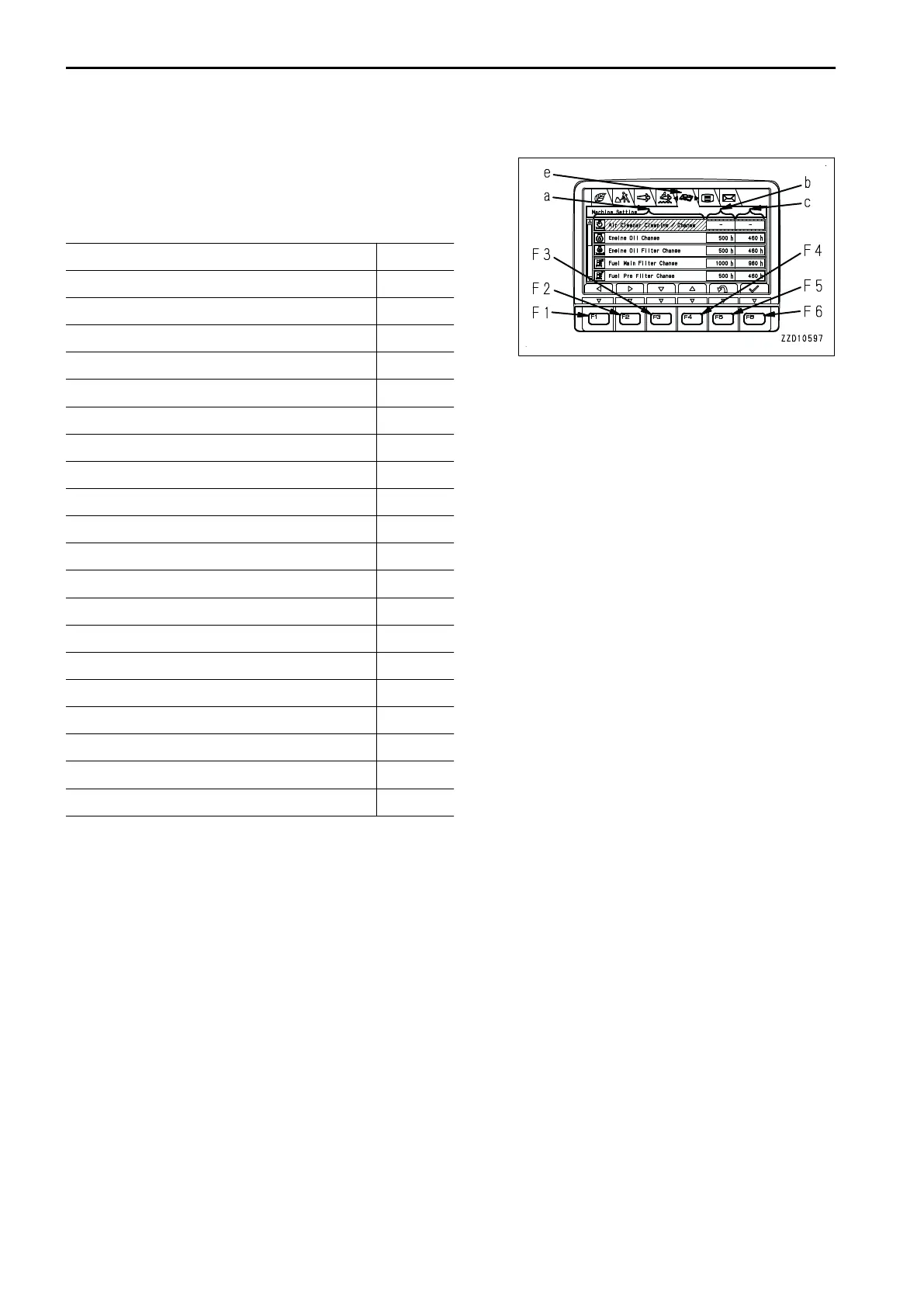
Each item of setting menu (e) on maintenance screen is used
for displaying and setting the notification relevant to mainte-
nance.
The items on the maintenance display are as follows.
a b
Air Cleaner Clean and Change -
Coolant Change -
Hydraulic Oil Additional Filter Change -
Hydraulic Oil Pilot Filter Change -
Engine Oil Change (*1 500
Engine Oil Filter Change (*1 500
Fuel Prefilter Change 500
Fuel Main Filter Change 1000
Hydraulic Tank Breather Change 1000
Hydraulic Oil Filter Change 1000
Damper Case Oil Check and Add 1000
Swing Machinery Oil Change 1000
DEF Breather Change 1000
Final Drive Oil Change 2000
DEF Filter Change 2000
KCCV Filter Change 2000
KDPF Filter Cleaning 4500
DEF Tank Cleaning 4500
Fuel Doser Cleaning 4500
Hydraulic Oil Change 5000
a: Maintenance items
b: Default maintenance interval settings (h)
c: Time remaining until maintenance (h)
*1:
When using engine oil for cold district, the maintenance interval setting must be changed. For details of the oil,
see “RECOMMENDED FUEL, COOLANT, AND LUBRICANT (7-5)”.
On the maintenance menu screen, it is possible to perform the following operations with switches F1 to F6.
F1, F2: Moves to the right and left menus.
F3: Moves to the next item (1 line below). When on the last line, it moves to the first line on the next page.
F4: Moves to the previous item (1 line above). When on the first line, it moves to the last line on the previous
page.
F5: Returns to the standard screen.
F6: If this switch is kept pressed, the screen changes to the screen for resetting the remaining time to the main-
tenance for the selected item.
EXPLANATION OF COMPONENTS OPERATION
3-78



 To Next Page