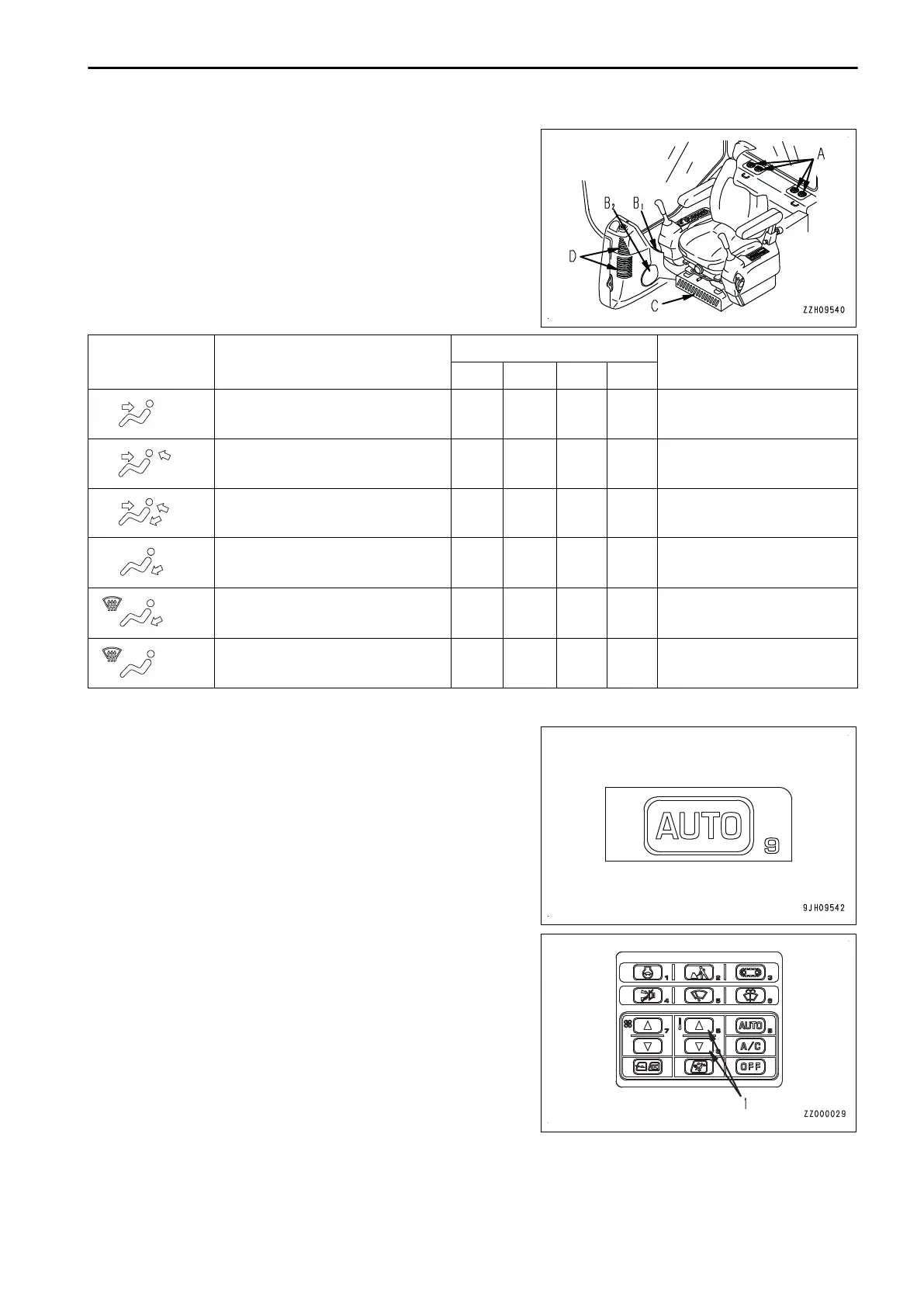
(A): Rear vent (4 places)
(B1): Face vent (1 place)
(C): Foot vent (1 place)
(D): Front window glass vent (2 places)
(B2): Front window glass vent (1 place)
Air blows out from the vents marked with ○.
LCD display
Air vent mode
Vent
Remarks
(A) (B) (C) (D)
Front vent
○
Not selected in auto mode
Front and rear vents
○ ○
-
Front, rear, and foot vents
○ ○ ○
-
Foot vent
○
-
Foot vent
Defroster vent
○ ○
Not selected in auto mode
Defroster vent
○
Not selected in auto mode
AUTO SWITCH
Use the auto switch for automatic selection of the air flow,
vents, and air source (FRESH/RECIRC) according to the set
temperature.
• Press this switch, then use temperature control switch (1)
to set the temperature, and run the air conditioner under
automatic control.
• When switching from automatic operation to manual oper-
ation, it is possible to use the switches to select the vents
and air source (FRESH/RECIRC).
REMARK
When Auto Mode is selected, if the set temperature is set to
18.0°C or 32.0°C , the air flow is always set to High, but this is
not a problem.
OPERATION HANDLE AIR CONDITIONER
3-221



 To Next Page