Innovative technology only for a better vision world
Hunan Bowan Technology Co.,Ltd. www.kommander.com.cn/en/
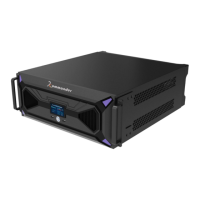
d) After setting up the project, press F6 to update the main and back up
the project to the standby or click the following button
3.11Plan loop and jump
Introduction
By setting the playback mode, you can loop or jump between plans.
Setting method
1. Click the material on the canvas, and click parameter to set the playback
mode
2. Play mode: Here you can set a specified duration or a specified number of
times


 To Next Page