Innovative technology only for a better vision world
Hunan Bowan Technology Co.,Ltd. www.kommander.com.cn/en/
3.35Customize the output display
4.36.1Introduction
Display port customization can change the display port size to the actual size of the
large screen, and then add the screen according to the actual size of each screen, which saves scale
conversion and makes correction more convenient
4.36.2Scenario
1536*1080 320*960 1920*1080There are one main and two sidekick screens ,the main
one is 15361080 ,and the smaller ones are 320960,and right now there is only one output display
port 19201080,how to make
4.36.3Instructions
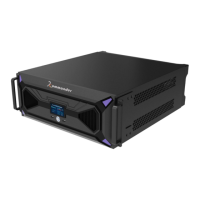
1. Click this icon to enter Screen Management
2. 19201080Choose the detected 1920*1080 display port
3. 21761080 Change it is resolution to 2176*1080
4. Set the resolution according to the actual screen resolution ,and click OK


 To Next Page