EasyManua.ls Logo

Komshine KFL-11M - User Manual

Komshine KFL-11M
2 pages
Print Icon
To Next Page IconTo Next Page
Loading...
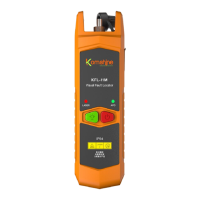
KFL-11M Visual Fault Locator Manual
External and key function description
1
On/off key
3
4
Laser connector
2
Ceramic ferrule
1
Silicone cap
2
LED light: flashlight lighting
USB charging port
3
4
Open the dust cap and
insert the tested fiber into the
laser connector.
Long press " " to turn on the device, the
red indicator light will light up, and the laser will
output continuous wave at the same time;
(If the optical fiber is connected, red light can
be seen at the end of the fiber under normal
circumstances; If the fiber is disconnected, there
is no red light output at the end of the fiber)
Short press the power button, the indicator
light flashes, and the laser pulse wave is output at
the same time; short press again to turn off the
red light.
Under normal circumstances, it will auto-
matically shut down if there is no operation for
15 minutes to extend the battery life.
Flashlight switch: long press
the " " button to turn on the
flashlight, which is convenient to
use in a dark environment and
realize the lighting function; short
press the " " button to turn off
the flashlight.
1
2
3
7
6
4
5
On/off key
Indicator light
5
6
LED lighting switch
7
LED flashlight
(干电池款不可充电)
Question and Answer IconNeed help?

Do you have a question about the Komshine KFL-11M and is the answer not in the manual?

Summary

External and Key Function Description

On;Off Key

Controls device power and laser output modes.

Indicator Light

Displays device status and laser operation.

LED Flashlight Lighting

Enables flashlight illumination.

USB Charging Port

Interface for charging the device.

LED Lighting Switch

Activates or deactivates the LED flashlight.

Laser Connector

On;Off Key Operation

LED Flashlight Operation

Common Fault Solutions

Product Description

Using Environment

Tips and Warnings

Overview

The KFL-11M Visual Fault Locator is a compact and essential tool for fiber optic engineering, construction, and network maintenance. It is designed to detect fiber faults and breaks by emitting a stable red laser light.

Function Description

The device utilizes a 650nm semiconductor laser as its light-emitting source, driven by a constant current to ensure stable red light output. When connected to a single-mode or multi-mode fiber via its optical fiber interface, it performs fiber fault detection. This makes it an indispensable tool for maintenance, optical device production, and research.

Key Functions:

  • On/Off Key (⑤):
    • Long press "ن": Turns on the device. The red indicator light will illuminate, and the laser will output a continuous wave (CW). If an optical fiber is connected, red light can be observed at the fiber's end under normal circumstances. If the fiber is disconnected, no red light will be output.
    • Short press "ن": Toggles between continuous wave and pulse wave modes. In pulse wave mode, the indicator light flashes, and the laser outputs a pulsed wave. Another short press turns off the red light.
    • Automatic Shut-off: The device automatically shuts down after 15 minutes of inactivity to conserve battery life.
  • LED Flashlight (③):
    • Long press "ن" (when the device is off): Turns on the built-in LED flashlight, useful for working in dark environments.
    • Short press "ن" (when the flashlight is on): Turns off the flashlight.
  • Laser Connector (2): This is where the fiber to be tested is inserted. Users should open the dust cap and carefully insert the tested fiber.
  • USB Charging Port (④): Available on charging models for recharging the internal Lithium battery. Dry battery models are not rechargeable.

Important Technical Specifications

The KFL-11M series offers different models with varying output powers and test distances:

Model Power Range Test Distance
VFL-11M-1 1mW 3-5km
VFL-11M-10 10mW 8-10km
VFL-11M-20 20mW 15-20km
VFL-11M-30 30mW 25-30km

General Specifications:

  • Wavelength Range: 650nm
  • Laser Type: LD (Laser Diode)
  • Modulation Frequency: CW (Continuous Wave) / 2Hz (Pulse Wave)
  • Operating Temperature: -20 ~ +60 (°C)
  • LED Flashlight: Supported
  • Power Supply:
    • AAAA 1.5V battery x 2 (for dry battery models)
    • Lithium battery 1000mAh (for charging models)
  • Dimensions: 127 x 36.5 x 28 (mm)
  • Weight: 61 g (With battery)
  • Connector: 2.5mm Universal connector; 1.25mm LC adapter (optional)
  • Operation Time: Approximately -30 hours (for 1mW model)

Usage Features

  • Ease of Use: Simple operation with a single power button for controlling both the laser and the flashlight.
  • Versatile Output Modes: Offers both continuous wave and pulsed wave operation, allowing for different fault detection scenarios. Pulsed mode can sometimes make it easier to locate intermittent faults or identify the signal over longer distances.
  • Built-in Flashlight: Enhances usability in low-light conditions, improving visibility during fiber connection and fault location.
  • Wide Application: Suitable for detecting broken fibers and fiber damage in various fiber optic systems.
  • Compact and Lightweight: Its small dimensions and light weight (61g with battery) make it highly portable and convenient for field use.
  • Universal Connector: The 2.5mm universal connector ensures compatibility with common fiber optic connectors like SC, FC, and ST. An optional 1.25mm LC adapter is available for LC connectors.

Maintenance Features

  • Battery Management:
    • For models with Lithium batteries, the USB charging port allows for convenient recharging.
    • If the device is not used for a long time, the Lithium battery may self-discharge. It is recommended to charge it before use if the voltage is too low to turn on.
    • The "CHARGE" indicator light provides feedback on the charging status.
  • Dust Protection: Always cover the laser connector with the dust cap after use to prevent dust and debris from entering, which can affect performance and damage the ferrule.
  • Interface Cleaning: After a period of use, it is important to clean the optical fiber interface with a special optical fiber cleaning cotton swab to maintain optimal performance and prevent contamination.
  • Environmental Considerations:
    • Avoid using the device in high-temperature environments, as this can shorten the life of the laser.
    • The operating environment altitude should be below 2000m.
  • Troubleshooting:
    • LED display is weak: Indicates low battery; charge the device.
    • Cannot boot: Could be due to low battery or other issues; try charging or restarting.

Safety Precautions:

  • Laser Radiation: Lasers are harmful to the eyes. It is strictly forbidden to look directly into the red light beam.
  • User Manual Adherence: Always read and follow the warning and operating instructions in the user manual to prevent damage to the product or personal injury.
  • Proper Use: Use the visual fault locator strictly in accordance with the user manual.
  • Heat Management: The laser is a heating device. Avoid prolonged use in high-temperature environments.

Komshine KFL-11M Specifications

General IconGeneral
BrandKomshine
ModelKFL-11M
CategoryMeasuring Instruments
LanguageEnglish

Related product manuals