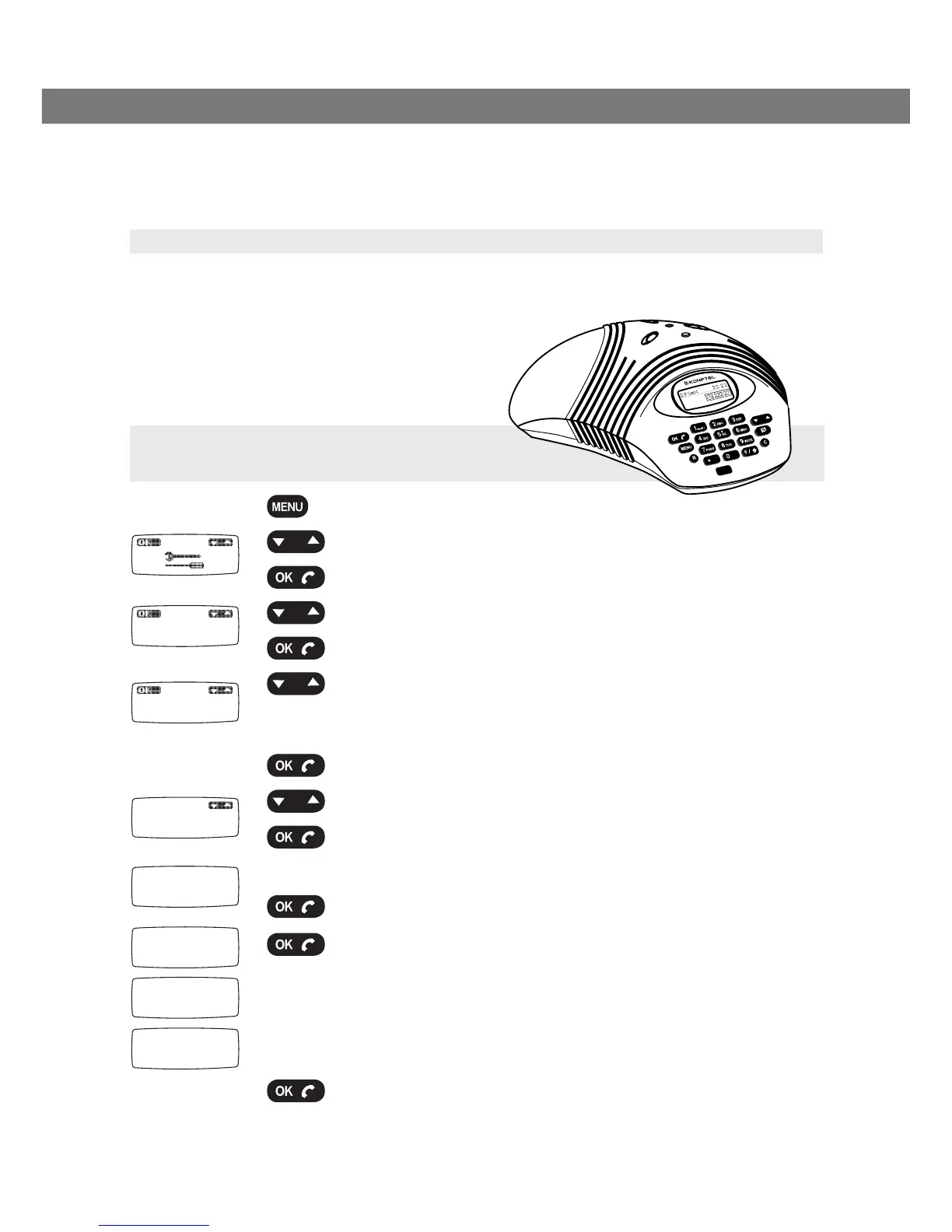
Reg
Base 1
0-9...
PIN:
****
Done
Search
PARK:
DECT system:
Here we explain how to register a Konftel 200W conference phone. To register other makes
of handsets (telephones), simply follow the same procedure. Please refer to your telephone
instruction manual if you are unsure.
Set the Konftel DECT base station in registration mode
Press and hold the key/LED on the base station until it starts to flash.
The base station is now in registration mode. Once registration has been completed, the
LED will stop flashing. If the base station does
not identify a DECT phone within 2 minutes, the
registration mode will switch off automatically.
Press the MENU key.
Select the menu “Tools” using the Up/down key.
Press OK.
Select the menu Reg using the Up/down key.
Press OK.
Select a base (1–4).
If no base station has been programmed, choose no. 1. Numbers
that are ticked are being used.
Press OK.
Select a DECT system.
Press OK.
Enter the security code (PIN code) (standard code is 0000).
Press OK.
Press OK. (Leave the PARK code blank.)
Your Konftel 200W is now in registration mode and is searching
for a base station in registration mode. Wait until you receive
confirmation that registration has been completed. Registration
can be interrupted by pressing
C. If registration was successful,
the word Done will appear in the display.
Press OK.
The Konftel 200W is now ready to use.
REGISTERING A HANDSET (CONFERENCE PHONE)
Register Konftel 200W with a
Konftel DECT base station


 To Next Page