EasyManua.ls Logo

Konica Minolta Instant Press - Page 7

Konica Minolta Instant Press
14 pages
Print Icon
To Next Page IconTo Next Page
To Previous Page IconTo Previous Page
Loading...
(!J
.:
.:
r
.
~
.
j
:;
:'
.
- .
""
' 1 '
if
~
V
.\
~
.
"<:.i,;f
"
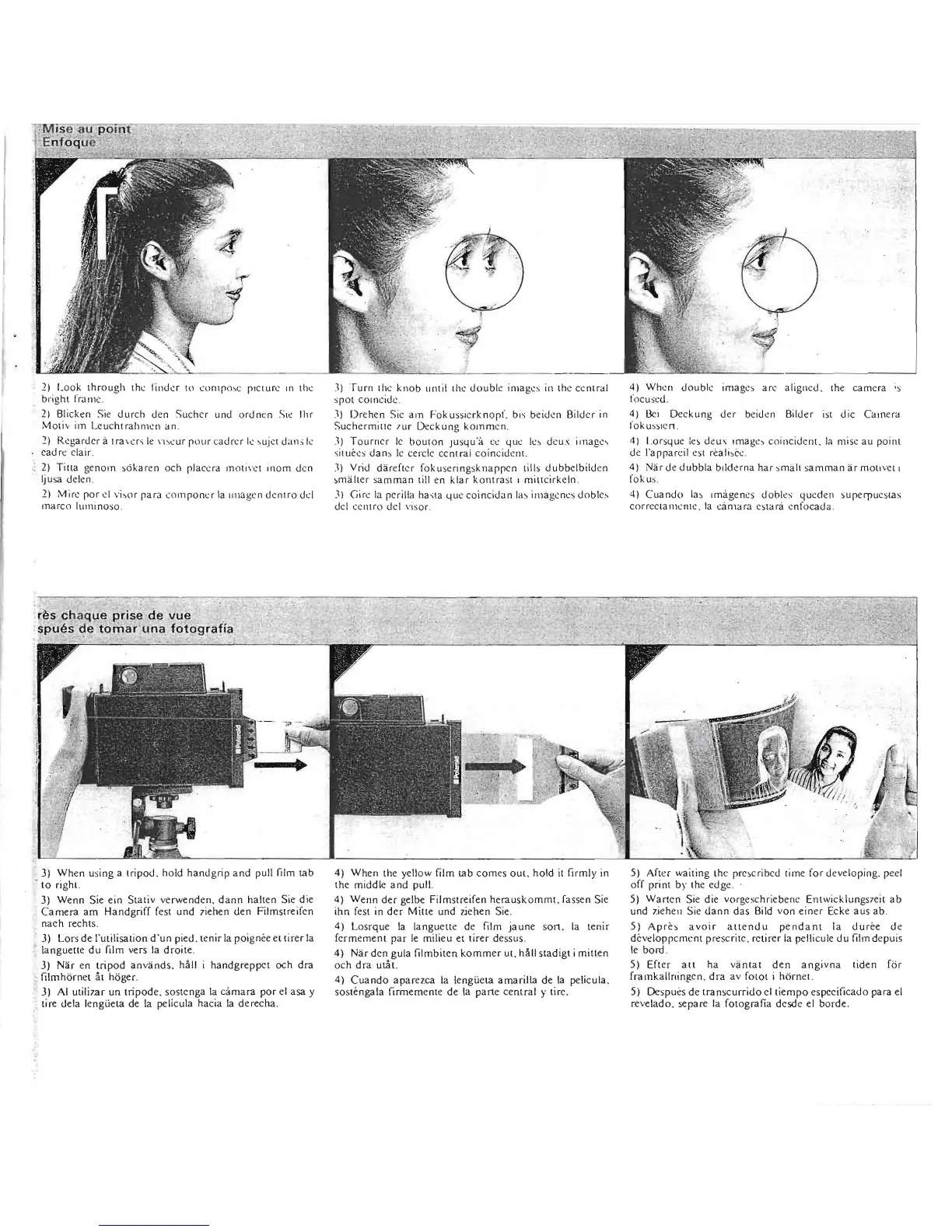
2) Look
thr
oug
h t
h(
Ilm
.1e
r
ln
COnlpo
:-.c
plcture
ln
th
e
bright fram
e.
2)
Bli
ek
en
Sie
dureh
den
Sue
her
und
ordnen
S
I<
Ihr
M OI l'·
im
Leucht rahmcn
an
.
:!)
Regarder à
lra
\.
u'i
le
\l
:-.
(ur
pour
cadrer
le
:-.u
jcI d.l
l1:-;
le
cadr
t:
claÎr.
2)
Tin
a
ge
nom
s6karen
oc
h
pl
ace ra
m
o{
j
\"l,~t
inom den
Iju
sa delcn .
1)
Mire
p
ar
d
v
i~o
r
pa
ra
co
mponcr
la Imagen de
nlr
o
dd
marco IUlllino
so
:q
Turn
the kn
ob
until
the
do
uble images in the
ce
ntr
al
spOt
cOlnc
id
c.
:\i D
re
hen Sic
am
Fokussicrknopt'.
bis
beidcn
Bild
cr
in
Suc
he
r
millc
lur
Deckung
komm
e
n.
.1)
T ou
rn
cr
le
bouton
Ju
sq
u"à
cc
que
k~
deux image
'!
s
iw
ec
s
dan:-.
le
cercle
ce
ntr
al co
in
c
id
t:
fl(.
.1)
Vrid
dardl
"r
fokuseringsknappcn
tills
dubb
elbilden
sm
aher s
am
man
till
en
klar
kontrast 1
miltcirkeln.
JI
Gire
la pcrilla
ha..;ta
LI
u
t:
co
incidan
la~
illlâgcnes
dob\c:-.
dei e
en
tro dei \'
Iso
r.
4)
Wh~n
double
im
ages
ar
c alignc
J,
the:
ca mera ;s
focuseu.
4) llci Deck ung d
er
bcidcn Bild
.r
iSl
die
Cam
era
fok us
sl
cn .
4)
I.orsque
:e
s deu \
Ima
g
t::'t
coincidcll1. la mise au point
de l'
appar
<:il
es
!
r~ali
:-.
c~
.
4)
Nar
de dubbla bdderna har smalt sam man a r
mall
\."(
!
ll
fo
ku
s.
4) Cu
and
o 1"
Imagencs
dooles
queden
su
pecru
es
Ul
s
cor
rC"Cl
a
1l
1en
te, [a cama
ra
es
ta
e
nf
ocada.
~
èsc
'
t'laque
prise
de
vue
.
sp
.
detoinaruna
fot9grafiil
3)
When
using a
tripod.
hold
hand
grip a
nd
pull film
tab
. 10 righL
3) We
nn
Sie
ein
Stali
v v
erwenden.
da
nn
halt
en Sie die
Cam
era
am
Handgriff
fesi
und
7iehen
den
Filmstreif
en
n
ae
h reehlS.
3) Lo
rs
de
l'ulilisalion
d'un
pied.
tenir
la
poign
ee
ellirer
la
languelle
du
film
ve
rs la
droile
.
J)
Nar
en
tripod
anvands.
hall i
handgreppel
och
dra
, filmho
rnel
al hOger.
J)
AI
ulili
7a
r
un
lripod
e.
sos
ien
ga la
camara
por
el
asa
y
lire dela
lengüeta
de
la pelieula h
ae
ia
la
d
erec
ha.
4)
When
Ihe yellow film
Ulb
eom
es
OUi
.
hold
il
firmly in
the
middle
a nd pull.
4)
Wenn
der
gelbe
Film
sue
ifen
herau
skomm
l. fassen S
ie
ihn
fesl in
der
Mille
und l
ichen
Sie.
4)
Losr
que
la
lan
guetl
e de film
jaune
so
n.
la
lenir
fermement
par
le
milieu
et
tirer
de
ssus
.
4)
Narden
gula
filmbilcn
ko
mm
er
ul.
hâll s
lad
ig
l i
millen
och
dra
ulà!.
4)
Cuand
o
ap
arel
.
ca
la
lengüeta
amarilla
de
la pelieula.
sOSléngala
flrmem
enle
de
la
pan
e
eenlral
y
lir
c.
5)
Afler
wa
it
i
ng
lhe pres
cribed
time
for
developing.
peel
off print by the
edge
.
5)
Wan
en
Sie die
vo
rgeschri
ebenc
En lwic
klun
gSle
il
ab
und ziehen Sie
dann
das
Bild
vo
n
einer
Eeke
aus
ab
.
5)
Après
avoi
r a
ltendu
pendant
la
dur
ée
de
développe
ment
prescrite.
retirer
la pellicule
du
film
depui
s
le
bord.
5) Efl
er
ait
ha
vanlal
den
angivna
liden
fbr
framkallning.en.
dra
av
fOIOt
i
horne!.
5)
Despu
ès
de
Ira
nseurrido
clliempo
espceifieado
para el
reve la
do.
separe
la fOlOgrafia desde el b
or
de
.