13
1. Inserting a SIM card
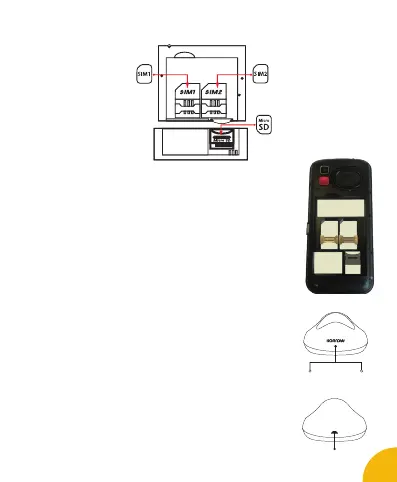
• Switch off the phone and remove the back cover. Insert the SIM card
correctly in the space provided for this purpose. You have 2 SIM card
ports (SIM1 and SIM2). Be sure to respect the direction of insertion of
the cards.
• Then replace the back cover.
CAUTION : The mobile data can only be used on one SIM card.
2. Inserting a MicroSD
It is possible to increase the internal memory of the SENIOR device
with a MicroSD card (maximum 8GB MicroSD card).
• Switch off the phone and remove the back cover and the drums.
• Insert the memory card into the relevant slot.
• Then replace the battery and the rear cover.
CAUTION : Inserting or removing a SIM card or a MicroSD card requires the
mobile phone to be completely switched off.
3. Charge the battery
Charging the battery:
• To charge the battery you have 2 options :
• Plug the USB cable (supplied) into the USB port of your mobile
phone and connect the power adapter to a sector socket.
or,
• Connect the USB cable of your mobile to the charging station and
connect the AC adapter to a power socket.
• The battery charge icon illuminates during charging and indicates
charging status.
• When the battery is fully charged, you can unplug the device
from the current.
CAUTION :
• The charging of the mobile is done only via its USB port and / or
the charging station.
• Make sure to fully discharge your phone before charging it for
the rst time.
English
SIM 1 SIM 2
Micro
SD
Blue
100% Charged
or
Missing device
Red
In charge
USB Connector


 To Next Page