Control Panel 2A
1.NEXT
In USB/SD/Bluetooth mode, press the key to skip to the next song.
In FM radio mode, press the key to select the next radio station. For manual FM station tuning,
press the key to increase the frequency (step frequency 0.1MHz). Press and hold this key to
enter seek mode, which will stop at the first radio station that is found.
2.PREV
In USB/SD/Bluetooth mode, press the key to skip to the previous song.
In FM radio mode, press the key to select the previous radio station. For manual FM station
tuning, press the key to decrease the frequency (step frequency 0.1MHz). Press and hold this
key to enter seek mode, which will stop at the first radio station that is found.
3.PLAY/PAUSE
In USB/SD/Bluetooth mode, press the key to play/pause.
In radio mode,press and hold the key to enter automatic seek mode over the entire frequency
range. In radio mode, press the key to enter the manual searching mode. The frequency
displayed on the screen will start flashing. After this happens, press the "NEXT" or "PREV" key
to increase or decrease the frequency. If there is no action within 15 seconds, the displayed
frequency will stop flashing.
4.MODE
Toggles audio source. Press this key to toggle the audio source in this order:
USB→SD→FM→AUX
5.EQ
Toggles EQ mode. Press this key to toggle the EQ mode in this order:
NORMAL-BASS-POP-POCK-JAZZ-COUNTRY
6.Bluetooth
Shortcut key for Bluetooth mode. Press this at any time to switch to Bluetooth mode.
Each time the KoolMAX is powered on, it defaults to Bluetooth mode.
7.FM2
In FM mode, press this key, then press the "NEXT" or "PREV" key to toggle between the 6 FM
stations stored in FM2. In manual tuning and seek modes, press the key to store the current
station in FM2. FM2 can store 6 stations at one time. If the number of stored stations is more
than 6, the earliest stored station will be overwritten.
8.FM1
In FM mode, press this key, then press the "NEXT" or "PREV" key to toggle between the 6 FM
stations stored in FM1. In manual tuning and seek modes, press the key to store the current
station in FM1. FM1 can store 6 stations at one time. If the number of stored stations is more
than 6, the earliest stored station will be overwritten.
9.MASTER VOL
Master volume control knob. Clockwise rotation increases volume, counter clockwise rotation
decreases volume.
10.MIC VOL
Microphone volume control knob. Clockwise rotation increases volume, counter clockwise
rotation decreases volume.
11.IR Remote Control Receiver
12.SD Card Slot
13.AUX IN
14.USB In/Charging Port
15.Bluetooth LED
Blue LED indicator light. Only turns on when in Bluetooth mode.
16.Dual LED
Dual LED Indicator System
Green LED: Turns on when KoolMAX is powered on
Red LED: Turns on when the battery is charging (regardless if KoolMAX is powered on
or not). When the battery is fully charged, the red LED will turn off.
17.LCD Display
18.Battery icon
Indication of battery power
Remote Control Guide 3A
Power
System power on/off
STOP
In USB/SD mode, press this key to stop the track that is currently played. If the PLAY/PAUSE
button is pressed again, KoolMAX will play the track from the beginning.
MUTE
MODE
Audio source selection key. Press this key to toggle the audio source in this order:
USB→SD→FM→AUX
Playback Mode
Toggles USB/SD playback modes. Press this key to toggle the playback mode in this order:
ALL (all tracks in a continuous loop), RANDOM (random playback), ONE (single tracks in a
continuous loop), FOLDER (only tracks in the current folder in a continuous loop). When
KoolMAX is powered on, it defaults to the ALL playback mode.
EQ
Toggles EQ mode. Press this key to toggle the EQ mode in this order:
NORMAL-BASS-POP-ROCK-JAZZ-COUNTRY
NEXT
In USB/SD/Bluetooth mode, press the key to skip to the next song.
In FM radio mode, press the key to select the next radio station.
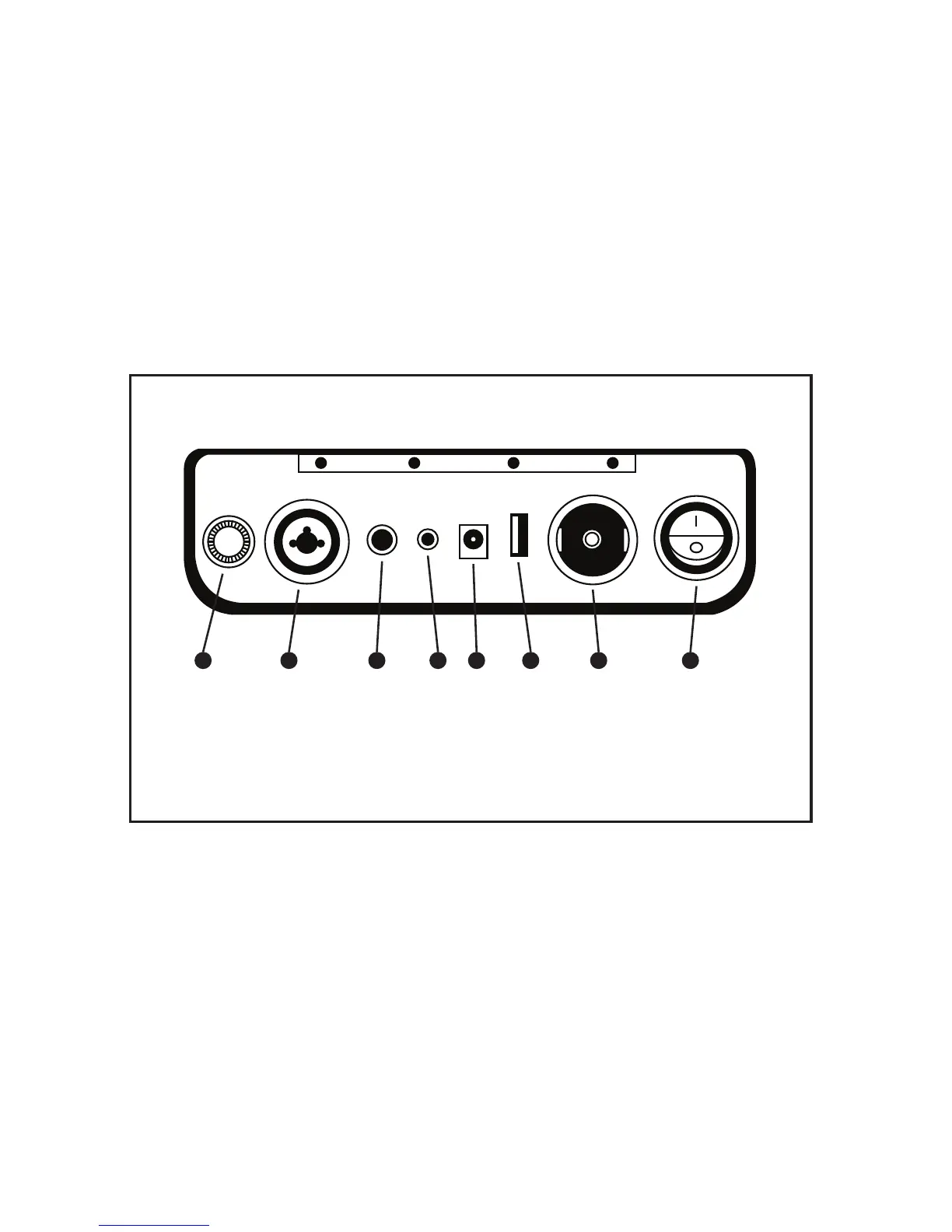
Input Panel Diagram 4A
1.FUSE
5x20mm, T5A/250V glass fuse
2.XLR 1/4” Input
Microphone and instrument input
3.1/4” Input
Instrument input
4.1/8” AUX Input
Used to connect to any device with an AUX port
PREV
In USB/SD/Bluetooth mode, press the key to skip to the previous song.
In FM radio mode, press the key to select the previous radio station.
PLAY/PAUSE
In USB/SD/Bluetooth playing mode, press the key to play/pause.
V+
Increases volume
V-
Decreases volume
Number Keys:
In USB/SD mode, use the digital keys to directly select a track number.
5.17V Power Input
Note: Only charge the KoolMAX with 100-240V AC/17V DC power adapter
6.USB Charging Output
5.2A output charges devices like cell phones, laptops, and tablets
7.Cigarette Lighter Plug (12V output)
12V output powers devices like fans, lights, and air pumps
8.Power Switch
FUSE
Input Panel Diagram 4A
1
2 3 4
5
6 7
8
1. FUSE
2. XLR 1/4” Input
3. 1/4” Input
7. Cigarette Lighter Plug
(12V output)
8. Power Switch
4. 1/8” AUX Input
5. 17V Power Input
6. USB Charging Output
10


 To Next Page
 Loading...