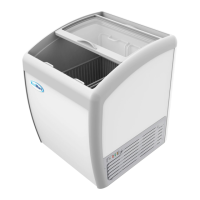
The KoolMore Refrigerated Salad Display is a commercial refrigeration unit designed for storing and displaying foodstuffs, particularly salads and other cold items, in a professional setting. It is available in two models, SCDC-7T and SCDC-8T, which differ primarily in their capacity and dimensions.
Function Description:
The primary function of this device is to keep food products, such as those in salad bars, at a consistently cool and safe temperature for display and serving. It features an internal compartment with trays where foodstuffs can be stored. The cooling system, located within the foamed insulation, utilizes a copper tube to maintain the desired temperature. A condensation area, situated on the right side, houses the motor-condensing unit responsible for the refrigeration cycle. The unit is equipped with a digital controller for precise temperature management.
Important Technical Specifications:
- Models: SCDC-7T, SCDC-8T
- Coolant and Injection Quantity (g):
- SCDC-7T: Not specified (likely R290 or R600a, common for commercial refrigeration, but not explicitly stated in the provided text).
- SCDC-8T: Not specified.
- General Rated Input Power (W):
- SCDC-7T: 157 W
- SCDC-8T: 170 W
- Rated Current (A):
- SCDC-7T: 2.2 A
- SCDC-8T: 2.4 A
- Kind of Weather: Not specified (refers to climate class, typically T, ST, N, SN for refrigeration, but not detailed).
- Refrigeration Temperature (°C): Not specified (typically 0-10°C for salad displays, but not explicitly stated).
- Electric Shock Protection Class: Class I (indicated by 'I' in the table).
- Total Effective Volume:
- SCDC-7T: Designed for 7x1/4 GN (Gastronorm) pans.
- SCDC-8T: Designed for 8x1/4 GN (Gastronorm) pans.
- Net Weight (Lbs.):
- SCDC-7T: 95.9 Lbs.
- SCDC-8T: 106.9 Lbs.
- Rated Voltage (V): 120-120 V (implies 120V operation).
- Rated Frequency (Hz): 60 Hz
- Overall Dimension (mm) (LxWxH):
- SCDC-7T: 59 X 13.1 X 8.8 mm
- SCDC-8T: 70.8 X 13.1 X 8.8 mm
Usage Features:
- Assembly: The unit requires assembly of its glass panes. This involves fixing side panes to the steel structure with screws, attaching the back pane to the side panes using brackets, and then placing and securing the cover pane.
- Location and Set Up:
- Handle With Care: The unit should not be tilted over 45 degrees during handling.
- Wait Period: After handling, a minimum two-hour waiting period is required before plugging in to allow refrigerants and oils to settle.
- Dry and Level Surface: Must be placed on a completely dry, solid, and level surface to prevent noise and malfunction.
- Sufficient Space: Requires at least 4 inches of clearance from walls or other surfaces to ensure proper airflow.
- Location Temperature: Should be placed indoors, away from direct sunlight, heat sources, and moisture-generating equipment to prevent compressor malfunction and voiding of warranty.
- No Heavy Load: Avoid placing heavy loads on top or installing anything onto the refrigerator. Do not puncture holes.
- Power Supply:
- Requires a dedicated 110/60Hz outlet; no extension cords or shared outlets.
- Ensure the unit is not resting on or against the electrical cord, and check for cable damage.
- After unplugging, wait at least 10 minutes before plugging back in to prevent compressor damage.
- Avoid plugging/unplugging with wet hands.
- Ensure correct voltage supply.
- Do not store flammable/explosive materials inside.
- Avoid flushing the refrigerator surface.
- Operation:
- Plug into a 115V exclusive socket.
- Set the desired temperature using the digital controller.
- Shelves are adjustable: remove, move supports to desired height, and place shelves. Equal spacing is recommended for even temperature distribution.
- Digital Controller:
- Set Temperature: Press
SET to display current set temperature, use up/down arrows to adjust, then press SET again to confirm.
- Lights: Press the
light bulb button to toggle lights on/off.
- Manual Defrost: Press and hold the
defrost button for 6 seconds to manually start or stop defrost.
- Refrigerant LED: On when the compressor is running, off when temperature is constant, flashes during delay start.
- Defrost LED: On during defrost cycle, off when defrost stops, flashes during delayed display of defrost.
Maintenance Features:
- General: Always unplug before maintenance. Avoid damaged plugs or loose sockets. Never flush the refrigerator. Do not use alkali detergent, soap, gasoline, acetone, or brushes.
- Cleaning the Interior:
- Use warm water and mild soap.
- Avoid steel wool, caustic soap, abrasive cleaners, or bleach.
- Periodically remove and clean shelves and shelf brackets with mild soap and warm water.
- Cleaning the Fan Blades and Motor:
- Clean with a soft cloth if necessary.
- If washing fan blades, cover the fan motor to prevent moisture damage.
- Cleaning the Condenser Coil:
- For efficient operation, keep the condenser surface free of dust, dirt, and lint.
- Recommended cleaning frequency: at least once per month.
- Clean with a commercial condenser coil cleaner.
Troubleshooting:
The manual provides a troubleshooting guide for common issues:
- No refrigeration: Check if plugged in, fuse working, and power available.
- Unsatisfactory refrigeration: Check for direct sunlight, nearby heat sources, adequate ventilation, proper door closure, prolonged door open times, deformed/damaged door seal, food blocking air suction/outlet, or if the refrigerator is too full.
- Refrigerator too noisy: Check if the refrigerator is level, touching a wall, or if there is a loose part.
For issues not resolved by troubleshooting, contact support@koolmore.com.
Warranty:
- Duration: One-year warranty, valid only in the United States.
- Coverage: Covers defects in material and workmanship for new, qualified Koolmore units. KoolMore Supply Inc. will repair or replace defective units or parts.
- Exclusions:
- Failure to install/use unit within proper operating conditions.
- Failure to properly maintain the unit (e.g., not cleaning condenser coil).
- Installation in non-commercial or residential applications.
- Products sold or used outside the United States.
- Damage due to negligence or improper handling.
- Overloading or improper loading preventing proper airflow.
- Spoilage of products, loss of sales/profits, or other consequential damages.
- Normal wear parts (light bulbs, gaskets).
- Non-transferable: Warranty applies only to the original purchaser/user.
- Claims: Must include model number, serial number, proof of purchase, installation date, and supporting information for the defect. Claims must be commenced within one year of the cause of action.
- Service: Contact warranty@koolmore.com for inquiries or service. Failure to contact KoolMore Supply Inc. prior to obtaining service may void the warranty.


 To Next Page
 General