25
1.4 Remote Control
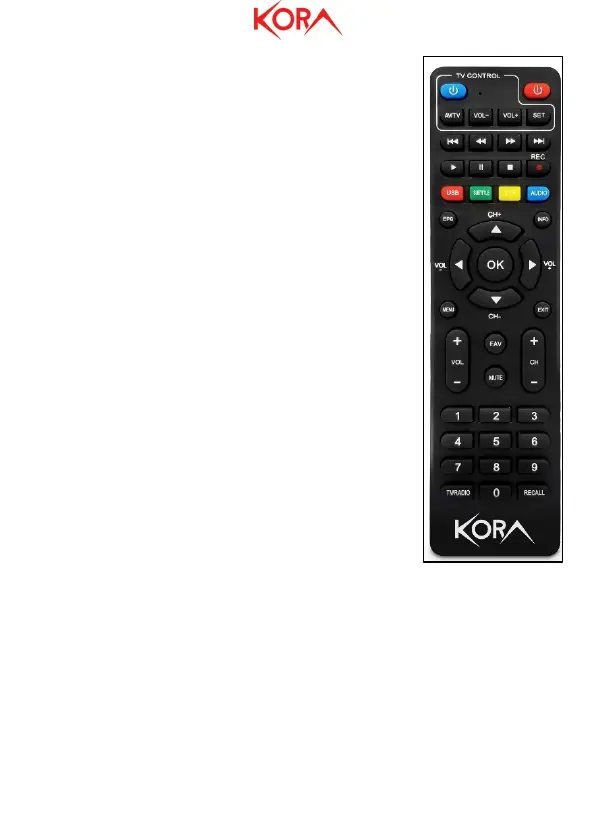
TV Control
● STANDBY: Allows switching between the ON and STANDBY
modes (TV).
● AV/TV: Allows to select the Input (TV)
● TTX: Teletext is displayed, if supported by the current
channel. Press EXIT to exit.
● VOL + / VOL-: Allows raising / lowering the volume level
on TV.
● SET: Learning function
● STANDBY: Allows switching between the ON and STANDBY
modes.
● REV / FWD: During playback allows rewinding / fast
forwarding.
● PREV / NEXT: During playback allows switching to the
previous / next video.
● PLAY: Allows start / restart of video file playback.
● PAUSE (TimeShift): To stop playing a video file. It allows
activating, if enabled, the TimeShift function.
● STOP: Stops playback.
● REC: Allows to start recording the displayed channel (not
supported).
● COLORED BUTTONS: Depending on the menu, the specific
function is displayed in the legend at the bottom of the
screen.
● EPG (Electronic Program Guide): The program guide is
displayed.
● INFO: Displays information about the current channel.
● CH + / CH-: Allows navigation in a menu or change
channels (next / previous).
● OK: Allows you to confirm a choice or show the channel list.
● VOL + / VOL-: Allows navigation in a menu or raising / lowering the volume level.
● MENU: Switch to menu display.
● EXIT: To exit the current menu or return to the previous one.
● AUDIO: Allows language selection and audio mode.
● SUB-T: Allows you to choose the language of the subtitles.
● FAV: Displays the list of favorite channel lists.
● MUTE: Allows you to disable / reactivate the volume.
● CH + / CH-: Allows navigation in a menu or change channels (next / previous).
● 0-9 (Numeric Buttons): Type the channel number you want to display.
● TV / RADIO: Switch between TV mode and RADIO mode and vice versa.


 To Next Page