34
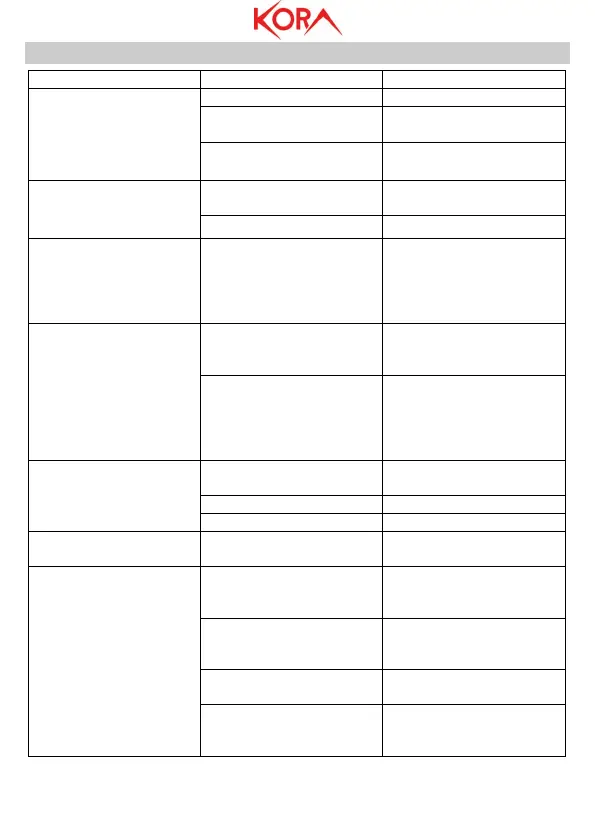
3. FREQUENTLY ASKED QUESTIONS
the TV to Video
Power supply device is not
connected
Connect the power supply
and switch on the device
Select (TV) the correct
video input device
Signal"
The antenna cable is not
connected
The picture is severely
disturbed and
sometimes the vision is
interrupted
The TV signal is too weak
antenna and if the
problem persists contact a
technician in order to fix
The playback is severely
disturbed and
sometimes the playback
is interrupted
The storage device is too
slow
Change the storage device
with a faster USB interface
The device is not a
multimedia player and
supports a limited number
of formats / codecs.
Convert the video file.
The volume level is too
low
Only sound is played but
no picture
The selected channel is a
RADIO
Press TV / Radio to switch
the operating mode
malfunctions
Point the remote control
at the receiver on the
front of the device
Obstacles presence
Reduce the distance to no
more than 4 meters and
Room brightness is too
high
Reduce the ambient
brightness
Often the device is placed
on glass tables that can



 To Next Page