E
E
a
a
s
s
y
y
S
S
t
t
a
a
r
r
t
t
C
C
O
O
N
N
T
T
E
E
N
N
T
T
S
S
Getting Started:
D3200 Connections and Navigation 2
Modes and Features Tour
3-5
Creating and Working with a New D3200 Song:
Assigning Inputs; Using EQ and Effects 5-6
Recording with Session Drums; Mixing Down and Mastering
7
Burning Audio CDs and Backing up Your Data via USB
8-9
Shortcut Keys; Important D3200 Owner’s Manual References
9
Eas
Star
D3200 Main Features
• 32 track recorder plus a dedicated stereo master track - a total of 272 virtual tracks!
• Up to 12 track simultaneous recording in both 16 and 24bit
• Record / playback @ 44.1 or 48kHz, with No Audio Compression
• New Knob Matrix and ClickPoint™ interface for fast and easy navigation!
• 44 channel, 12 buss automated digital mixer (69bit processing)
• 8-XLR inputs w/ individually switchable phantom power
• 12- 1⁄4 TRS balanced inputs w/26dB pads and 48dB trim knobs
• 4-band fully parametric EQ (2-band shelving EQ on CH.25-32) plus 4 band master EQ
• Up to 11 simultaneous effects per song: 8 inserts, 2 masters and a final song effect.
• High quality REMS mic, amp and cabinet effects (56bit)
• Dynamic Fader and Scene Automation; 100 Scenes per song and extensive digital editing
• Session Drums™ - 756 drum patterns with tons of real-time control and easy operation
• Dedicated guitar input and tuner
• Internal 40 GB IDE hard disk for recording.
• Internal CD-RW for ripping, mastering and backup
• Hi-s
eed USB 2.0 for eas
connection to com
uters – backu
im
ort
ex
ort WAV files

 Need help?
 General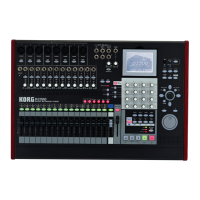

 To Next Page

