EasyManua.ls Logo

Korg Wavestation - Page 37

Korg Wavestation
60 pages
Print Icon
To Next Page IconTo Next Page
To Previous Page IconTo Previous Page
Loading...
S PEC
I AL
SCREEN
( With
regard to
the
SPECIAL
SCREEN
and
the
copy
of
the
test
card )
«
CAUTION
»
This mode
is
for the
development
so
do
not
operate
the
other
keys
except
the
following.
Otherwise,
the
memory
will
crash
or
run
recklessly.
Also,
start
this mode
after
saving
the
data
as
well
as
the
diagnostic
test.
«
STARTING
THE
SPECIAL
SCREEN
))
1.
Turn
the
power
ON.
2.
As
soon
as
the
letter
"
KORG
"
is
indicated
in
the
LCD,
press
CURSOR
KEY T
(
DOWN )
and
TEN
KEY
4
at
the
same
time-
3. After
4
~
5
seconds
pass,
the
SPECIAL
SCREEN
starts-
((
THE
CONTENT
OF
THIS MENU
»
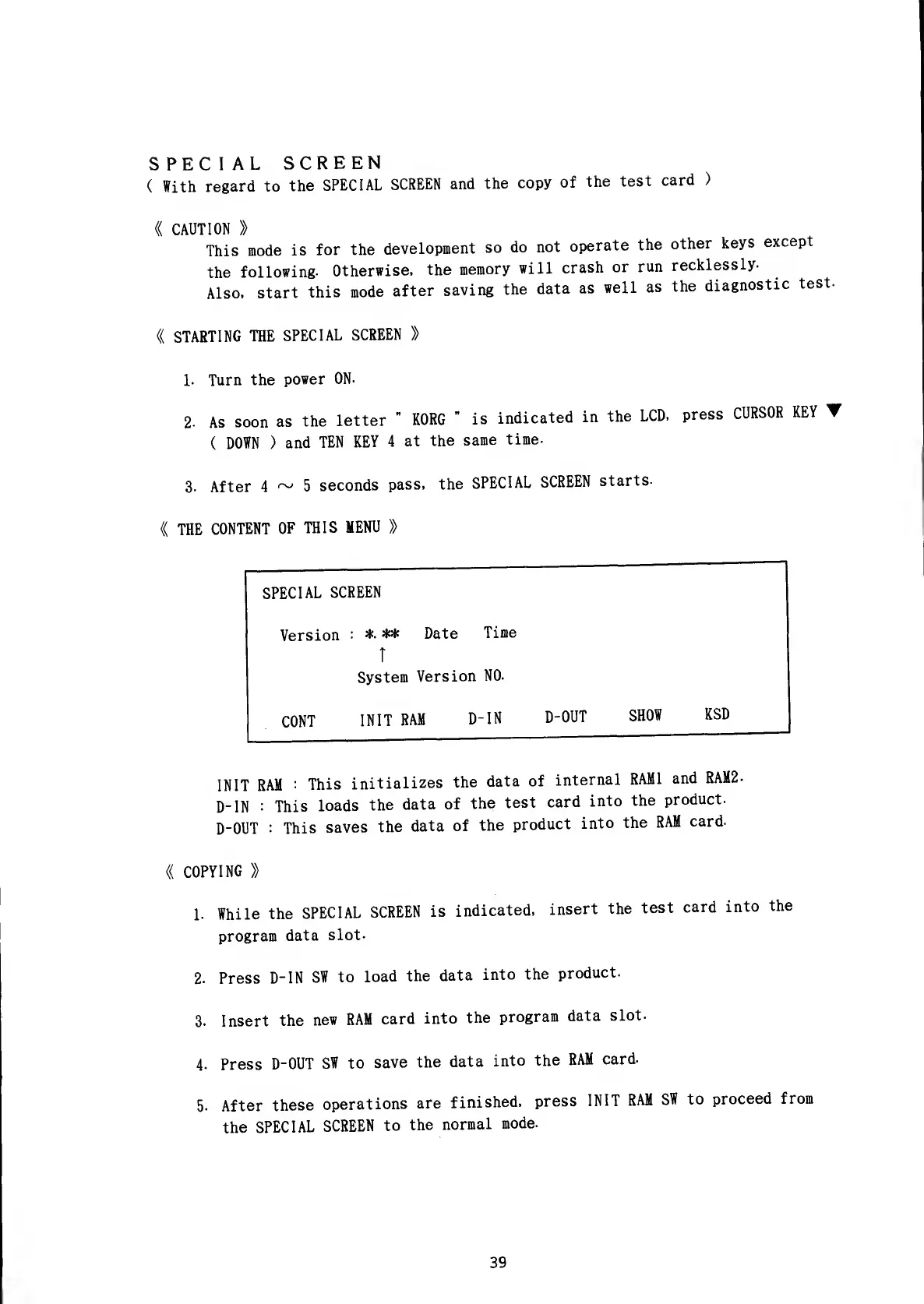
SPECIAL
SCREEN
Version
:
*• ** Date
Time
CONT
T
System
Version
NO-
INIT
RAM
D-IN
D-OUT
SHOW
KSD
INIT
RAM
:
This
initializes
the
data of
internal
RAMI
and
RAM2-
D-IN
:
This
loads
the
data of
the
test
card
into
the
product.
D-OUT
:
This
saves
the
data of
the
product
into
the
RAM
card.
«
COPYING
»
1. While
the
SPECIAL
SCREEN
is
indicated,
insert
the
test
card
into
the
program
data
slot-
2. Press
D-IN
SW
to
load
the
data
into
the
product.
3. Insert
the
new
RAM
card
into
the
program
data
slot.
4. Press
D-OUT
SW to
save
the
data
into
the
RAM
card.
5. After
these
operations
are
finished,
press
INIT
RAM
SW to
proceed
from
the
SPECIAL
SCREEN
to
the
normal
mode.
39

Other manuals for Korg Wavestation

Related product manuals