FUNCTIONAL DESCRIPTION
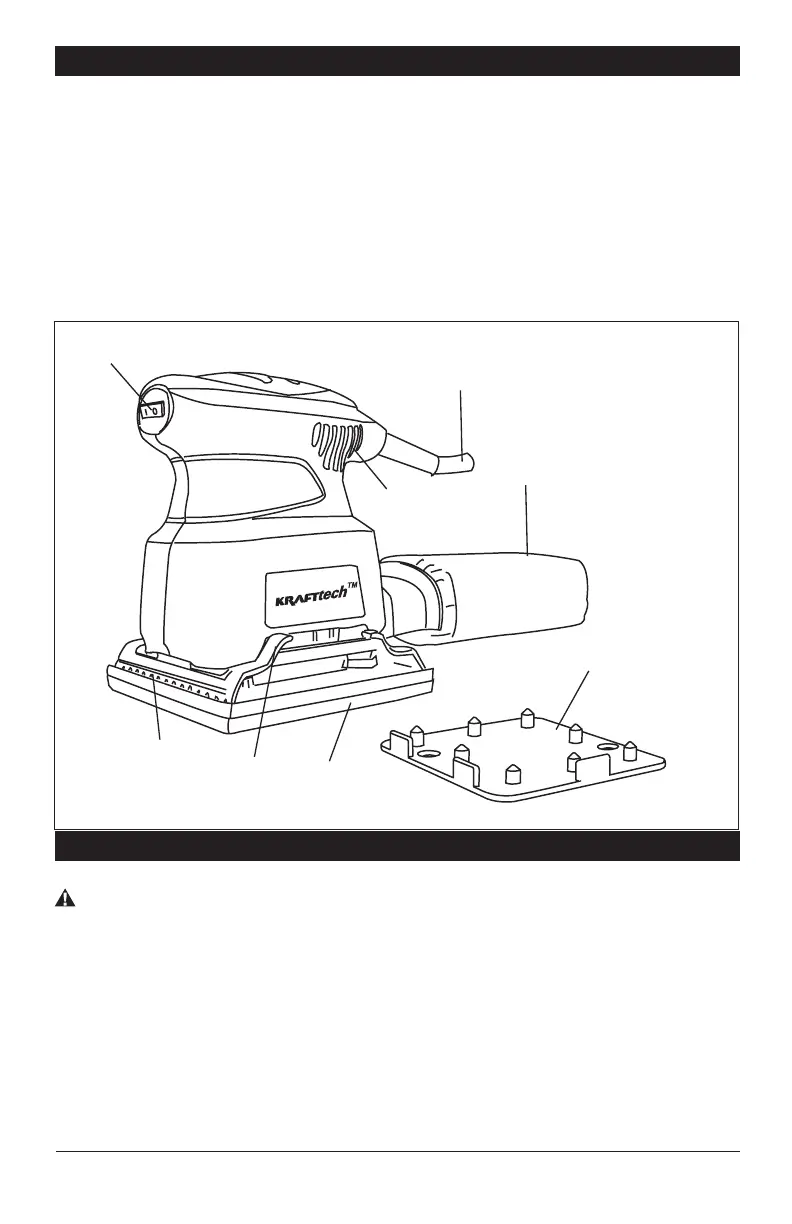
1. Rocker “On/Off” Switch with Dust Guard
2. Sandpaper Clamp
3. Clamp Lever
4. Pad
5. Vents
6. Cord
7. Dust Collection Bag
8. Sandpaper Punch
ASSEMBLY
WARNING Always disconnect the plug from the power source before attach-
ing or removing sandpaper. The sandpaper must be drawn as tight as possible
across the pad of the sander for efficient sanding, as a loose sandpaper can slip
on the work surface.
ATTACHING SANDPAPER
1. To open clamp, push down clamp lever as shown in (FIG. 3).
2. Place the sandpaper (grit side up) between the clamp and base plate while aligning
edges of the sandpaper with either edge of the pad. (Pre-bending the sandpaper
makes attachment easier.)
KRAFTtech PS160CA-3 Page 6
FIG. 2
1
6
7
4
3
2
5
8



 To Next Page