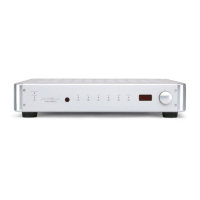
Front Panel Description
The front panel accesses power on/stand-by
and infrared sensor (remote control) functions.
The power stand-by, bias, regulator, and Krell
CAST LEDs, arranged in a triangle on the front
panel above the power button, illuminate to indi-
cate amplifier status.
FULL POWER BALANCED 200c,
300c, AND 600c STEREO POWER
AMPLIFIERS
See Figure 1 on page 6
1 Power Stand-by LED
The blue power stand-by LED (top of LED tri-
angle) illuminates when the back panel power
breaker switch has been moved to on, engag-
ing the input circuitry and placing the amplifier
in stand-by mode.
2 Bias LED
The blue bias LED (lower left of triangle) illumi-
nates after the front panel power button is
pressed, indicating that the Sustained Plateau
Bias II is engaged.
3 Power Button
Use the silver power button, to power on the
amplifier from stand-by mode.
4 Infrared Sensor
The infrared sensor receives the signal from a
remote control.
5 Krell CAST LED
The red Krell CAST LED (center of triangle) illu-
minates when a Krell CAST input on the back
panel is connected to another Krell product with
a Kreil CAST output.
6 Regulator LED
The blue regulator LED (lower right of triangle)
illuminates after the front panel power button is
used to power on from stand-by mode, indicat-
ing that the regulator is providing power to the
output stage.
Note
An optional remote control is available for Full
Power Balanced amplifiers.
FULL POWER BALANCED 250Mc,
350Mc, AND 650Mc MONAURAL
POWER AMPLIFIERS
See Figure 2 on page 7
7 Power Stand-by LED
The blue power stand-by LIED (top of LED tri-
angle) illuminates when the back panel power
breaker switch has been moved to on, engag-
ing the input circuitry and placing the amplifier
in stand-by mode.
8 Bias LED
The blue bias LED (lower left of triangle) illumi-
nates after the front panel power button is
pressed, indicating that the Sustained Plateau
Bias II is engaged.
9 Power Button
Use the silver power button to power on the
amplifier from stand-by mode.
10 Infrared Sensor
The infrared sensor receives the signal from a
remote control.
11 Krell CAST LED
The red Krell CAST LED (center of triangle) illu-
minates when a Krell CAST input on the back
panel is connected to another Krell product with
a Krell CAST output.
12 Regulator LED
The blue regulator LED (lower right of triangle)
illuminates after the front panel power button is
used to power on from stand-by mode, indicat-
ing that the regulator is providing power to the
output stage.
8 Krell Full Power Balanced Power Amplifiers





 To Next Page