2. Installaon of the wheels: place 4 wheels to the holes located at the base of the air
cooler. Insert the wheels ghtly to the air cooler’s body.
3. Set the unit on a stable and horizontal base, keeping it away from radiang heat sourc-
es and naked ame.
4. Filling water: turn the water tank lock to horizontal posion, taking out the water tank,
put in the ice boxes and add clean tap water to the tank. Be sure that the water level in
the tank does not exceed the level “MAX” which is located at the back of the tank.
5.Push the water tank to its housing and turn the tank lock to the vercal posion.
OPERATING THE AIR COOLER
Insert the plug into the electrical outlet. The power indicator will make a beep sound
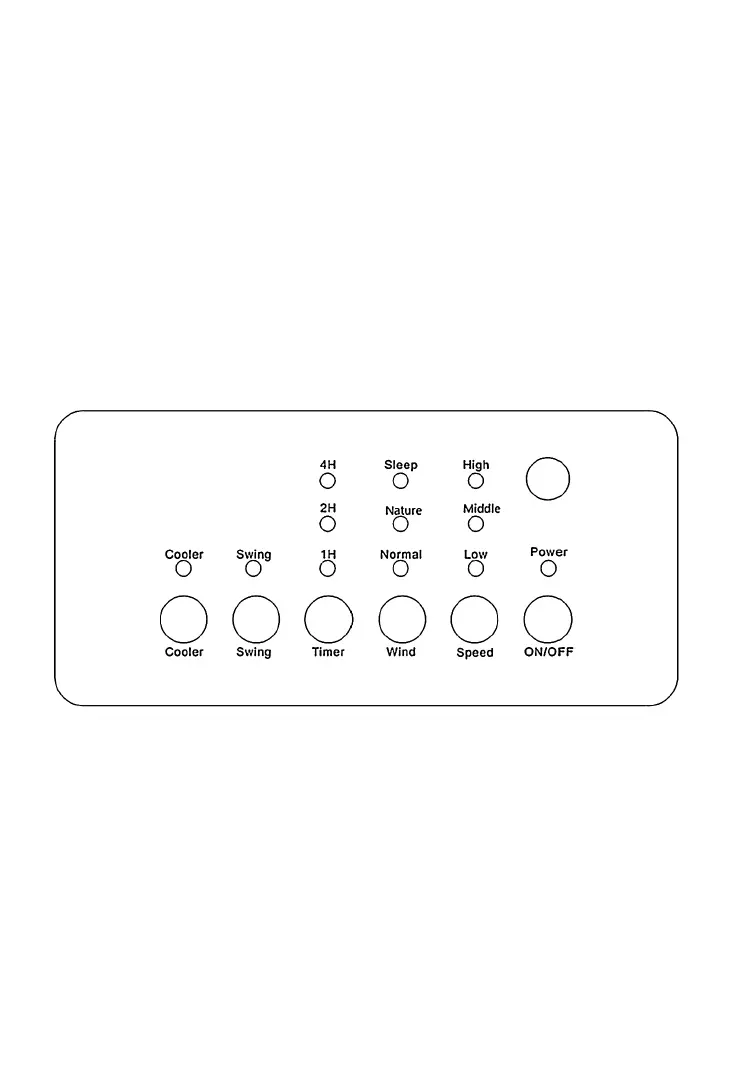
and the air cooler switches to the standby posion. The funcons of the unit can be con-
trolled using the control panel or the remote control.
1. ON/OFF: Press the “ON/OFF” buon on the control panel or press the ON/OFF buon
of the remote control to turn the unit ON. The unit will start at low speed and normal
wind. To switch back to the standby posion, simply press the ON/OFF buon on the
control panel or on the remote control.
2. Speed: wind speed can be adjusted to 3 levels (low-mid-high) by pressing the “Speed”
buon. Each me the “Speed” buon is pressed, an indicator will light to indicate the
speed level.
3. Wind: press the “Wind” buon to choose the wind type. Each me this buon is
pressed, an indicator will light on the screen to indicate the type of wind. There are 3
types of winds to choose: Normal, nature or sleep.
4. Timer: press the “Timer” buon to set the fan running me between 1-7 hours, which



 To Next Page