Need help?
Do you have a question about the KROM KEY and is the answer not in the manual?
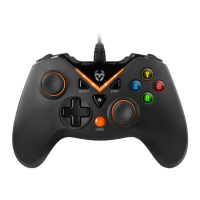
Identifies all physical buttons, joysticks, triggers, and the directional pad on the gamepad.
Explains how to activate and deactivate the rapid fire feature using the Turbo button.
Instructions for connecting and setting up the gamepad on Windows operating systems.
Steps for connecting the gamepad to a PS3 console.
Guide for connecting the gamepad to Android devices via USB OTG.
Details warranty period, coverage scope, and how to make a claim.
Lists specific conditions and damages not covered by the product warranty.
States the product's conformity with relevant European Union directives.
Provides guidelines for environmentally sound disposal of the product and batteries.
 General
| Connection | Wired |
|---|---|
| Type | Gamepad |
| Connectivity | USB |
| Backlight | No |
| D-Pad | Yes |
| Vibration | Yes |
| Motion Controls | No |
| Compatibility | PC |
| Battery | No |
| Charging Time | Not applicable |
| Play Time | Not applicable |
| Analog Sticks | 2 |

 To Next Page