Need help?
Do you have a question about the KROM K-WHEEL and is the answer not in the manual?
Lists compatible operating systems including Windows, PS3, PS4, and Xbox One.
Specifies the need for a USB 2.0 or 3.0 port for device connection.
Notes that software installation is required specifically for PC D-Input mode.
Instructions for connecting the K-Wheel to a PC in X-Input or D-Input modes.
Steps for connecting and operating the wheel with a PlayStation 3 console.
Instructions for connecting and using the wheel with a PlayStation 4 console.
Instructions for connecting and using the wheel with an Xbox One console.
Confirms product compliance with European Union Directives.
Guidance on proper disposal of electrical and electronic equipment waste.
Details who is protected by the warranty and what the warranty covers.
Lists conditions and damages that are not covered by the product warranty.
 General
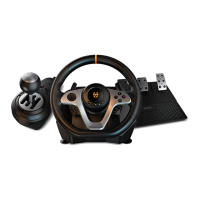
| Device type | Steering wheel + Pedals |
|---|---|
| Buttons quantity | 12 |
| Reflex vibration | Yes |
| Gaming control technology | Analogue / Digital |
| Gaming platforms supported | PlayStation 4, Playstation, Playstation 3, Xbox One |
| Steering wheel rotation angle | 180 ° |
| Gaming control function buttons | - |
| Cable length | 2.4 m |
| Product color | Black |
| Housing material | Fabric |
| Device interface | USB |
| Connectivity technology | Wired |
 Weight and Dimensions
| Depth | 350 mm |
|---|---|
| Width | 330 mm |
| Weight | 2020 g |


 To Next Page