2.3 Pairing iOS / Android devices
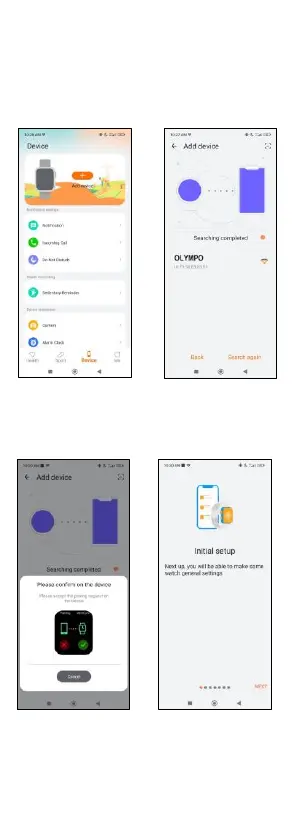
1. Enable your smartphone’s Bluetooth.
2. Log in to the Smart-Time
Pro app and access the
device section (third icon
on the bottom of the
screen) and tap on “Add
device”.
3. Make sure to accept all the
permissions. Then, tap on
OLYMPO.
4. Once you have done so,
a pairing message will
appear on the
smartwatch. Accept it.
5. Once paired, the “Initial
setup” screen will appear.
Make sure to accept all the
permissions.
2.4 Troubleshooting
- If the app cannot find the device power off the smartwatch
and then on again.
- If the device connects and disconnects quickly there may
be an obstruction between the device and the phone.
Wearing metal jewelry may interfere with the stability of the


 To Next Page