19L11A / 22L11A / 23L11 共用 中性 英 文说 明书(欧 洲模 数)(MSD 306方案 )
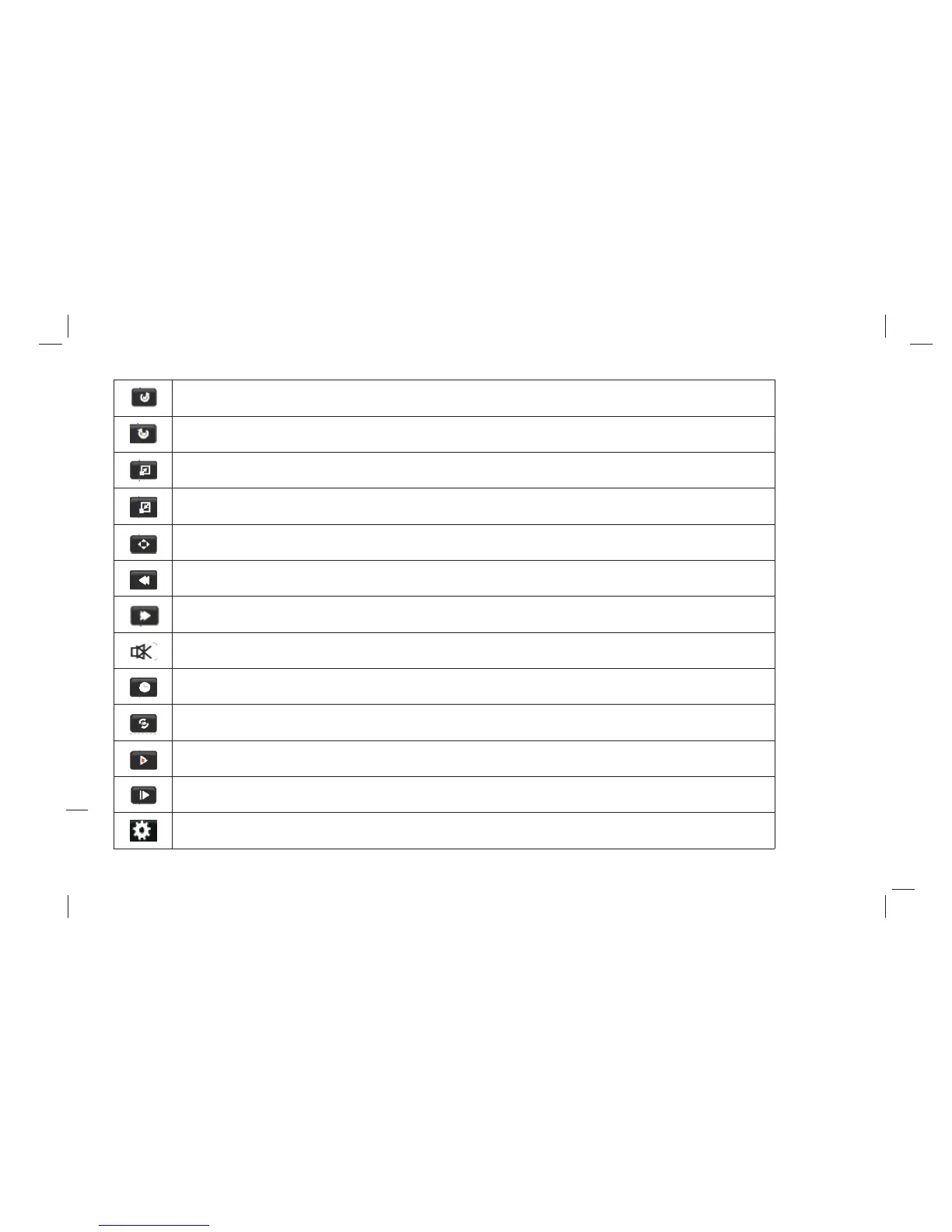
Clockwise: Press "Left/Right" key on the remote control to select this function , press "OK" key to
clockwise rotation photo.
Counter-clockwise: Press "Left/Right" key on the remote control to select this function, press "OK"
key to counter-clockwise rotation photo.
Zoom in: Press "Left/Right" key on the remote control to select this function, press "OK" key to
enlarge picture.
Zoom out: Press "Left/Right" key on the remote control to select this function, press "OK" key to
reduce picture.
Movie View: If the picture big enough to surpasses the screen, you may use this function to
move the picture.
FB: Press "Left/Right" key on the remote control to select this function, press "OK" key to fast
back. Press "PLAY" key to play normally.
FF: Press "Left/Right" key on the remote control to select this function, press "OK" key to fast
forward. Press " PLAY" key to play normally.
MUTE: Press "Left/Right" key on the remote control to select this function, press "OK" key to
fast back. Press ”MUTE” key to Switch off sound.
GO TO Time: Press "Left/Right" key on the remote control to select this function, press "OK"
key to select the time to play.
Set A: Press "Left/Right" key on the remote control to select this function, press "OK" key to set
A and B, the film will circulating play in the time of A to B.
SF: Press "Left/Right" key on the remote control to select this function, press"OK" key to slow
down play speed. Press "PLAY" key to play normally.
Step: Press "Left/Right" key on the remote control to select this function, press "OK" key to play
one step by step. Press "PLAY" key to play normally.
Aspect Ratio: Press "Left/Right" key on the remote control to select this function, press "OK"
key to select Auto,4: 3,16: 9 or PC Mode.
33


 To Next Page