EasyManua.ls Logo

KTC H27S17 - Page 5

KTC H27S17
10 pages
Print Icon
To Next Page IconTo Next Page
To Previous Page IconTo Previous Page
Loading...
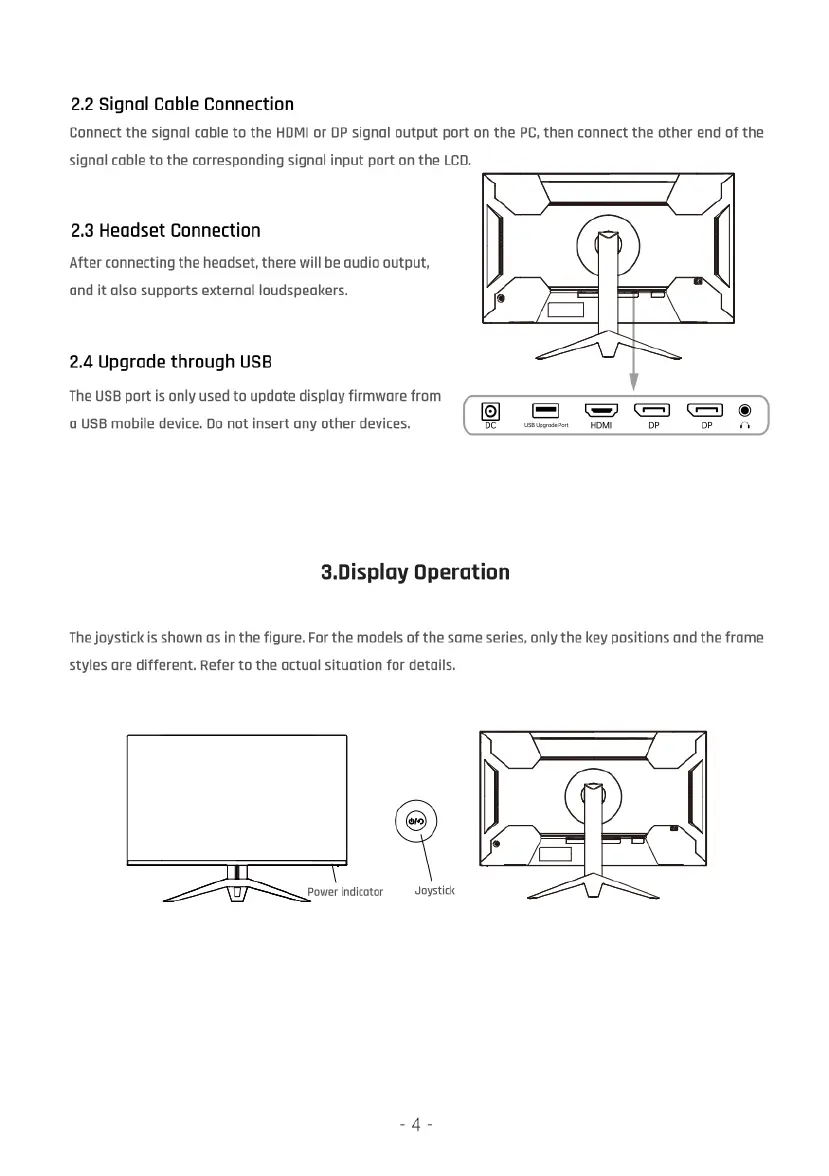
2.2
Signal
Cable
Connection
Connect
the
signal
cable
to
the
HOMI
or
DP
signal
output
port
on
the
PC,
then
connect
the
other
end
of
the
signal
cable
to
the
corresponding
signal
input
port
on
the
LCD.
2.3
Headset
Connection
After
connecting
the
headset,
there
will
be
audio
output,
and
it
also
supports
external
loudspeakers.
4
2.4
Upgrade
through
USB
The
USB
port
is
only
used
to
update
display
firmware
from
" ; . .
=2
&S
3
e
0
USB
mobile
device.
Do
not
insert
any other
devices.
O
e
oW
o
R
3.Display
Operation
The
joystickis
shown
as
in
the
figure.
For
the
models
of
the
same
series,
only
the
key
positions
and
the
frame
styles
are
different.
Refer
to
the
actual
situation
for
details.
fi\wmmm
Soystck