3.1 Power Indicator
The blue indicator represents the proper functioning of the display; the red flash indicator
represents no signal state. Under the energy conservation state, the display will normally work if
the signal is provided again. The display is still powered on in the standby state. Thus, unplug the
power cord when you do not use the display for safety.
3.2 Key Function Introduction
Initial Status:
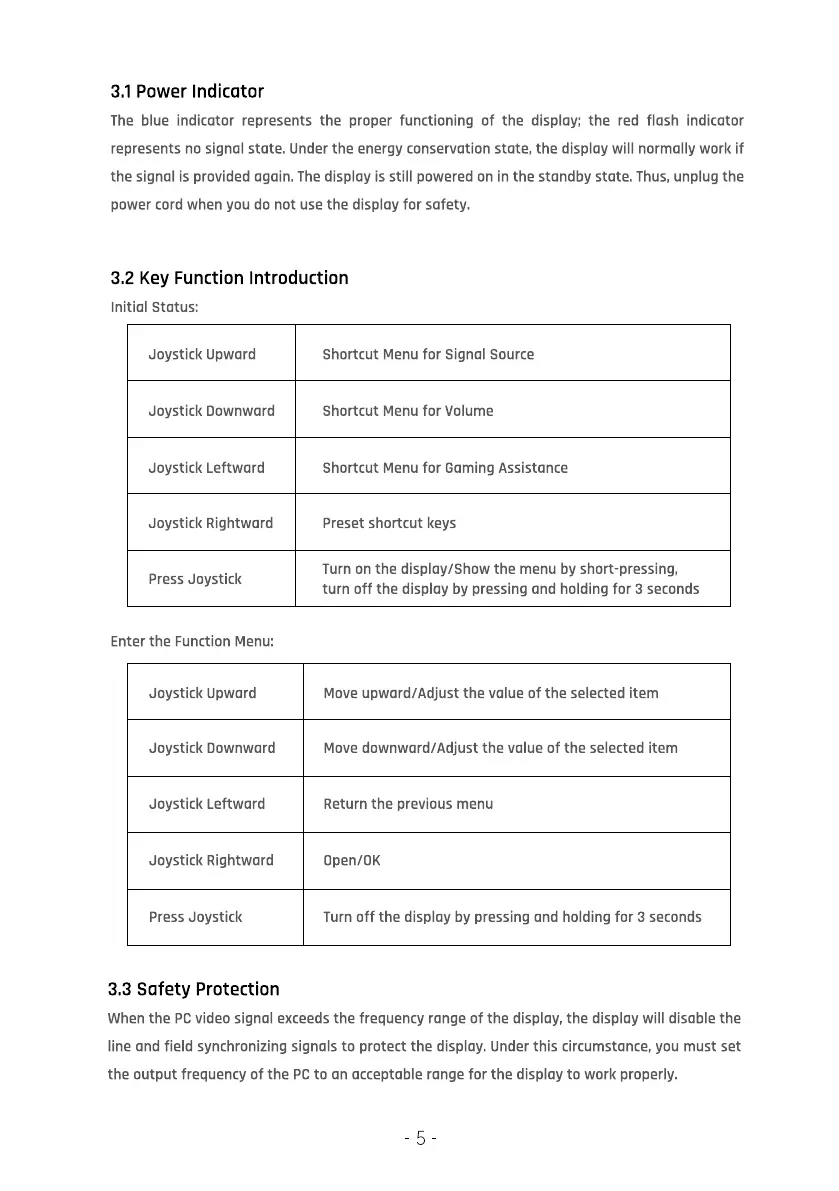
Joystick Upward
Joystick Downward
Joystick Leftward
Joystick Rightward
Press Joystick
Enter the Function Menu:
Joystick Upward
Joystick Downward
Joystick Leftward
Joystick Rightward
Press Joystick
3.3 Safety Protection
Shortcut Menu for Signal Source
Shortcut Menu for Volume
Shortcut Menu for Gaming Assistance
Preset shortcut keys
Turn on the display/Show the menu by short-pressing,
turn off the display by pressing and holding for 3 seconds
Move upward/Adjust the value of the selected item
Move downward/Adjust the value of the selected item
Return the previous menu
open/0K
Turn off the display by pressing and holding for 3 seconds
When the PC video signal exceeds the frequency range of the display, the display will disable the
line and field synchronizing signals to protect the display. Under this circumstance, you must set
the output frequency of the PC to on acceptable range for the display to work properly.
5



 To Next Page