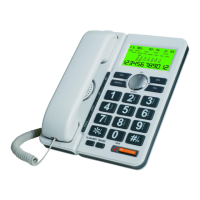
7.3 To view the caller’s data, press the UP or DOWN key
repeatedly to search the numbers.
7.4 “out of area” and “ pri” are also counted as one call.
8. New calls indicator
When there is an new incoming call, the “NEW” symbol will
light up on the LCD and NEW LED Indicator will flash.
9. Erase data from caller ID list
9.1 If the caller ID’s data is full, the unit will automatically
erase the oldest data when a new caller ID data is received.
9.2 Press UP or DOWN to search the number to be erased.
9.3 Press the DEL once, the data displayed will be erased.
9.4 Or press and hold DEL to delete all memories.
10. Set up VIP memory
10.1 If some Caller ID’s date is VIP number, when press UP or
DOWN to review the Caller ID numbers, you could press
VIP/P to set up the desired number as VIP number.
10.2 After you set up the desired number as VIP number, there
will be a Lock symbol on the LCD display. The VIP
number will not be erased by the new incoming memories.
10.3 To cancel VIP setting, when reviewing VIP memory, press
VIP/P once to cancel it, the Lock symbok will disappear.
11. Dial-Out memory Review, Call Back & Delete
11.1 Press OUT repeatedly to review Dialed-Out memories.
11.2 Press RD/ARD to call back desired Dialed-Out memory.
11.3 Press DEL once to delete the desired memory.
11.4 Or press and hold DEL to delete all memories.
12. Pre-dialing mode
12.1 Enter the numbers without picking up the handset
12.2 Press the REDIAL key.
12.3The entered numbers will be dialed out automatically.
12.4 In case of wrong entering of the numbers, press the
DEL key to erase. Then input correct numbers again.
16


 To Next Page
 Loading...