Need help?
Do you have a question about the KUGOO JX-168 and is the answer not in the manual?
Connects the Red Cable (D+) for positive electrode input.
Connects the Black Cable (GND) for negative electrode input.
Utilizes the Blue Cable (DS) for power switch and lock functions.
Identifies the Green Cable (RX) for signal reception.
Designates the White Cable (TX) for signal express transmission.
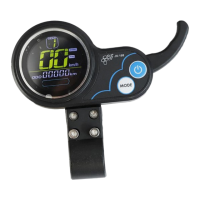
Lists various data displayed: speed, battery, range, voltage, current, hours, and modes.
Specifies the UART protocol used for communication.
Details displaying all meter information for 1 second after power on.
Covers power capacity display and multi-function area for ODO, TRIP, V, A, TIME, and fault codes.
Explains fault codes E-001 to E-007 related to motor, accelerator, controller, and communication errors.
Details the speed icon, units (MPH, KM/H), and calculation based on Hall signal.
Describes how to cycle through gears using the 'MODE' button for speed adjustment.
Explains how to activate the front light icon by pressing and holding the 'MODE' button.
Details the conditions for the cruise control icon to appear after steady acceleration.
Illustrates icons for 'Non-zero Start' and 'Zero Start' modes.
Explains the USB icon for charging and protection modes based on current output.
Details settings for brightness, range unit, voltage, sleep time, wheel diameter, speed limit, and cruise.
Describes how to initialize settings (P99) and clear total range (ODO) by using the 'MODE' button.
Instructions for powering the scooter on and off using the power button.
Explains single press for mode change (ODO, TRIP, V, A, E, TM) and long press for settings.
Details how to change gears by pressing the 'MODE' button.
 General
| Category | Scooter |
|---|---|
| Motor Power | 350W |
| Max Load | 120 kg |
| Tire Size | 8.5 inches |
| Suspension | Front suspension |
| Weight | 12 kg |
| Foldable | Yes |
| Brakes | Disc Brake |

 To Next Page