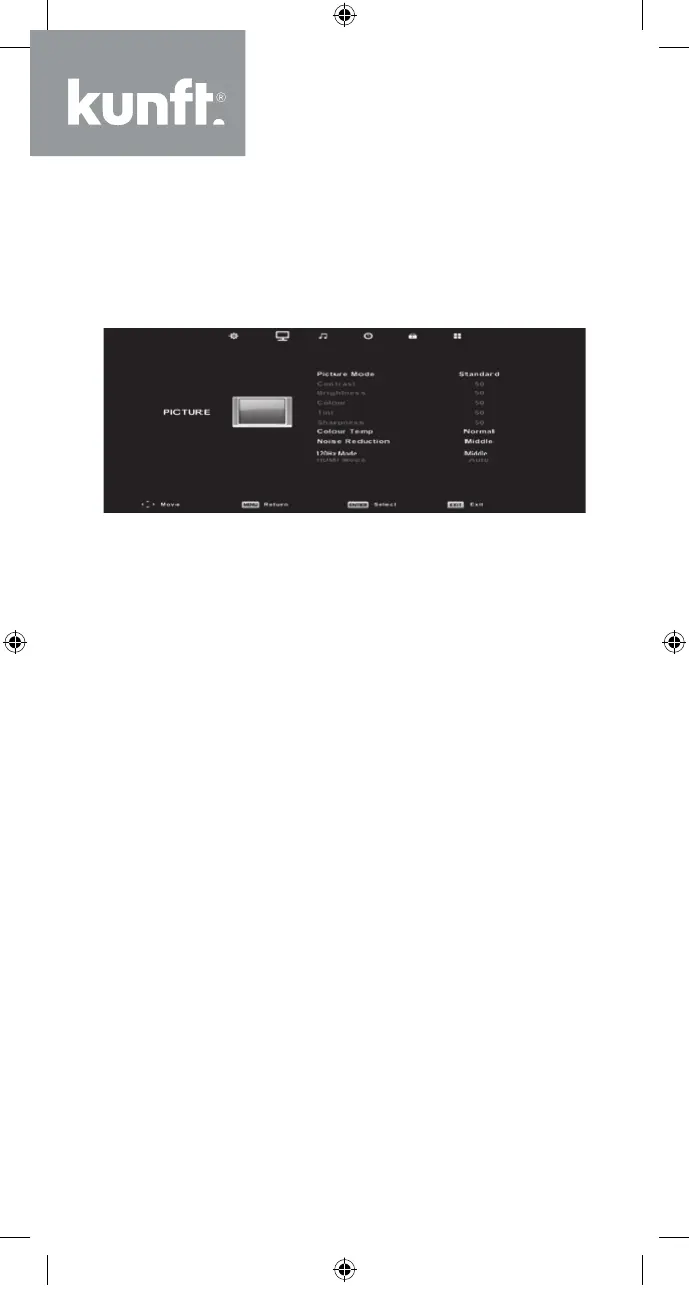
Picture Menu
Press the MENU button to display the main menu
and then press the ◄/► button to select PIC-
TURE in the main menu.
Note: The 120 Hz MODE function is only support-
ed with UHD TV.
1. Press the ▼/▲ button to select the option that
you want to adjust in the PICTURE menu.
2. Press the OK button to make the desired adjust-
ments.
3. After finishing your adjustment, press the MENU
button to save and return to the previous menu.
Picture Mode
Press the ▼/▲ button to select Picture Mode and
then press the OK button to enter the sub-menu.
You can change the value of contrast, brightness,
colour, sharpness and tint when the picture is in
Personal mode.
TIP: You can press the PMODE button to change
the Picture Mode directly.
24
K5128X22F User manual.indb 24K5128X22F User manual.indb 24 2020. 02. 12. 15:57:472020. 02. 12. 15:57:47


 To Next Page