If you have any questions regarding this product, call 1-800-642-2112 and ask for our product
specialists (Mon.-Fri. 9:00 am – 5:00 pm EST) or email: productspecialist@improvementscatalog.com
See many more products on the Internet! www.improvementscatalog.com
To order, call 1-800-642-2112
3
�
�
PA
RT
S
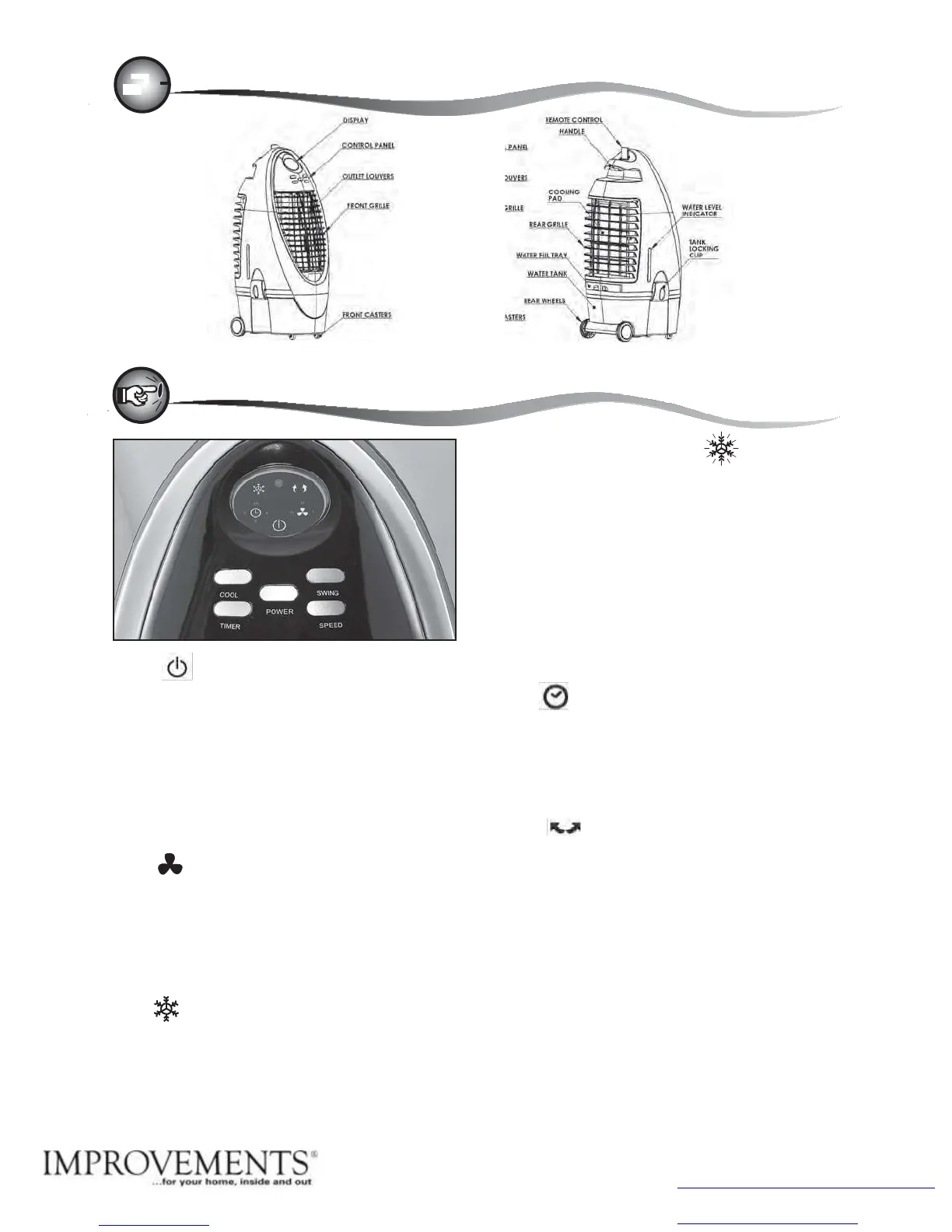
DESCRIPTION
USE AND
OPERAT
ION
POWER
1. Connect the cord to a power outlet. The Power LED icon
will
glow in amber indicating the power source is connected.
2. Press the POWER button to turn on the unit. To
turn off
the unit, press the POWER button again. When the POWER
button is pressed, the Power LED icon will change color
from
amber to red and the blue fan LED icon will come on. The
cooler will start in fan mode at medium speed
then drop to
the low speed
setting.
SPEED
Press the SPEED
button to select the desired fan speed. The
selected fan speed indicator
LED will come
on.
H = High speed
M = Medium speed
L
=
Low speed
COOL
To use the unit
as an evaporative cooler, press the
COOL
button,
the
pump
will
turn
on
and
distribute
water
to
wet
out
the
cellulose
cooling pad located in the rear of the unit. The indicator LED
light will come on. After approximately three minutes, as the
pad becomes
saturated, the air from the outlet should be cool.
LOW WATER ALARM FUNCTION
The KA45 is equipped with a low water sensor alarm. When
water in the tank is below minimum level, you will hear 10
beeps and COOL LED
indicator will flash continuously. At the
same time the power to the pump will be cut off to protect the
life of the pump. In order to disengage the alarm function,
turn
off and unplug the unit from the power outlet, and fill the
tank
with water above the minimum level. In order to turn off the
alarm function and continue to use it in
FAN
mode, turn off the
unit and turn the unit back on. If
COOL button is pressed
again
without filling the tank with water, low water alarm will go
off
again.
TIMER
The
unit
comes
with
a
maximum
7.5-Hour
timer.
Each
time
TIMER
button is pressed 0.5 hour of operation time is added. The
sum
of all illuminated
LED indicates the
remaining operation time.
EX: „2‟ and „4‟ lights illuminated meaning there are 6 hours
remaining before unit shuts
off.
SWING
Press the SWING button to direct the air stream. The louvers
will
begin to move automatically from side to side. The
indicator
LED will come
on.
UP-DOWN AIR FLOW
To adjust the vertical direction of air flow, adjust the
horizontal
louvers located behind the front grille
manually
.


 To Next Page