EasyManua.ls Logo

Kverneland Exacta-CL-GEOSPREAD - User Manual

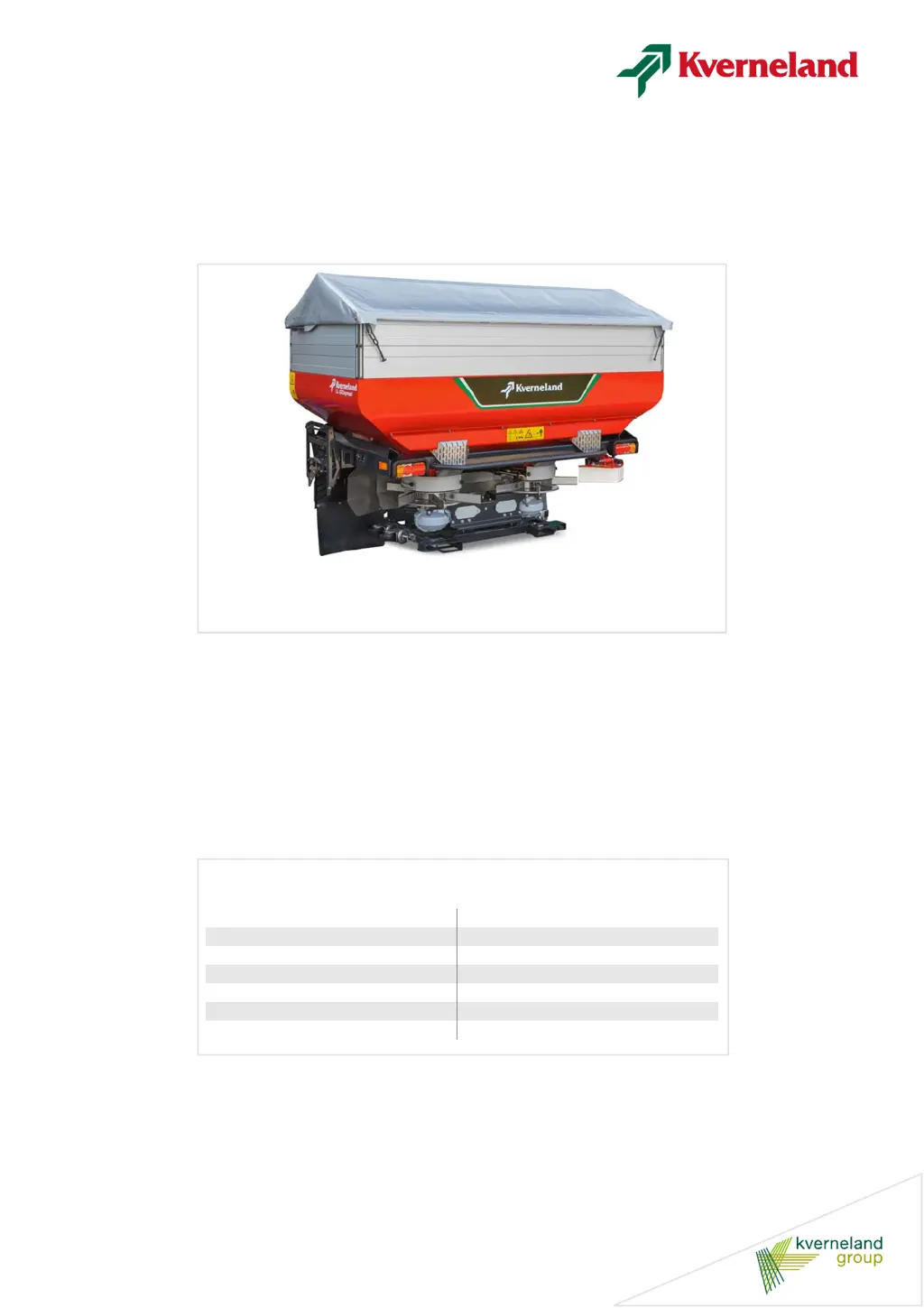
Kverneland Exacta-CL-GEOSPREAD
216 pages
Print Icon
To Next Page IconTo Next Page
Loading...
Exacta-CL-GEOSPREAD
User Manual
Item 02-2018
Print date 02.2018
Language EN
From software version V 1,16
From machine number 1001
Serial number From VN263
Reference number A138454040-2

Table of Contents

Questions and Answers

  • J
    Janet JordanAug 12, 2025
    Why is the Kverneland Exacta-CL-GEOSPREAD Spreader applying incorrect rates per hectare?
    • C
      Cindy DiazAug 12, 2025
      Several factors can cause incorrect application rates. The dosing setting might be off, or the fine dosage setting could be incorrect. The driving speed signal may not be correctly set in the control system. A new fertilizer type might be used with old settings. The fertilizer flow could be blocked. Double-check that the dosing setting and flowrate are entered on the ‘Curve Calibration’ screen. Ensure the application rate, working width, and discharge point letter value are correctly entered. The speedometer might be faulty, or incorrect values could have been entered after a manual calibration test. Make sure to check each of these potential issues.
  • A
    Ashley WalshAug 16, 2025
    What to do if spreading tracks are visible among crops with the Kverneland Exacta-CL-GEOSPREAD Spreader?
    • D
      Donald GomezAug 16, 2025
      If you notice spreading tracks, several issues could be the cause. It might be due to average quality fertilizer, a blend of fertilizer types, or using the wrong spreading chart. Incorrect overlapping of the spreading pattern, incorrect horizontal/vertical settings, incorrect spreader height, incorrect working width, worn or missing vanes, or unequal tire pressure could also be contributing factors. Check the fertilizer distribution, type, pattern. Ensure the machine is level and at the correct height (75 cm above the crops or soil). Verify the discharge point letter, PTO shaft RPM, and tire pressure.
  • G
    Gabriel MeltonAug 20, 2025
    What to do if my Kverneland Exacta-CL-GEOSPREAD makes a noise while running?
    • J
      James WashingtonAug 20, 2025
      If your spreader is making noise, it could be due to the discharge bushing contacting the spreading disc, the spreader being put down with a filled hopper, or a hidden/out of balance spreading disc. Contact your dealer to resolve the issue with the discharge bushing. If the spreader was put down with a filled hopper, repair the machine and reset the dosing mechanism and discharge point. Inspect the spreading discs for damage and ensure all vanes are present.
  • R
    Robin AtkinsAug 23, 2025
    What to do if I feel powerful vibrations from my Kverneland Exacta-CL-GEOSPREAD?
    • S
      Scott MorrisAug 23, 2025
      If you are experiencing strong vibrations, it could be due to a great imbalance in the spreading discs, a bent agitator axle or damaged agitator, or the PTO shaft working angle being out of reach. Check the vanes and spreading discs for imbalance. Replace the agitator axle or the agitator if damaged. Limit the PTO shaft working angle to a maximum of 30º.
  • L
    latasha49Aug 27, 2025
    Why is there great amounts of dust while spreading with Kverneland Exacta-CL-GEOSPREAD Spreader?
    • R
      Robert ThomasAug 27, 2025
      Excessive dust during spreading can be caused by average quality fertilizer (too soft, broken, mixed types) or incorrect storage, or the right agitator grinding. Contact your supplier and update the storage area. If the agitator is grinding, the spreading disc may not be disconnected while border spreading with the border spreading plate.
  • A
    Alicia CooperAug 31, 2025
    What to do if the Kverneland Exacta-CL-GEOSPREAD does not appear on the screen?
    • H
      Hannah RandolphAug 31, 2025
      If the spreader isn't showing on the screen, the control box might be displaying another system, or the spreader ISO plug might not be connected. Press the switch key to select the spreader display. Ensure the spreader ISO plug is properly connected.
  • C
    Christopher PerezSep 3, 2025
    What causes the flowrate on the left and right spreading disc to differ on Kverneland?
    • S
      stanleysharonSep 4, 2025
      Unequal flowrates on the spreading discs can result from unequally set actuators or moved stops on one or both actuators. Check the actuator settings and readjust the position of the connecting points.
  • K
    Kevin SchmidtSep 7, 2025
    What does alarm on the control box screen of Kverneland Exacta-CL-GEOSPREAD mean?
    • C
      christydillonSep 7, 2025
      If there is an alarm on the control box screen, it could mean that the control system cannot perform the requested function correctly, the external system is not communicating with the control box, or application rate control via an external signal is not connected. Check and modify the plug pin occupation on the side of the control box, see user's manual for control box and external system and switch on the external signal reception.

Summary

Preface

Target Group of This Manual

Identifies the intended audience and their required qualifications for using the manual.

For Your Safety

Highlights critical safety information and ensures safe operation of the implement.

For the Employer

Details employer responsibilities regarding training, safety, and personal protective gear.

Meaning of Symbols

Explains the various symbols and pictograms used throughout the manual for clarity.

Safety

General Safety Instructions

Provides essential safety rules and guidelines for operating the machine safely.

Warning Stickers and Symbols

Explains the meaning and importance of warning stickers affixed to the machine.

User Responsibilities and Authorisation

Outlines user responsibilities, training requirements, and authorisation for operating the machine.

Operational Safety Precautions

Details safety measures related to the workplace, tractor, and machine operation.

Weight and Load Calculations

Explains how to calculate axle loads and total weight for safe operation.

Getting Familiar with the Machine

Machine Applications and Systems

Covers machine uses, GEOSPREAD, ExactLine, and CentreFlow systems.

Spreading Pattern and Width Distribution

Details different spreading patterns and GEOSPREAD width distribution.

ISO and Automatic Control Systems

Explains ISOBUS control and automatic weighing systems.

Before First Use

Machine Inspection and Preparation

Covers initial inspection, mounting instructions, and safety checks.

Control Box and Console Setup

Guides on assembling and mounting the control box and console.

System Connections and GPS Setup

Details connecting IsoMatch terminals, GPS, and ISOBUS systems.

Machine Components and Adjustments

Covers hopper extensions, covers, parking wheels, vanes, ExactLine, and hydraulic plates.

Calibration and Tractor Setup

Explains calibration container use and tractor requirements.

Coupling Shaft Installation

Provides detailed instructions for coupling shaft mounting and shortening.

System Settings

Interface and Basic Settings

Covers operational differences, interface elements, and basic settings like alarms.

Calibration and Spreading Adjustments

Details ExactLine/border plate positions, border spreading, driving speed, and calibration tests.

Advanced System Configuration

Covers PIN code access, auto-calibration, weighing systems, gored spreading, and ISOBUS communication.

Software, Licensing, and Data Management

Explains software licensing, machine data setup, GEOPOINT, and field registration.

Spreader Calibration and Alarms

Details actuator calibration, hopper weight calibration, and system alarms.

Before Spreading

Setting Up the Spreader

Covers selecting settings based on fertiliser characteristics and charts.

Spreader Adjustment Procedures

Details setting working width, discharge point, inclination, and application rates.

Calibration and Pattern Testing

Explains manual calibration and performing spreading pattern tests.

Use in the Field

Operational Safety and Environment

Covers safety during operation, environmental protection, and cabin use.

Machine Adjustment and Control System Setup

Details spreading height adjustments and configuring the control system.

Field Registration and Tramline Setup

Explains field registration with GEOCONTROL and electronic tramline setting.

Spreading Operations and Pattern Testing

Covers spreading on fields, headlands, tramlines, and testing patterns.

Over;Underdosing and Border Spreading

Details application rate adjustments and border spreading techniques.

Storing the Machine

Pre-Storage Safety and Protection

Covers safety precautions, machine protection, and cleaning before storage.

Machine Disconnection and Parking

Details procedures for safely disconnecting and parking the machine.

Winter Storage Preparation

Outlines steps for preparing the machine for winter storage, including lubrication and preservation.

Maintenance

Safe Repair and General Precautions

Emphasizes safe repair practices, authorized personnel, and general maintenance guidelines.

Machine Component Checks and Lubrication

Covers checks for modification, parts, bolts, sieves, materials, and lubrication.

Oil, Grease, and Maintenance Intervals

Specifies oil/grease types, quantities, intervals, and lubricating points.

Hydraulic System Checks and Replacements

Details checking hydraulic systems, hose replacements, and pressure limits.

Dosing and Discharge Mechanism Adjustments

Covers setting the dosing mechanism, plates, discharge point, and bushing height.

Agitator Axle Seal Replacement

Provides instructions for replacing the agitator axle seal.

Troubleshooting

Troubleshooting Guide

A comprehensive table addressing common problems, causes, and solutions.

Operational Issues and Machine Behavior

Covers dust, spreading tracks, noise, vibrations, and PTO shaft issues.

System Communication and Display Errors

Addresses control box alarms, external system communication, and screen display problems.

Disposal and End-of-Life

Material Disposal Guidelines

Provides instructions for the proper disposal of metal, plastic, rubber, and electronic waste.

Fertiliser Handling

Covers storage or disposal regulations for remaining fertiliser.

Liability

Liability

Outlines the seller's responsibilities and limitations for damages.

Complaints

Stipulates procedures for reporting and handling buyer complaints.

Guarantee

Explains how to obtain and utilize guarantee conditions.

EC Declaration of Conformity

Notes

Kverneland Exacta-CL-GEOSPREAD Specifications

General IconGeneral
BrandKverneland
ModelExacta-CL-GEOSPREAD
CategorySpreader
LanguageEnglish

Related product manuals