Section 5.0 - Controls
Work Safely. Always wear safety glasses near the machine.
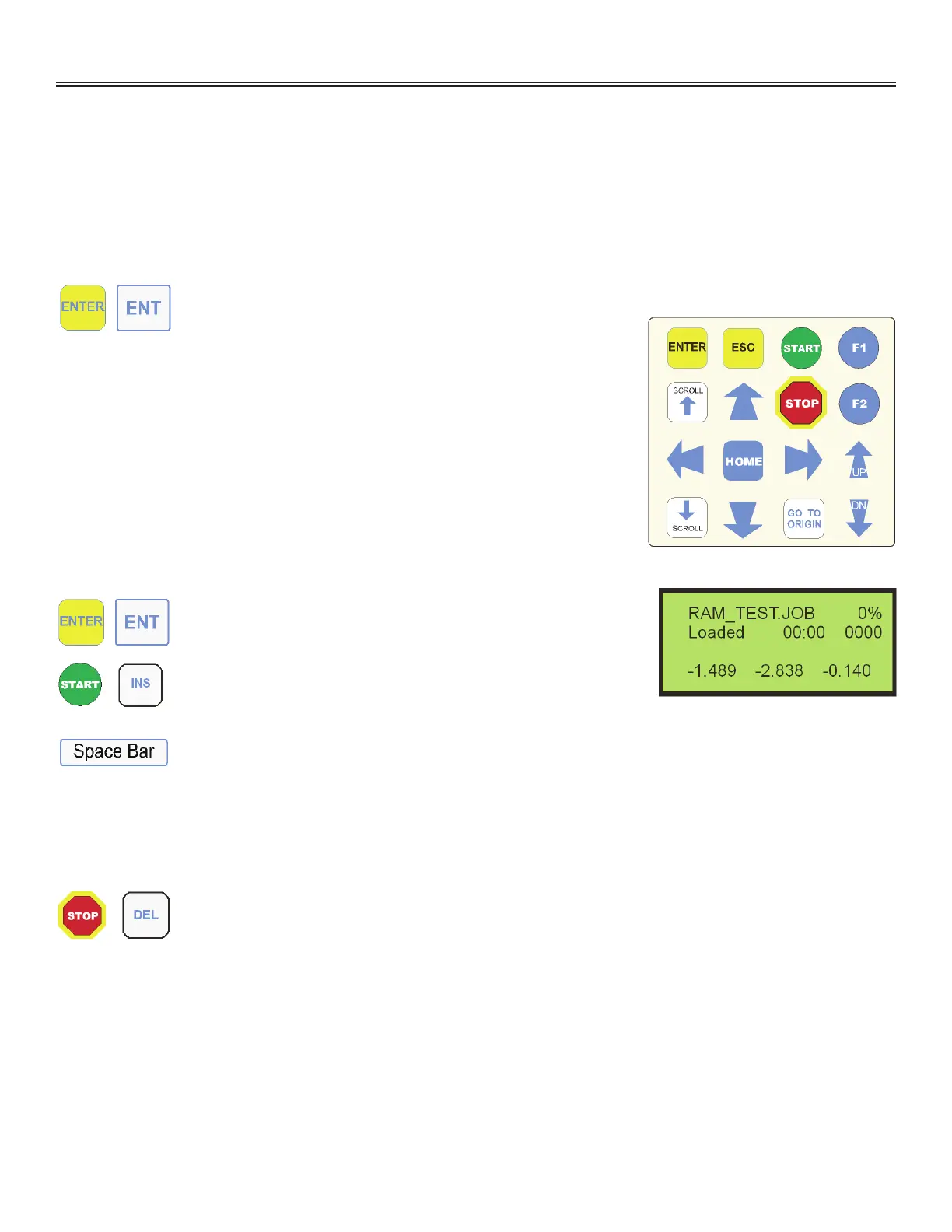
The system features a backlit LCD display and a touch pad for operation and control. The following is a
description of all of the features and their functions throughout all of the modes of operation. Please note
some keys have multiple functions. These functions may be enabled during the dierent modes of operation.
NORMAL MODE
• Chooses current selection
JOB LOADED MODE
• Sets the machine into outline mode if enabled. If not
enabled, changes to the tool setting screen
• Hold for 5 seconds to enter single step mode
JOB LOADED MODE WHEN DISPLAYING LINES
• Displays line formation for selected line
RUN MODE
• Toggles loop mode for continuous running
PAUSED MODE
• Toggles the display to the set height and edit tools screen
NORMAL MODE
• Cancels entry. Goes back by one level in selection
• Hold for 5 seconds to access security le via password
OUTLINE MODE
• Begins the outline process which disables output 1 and traces
a rectangle around the outline of the pattern
NORMAL MODE
• Starts the machine cycle if a job is loaded
• Diagnostic mode toggles between axis info, I/O status & extended outputs
ALL MODES EXCEPT RUN MODE, PAUSE MODE AND DIAGNOSTIC
MODE
• Displays the X, Y & Z home and origin position and enables jogging
RUN MODE
• Pauses machine cycle (1st key press)
PAUSED MODE
• Cancels cycle (2nd key press)
OUTLINE MODE
• Stops the outline mode and returns the head to the starting point
ROTARY VALVE SETUP
• Homes plunger to "top" position
JOB LOADED MODE
• Hold for 5 seconds to run job with no XY or Z motion
or
Multi Key Touch Pad
LCD Display


 To Next Page