EasyManua.ls Logo

Kyocera TASKalfa 9003i - Copy Configuration; Configure Copy Options

Kyocera TASKalfa 9003i
28 pages
Print Icon
To Next Page IconTo Next Page
To Previous Page IconTo Previous Page
Loading...
9
Original
Size
Paper
Selection
Mixed Size
Originals
Original
Orientation
Collate/
Offset
Staple
/Punch
Paper Output
Quick Setup Advanced
Setup
Program
100%
A4
A4Original
Zoom
:
:
:Paper
Preview
Image Quality
Org./Paper/
Finishing
Layout/Edit
c0102
Preview Proof Copy
Fold
Copies
ID Card Copy
Authentic./
Logout
Copy Send Custom Box
Job Box USB Drive
Select the function.
Admin
FAX
Internet Browser
FAX Box
Program㻿㼥㼟㼠㼑㼙
㻹㼑㼚㼡
Paper
Settings
Status/
Job Cancel
Device
Information
Language HelpWi-Fi Direct
Status
Status/
Job Cancel
Copy Function Send Function FAX Function
08/08/2018 14:00
System Menu
/Counter
Interrupt
Numeric
Keypad
Reset
Stop
Start
Accessibility
Display
Image QualityOrg./Paper/
Finishing
Quick Setup Layout/Edit Advanced
Setup
Program
:
:
:
100%
A4
A4
Preview
Original
Zoom
Paper
Preview
Proof Copy
Copies
Staple
/Punch
Density
Normal 0
Paper
Selection
Auto
Zoom
100%
Off1-sided
>>1-sided
Duplex
Off
Combine
ID Card Copy
Authentic./
Logout
Copy Send Custom Box
Job Box USB Drive
Select the function.
Admin
FAX
Internet Browser
FAX Box
Program㻿㼥㼟㼠㼑㼙
㻹㼑㼚㼡
Paper
Settings
Status/
Job Cancel
Device
Information
Language HelpWi-Fi Direct
Status
Status/
Job Cancel
Copy Function Send Function FAX Function
08/08/2018 14:00
System Menu
/Counter
Interrupt
Numeric
Keypad
Reset
Stop
Start
Accessibility
Display
Image QualityOrg./Paper/
Finishing
Quick Setup Layout/Edit Advanced
Setup
Program
:
:
:
100%
A4
A4
Preview
Original
Zoom
Paper
Preview
Proof Copy
Copies
Staple
/Punch
Density
Normal 0
Paper
Selection
Auto
Zoom
100%
Off1-sided
>>1-sided
Duplex
Off
Combine
ID Card Copy
1
2
ID Card
ID Card
Cop
p
o
op
opy
py
Copy
Copy
Copy
opy
o
op
opy
o
p
p
p
y
py
y
y
y
y
opy
o
Cop
p
p
op
p
opy
opy
o
p
p
p
o
o
o
op
o
o
o
o
o
op
p
C
C
Co
o
py
py
py
p
2
1
1
3
32
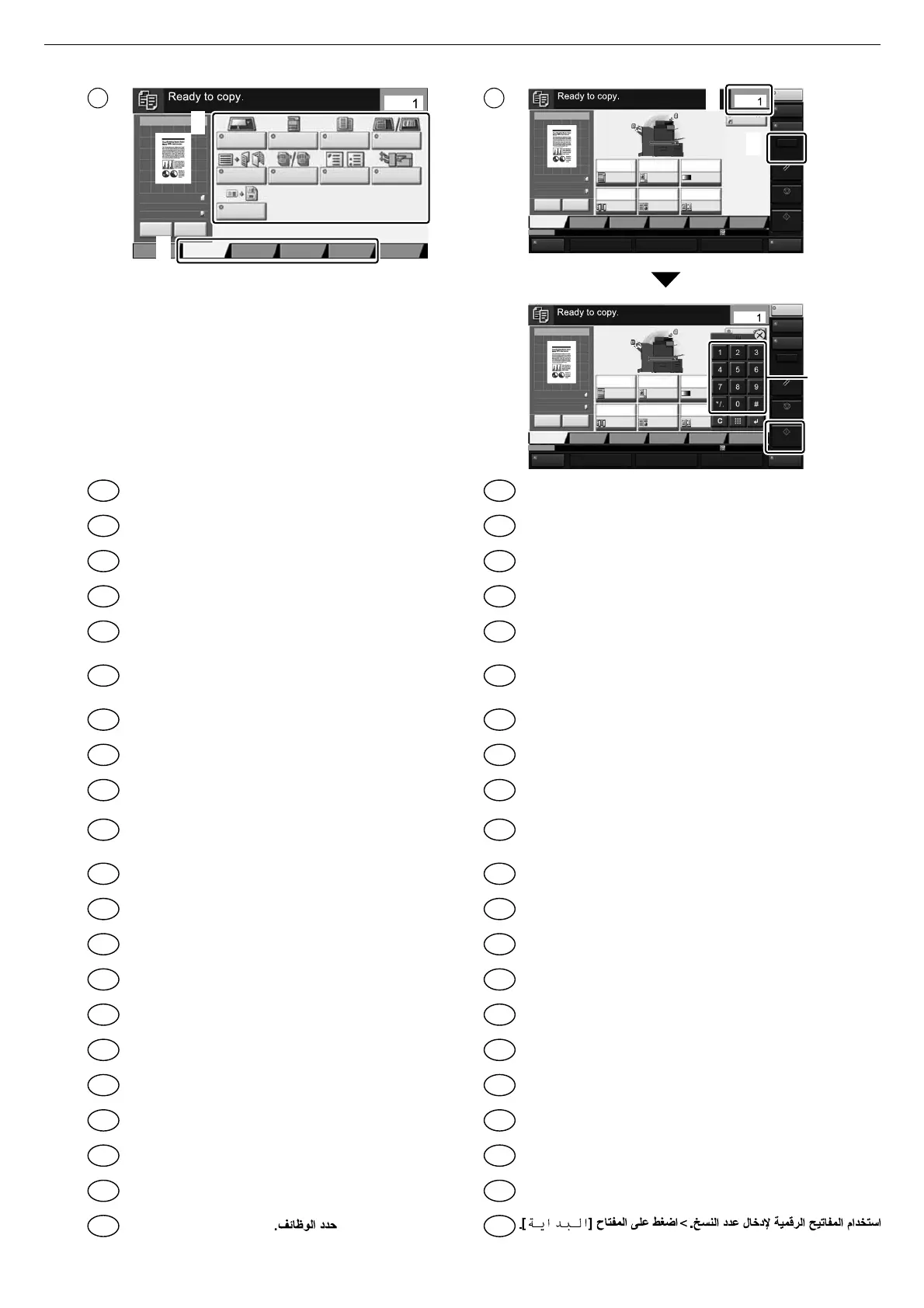
Select the functions.
Seleccioneu les funcions.
Vyberte funkce.
Vælg funktionerne.
Funktionen auswählen.
Επιλέξτε τις λειτουργίες.
Seleccione las funciones.
Valitse toiminnot.
Sélectionner les fonctions.
Válassza ki a funkciót.
Selezionare le funzioni.
Selecteer de functies.
Velg funksjonene.
Wybierz funkcje.
Selecione as funções.
Seleccione as funções.
Selectaţi funcţiile.
Выберите функции.
Välj funktionerna.
İşlevleri seçin.
Enter the copy quantity. > Press the [Start] key.
Introduir el nombre de còpies. > Polseu la tecla [Inicia].
Zadejte počet kopií. > Stiskněte tlačítko [Spustit].
Indtast antal kopier. > Tryk på tasten [Start].
Geben Sie die Anzahl der Kopien ein. > Taste
[Start] wählen.
Καταχωρίστε τον αριθμό των αντιγράφων. >
[Πατήστε το πλήκτρο [Έναρξη].
Introducir la cantidad de copias. > Pulse la tecla [Inicio].
Anna kopioiden määrä. > Paina [Käynnis.]-näppäintä.
Entrez le nombre de copies. > Appuyer sur la
touche [Départ].
Adja meg a másolatok számát. > Nyomja meg a
[Indítás] gombot.
Inserire il numero di copie. > Premere il tasto [Avvio].
Voer het aantal exemplaren in. > Druk op de [Start] toets.
Angi antall kopier. > Trykk [Start]-tasten.
Wprowadzenia liczby kopii. > Naciśnij klawisz [Start].
Inserir a quantidade de cópias. > Pressione a tecla [Iniciar].
Inserir a quantidade de cópias. > Prima a tecla [Iniciar].
Introduceți numărul de copii. > Apăsaţi tasta [Început].
Введите количество копий > Нажмите клавишу [Старт].
Ange antal kopior. > Tryck på knappen [Starta].
Kopya sayısını girin > [Başlat] tuşuna basın.
EN
CA
CS
DA
DE
EL
ES
FI
FR
HU
IT
NL
NO
PL
PT-BR
PT-PT
RO
RU
SV
TR
AR
AR
EN
CA
CS
DA
DE
EL
ES
FI
FR
HU
IT
NL
NO
PL
PT-BR
PT-PT
RO
RU
SV
TR

Related product manuals