EasyManua.ls Logo

La Crosse Technology 308-1410GR - User Manual

La Crosse Technology 308-1410GR
4 pages
Print Icon
To Next Page IconTo Next Page
Loading...
308-1410GR www.lacrossetechnology.com/support Page | 1
WIRELESS THERMOMETER
Get started
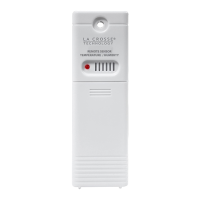
1. Insert 2 new AA batteries (not included) into the TX141-BV2 sensor.
Observe the correct polarity. The LED will flash when transmitting.
2. Insert 2 new AA batteries (not included) into the station. Observe the
correct polarity.
3. After 5 minutes, place the sensor outside in a shaded location.
Maximum range is 300 feet (91 meters) open air.
Buttons
2 “AA
Model: 308-1410GR
Instruction Manual
DC: 092117
2 “AA”
SENSOR
TX-141-Bv2
LED
TX
Question and Answer IconNeed help?

Do you have a question about the La Crosse Technology 308-1410GR and is the answer not in the manual?

Summary

Get Started

Set Time

Fahrenheit;Celsius Display

MIN;MAX Temperatures

Temperature Trend Indicators

Position Outdoor Sensor

Search for Outdoor Sensor

Low Battery Icon

Specifications

Warranty and Support

FCC Statement

Overview

This document describes the La Crosse Technology Model 308-1410GR Wireless Thermometer, an instruction manual dated DC: 092117.

Function Description:

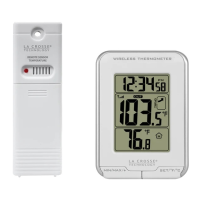
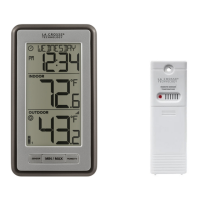
The La Crosse Technology Model 308-1410GR is a wireless thermometer system designed to display both indoor and outdoor temperatures, along with the current time. It consists of a main display station and a remote outdoor sensor (TX-141-BV2). The system allows users to monitor temperature trends, view minimum and maximum temperatures, and switch between Fahrenheit and Celsius displays.

Important Technical Specifications:

Indoor:

  • Temperature Range: 32°F to 122°F (0°C to 50°C)
  • Interval: About every 30 seconds

Outdoor:

  • Temperature Range: -40°F to 140°F (-40°C to 60°C)
  • Alkaline Batteries Temperature Range: -20°F to 140°F (-28.8°C to 60°C)
  • Lithium Batteries Temperature Range: -40°F to 140°F (-40°C to 60°C)
  • Distance: Over 300 ft. (91 meters) in open air (RF 433MHz)
  • Interval: About every 50 seconds

Power:

  • Wireless Thermometer (Station): 2-AA, IEC, LR6 batteries (not included)
  • TX141-BV2 Sensor: 2-AA, IEC, LR6 batteries (not included)

Battery Life:

  • Wireless Thermometer (Station): Over 24 months with reputable battery brands (Alkaline and Lithium)
  • TX141-BV2 Sensor: Over 24 months with reputable battery brands (Alkaline and Lithium)

Dimensions:

  • Wireless Thermometer (Station): 3”L x 1.36"W x 4.17”H (76 x 34 x 106 mm)
  • TX141-BV2 Sensor: 1.57" x 0.79" x 5.12" (40 x 20 x 130mm)

Usage Features:

Getting Started:

  1. Insert 2 new AA batteries into the TX141-BV2 sensor, observing correct polarity. The LED on the sensor will flash when transmitting.
  2. Insert 2 new AA batteries into the main station, observing correct polarity.
  3. After 5 minutes, place the sensor outside in a shaded location. The maximum range is 300 feet (91 meters) in open air.

Set Time:

  1. Hold the SET/°F/°C button to enter time settings.
  2. Use the MIN/MAX/+ button to adjust values.
  3. Press the SET/°F/°C button to confirm adjustments and move to the next item.
  4. The time setting order is: 12/24 Hour Time Format, Hour, Minutes.
  5. Press SET/°F/°C to exit, or wait 20 seconds for automatic exit.

Fahrenheit/Celsius Display:

  • Press the SET/°F/°C button to select either Fahrenheit or Celsius display.

MIN/MAX Temperatures:

  • The station automatically resets minimum/maximum temperatures daily at midnight (12:00 AM).
  • Press the MIN/MAX/+ button once to view minimum temperatures.
  • Hold the MIN/MAX/+ button to reset minimum temperatures.
  • Press the MIN/MAX/+ button twice to view maximum temperatures.
  • Hold the MIN/MAX/+ button to reset maximum temperatures.

Temperature Trend Indicators:

  • Arrows on the display indicate a rising, falling, or steady temperature trend (2°F/1°C) over the past three hours.
  • These indicators update every 30 minutes or less.

Position Outdoor Sensor:

  • Mount the outdoor sensor on a north-facing wall or in any well-shaded area, preferably under an eave or deck rail.

Search for Outdoor Sensor:

  • Hold the MIN/MAX/+ button for 3 seconds to initiate a search for the outdoor sensor.

Low Battery Icon:

  • A low battery icon indicates low battery for either the sensor or the station.
  • If the icon is displayed in the Outdoor Temperature section, replace batteries in the outdoor sensor.
  • If the icon is displayed in the Indoor Temperature section, replace batteries in the station.

Maintenance Features:

Battery Care:

  • Replace all batteries of a set at the same time.
  • Clean battery contacts on both the device and batteries prior to installation.
  • Ensure batteries are installed with correct polarity (+/-).
  • Remove batteries from equipment when it is not to be used for an extended period.
  • Promptly remove expired batteries.
  • Do not mix old and new batteries.
  • Do not mix Alkaline, Standard, Lithium, or Rechargeable Batteries.
  • Always purchase the correct size and grade of battery suitable for the intended use.

Warranty and Support:

  • La Crosse Technology, Ltd. provides a 1-year limited time warranty from the date of purchase, covering manufacturing defects in materials and workmanship.
  • Contact support via phone at 1-608-782-1610 or visit www.lacrossetechnology.com/support for warranty work, technical support, or other information.

La Crosse Technology 308-1410GR Specifications

General IconGeneral
BrandLa Crosse Technology
Model308-1410GR
CategoryThermometer
LanguageEnglish

Related product manuals