EasyManua.ls Logo

La Crosse Technology L78571 - User Manual

La Crosse Technology L78571
13 pages
Print Icon
To Next Page IconTo Next Page
Loading...
Color Weather Forecast Station
Instructional Manual
Model: S85814v2 (L78571)
DC:082320
For online video support:
http://bit.ly/LaxTechTalk
Question and Answer IconNeed help?

Do you have a question about the La Crosse Technology L78571 and is the answer not in the manual?

Summary

Buttons

Quick Setup Guide

Step-by-step guide to power up and configure the weather station, including sensor placement.

Device Settings Configuration

Instructions for entering and adjusting various device settings like time, date, and units.

Temperature & Humidity Alerts

Alert Setting Sequence

Lists the sequence for configuring temperature and humidity alerts for indoor and outdoor sensors.

Audible Alert Notifications

Details how the display provides audible alerts when set temperature or humidity values are reached.

HI;LO Temperatures

High and Low Temperature Records

How to view the highest and lowest recorded indoor/outdoor temperatures and humidity levels.

Heat Index and Dew Point Calculation

Explains how to access and view the calculated Heat Index and Dew Point for outdoor conditions.

Forecast

Weather Forecast Icons

Explains the meaning of the six forecast icons displayed, which are based on barometric pressure.

Interpreting Forecast Tendency Arrows

Understanding the arrows indicating pressure trends for predicting weather improvements or worsening.

Seasonal Trees

Seasonal Tree Visual Changes

The display features trees and foliage that change color seasonally, programmed automatically.

Temperature | Humidity Trend Arrows

Temperature and Humidity Trend Arrows

Interpreting trend arrows that show temperature and humidity changes over the past hour.

Sensor Search

Outdoor Sensor Search Procedure

How to initiate a search for the outdoor sensor and interpret the signal strength indicator.

Low Battery Indicator

Low Battery Warning and Replacement

Guidance on recognizing low battery indicators for the display and sensor, and battery replacement.

Backlight Adjustment

Backlight Brightness Control

How to adjust the backlight brightness (HI-LOW-OFF) using the LIGHT button when powered by cable or batteries.

Atomic Time Synchronization

Atomic Time Signal Reception

Details on the display's search for atomic time signals, the signal indicator, and time zone settings.

Mounting the Outdoor Sensor

Outdoor Sensor Mounting Instructions

Instructions for securely mounting the outdoor sensor for optimal performance, including location and orientation.

Display Unit Positioning

Optimal Display Placement Recommendations

Recommendations for positioning the display for best atomic time reception and avoiding electronic interference.

Care and Maintenance

Battery Care and Handling Guidelines

Guidelines for proper battery usage, mixing, and replacement to ensure device longevity and performance.

Warranty and Support

Product Support and Warranty Information

Contact details for customer support, online help resources, warranty information, and product registration.

Product Specifications

Indoor Unit Specifications

Technical specifications for the indoor unit, including temperature and humidity ranges.

Outdoor Sensor Specifications

Technical specifications for the outdoor sensor, including temperature, humidity, and wireless range.

Power and Battery Information

Details on the power adapter, optional battery backup, and expected battery life for the display and sensor.

Device Dimensions

Physical dimensions of the main display unit and the outdoor sensor for placement planning.

FCC Compliance

FCC Statement Details

Regulatory statement regarding compliance with FCC Rules for digital devices and interference mitigation.

Canada Compliance

Canada Statement Details

Regulatory statement regarding compliance with CNR Industry Canada license-exempt devices and interference acceptance.

Summary

Buttons

Quick Setup Guide

Step-by-step guide to power up and configure the weather station, including sensor placement.

Device Settings Configuration

Instructions for entering and adjusting various device settings like time, date, and units.

Temperature & Humidity Alerts

Alert Setting Sequence

Lists the sequence for configuring temperature and humidity alerts for indoor and outdoor sensors.

Audible Alert Notifications

Details how the display provides audible alerts when set temperature or humidity values are reached.

HI;LO Temperatures

High and Low Temperature Records

How to view the highest and lowest recorded indoor/outdoor temperatures and humidity levels.

Heat Index and Dew Point Calculation

Explains how to access and view the calculated Heat Index and Dew Point for outdoor conditions.

Forecast

Weather Forecast Icons

Explains the meaning of the six forecast icons displayed, which are based on barometric pressure.

Interpreting Forecast Tendency Arrows

Understanding the arrows indicating pressure trends for predicting weather improvements or worsening.

Seasonal Trees

Seasonal Tree Visual Changes

The display features trees and foliage that change color seasonally, programmed automatically.

Temperature | Humidity Trend Arrows

Temperature and Humidity Trend Arrows

Interpreting trend arrows that show temperature and humidity changes over the past hour.

Sensor Search

Outdoor Sensor Search Procedure

How to initiate a search for the outdoor sensor and interpret the signal strength indicator.

Low Battery Indicator

Low Battery Warning and Replacement

Guidance on recognizing low battery indicators for the display and sensor, and battery replacement.

Backlight Adjustment

Backlight Brightness Control

How to adjust the backlight brightness (HI-LOW-OFF) using the LIGHT button when powered by cable or batteries.

Atomic Time Synchronization

Atomic Time Signal Reception

Details on the display's search for atomic time signals, the signal indicator, and time zone settings.

Mounting the Outdoor Sensor

Outdoor Sensor Mounting Instructions

Instructions for securely mounting the outdoor sensor for optimal performance, including location and orientation.

Display Unit Positioning

Optimal Display Placement Recommendations

Recommendations for positioning the display for best atomic time reception and avoiding electronic interference.

Care and Maintenance

Battery Care and Handling Guidelines

Guidelines for proper battery usage, mixing, and replacement to ensure device longevity and performance.

Warranty and Support

Product Support and Warranty Information

Contact details for customer support, online help resources, warranty information, and product registration.

Product Specifications

Indoor Unit Specifications

Technical specifications for the indoor unit, including temperature and humidity ranges.

Outdoor Sensor Specifications

Technical specifications for the outdoor sensor, including temperature, humidity, and wireless range.

Power and Battery Information

Details on the power adapter, optional battery backup, and expected battery life for the display and sensor.

Device Dimensions

Physical dimensions of the main display unit and the outdoor sensor for placement planning.

FCC Compliance

FCC Statement Details

Regulatory statement regarding compliance with FCC Rules for digital devices and interference mitigation.

Canada Compliance

Canada Statement Details

Regulatory statement regarding compliance with CNR Industry Canada license-exempt devices and interference acceptance.

Overview

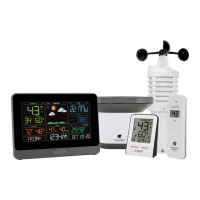
The La Crosse Technology Color Weather Forecast Station is a comprehensive device designed to provide users with detailed weather information and timekeeping functions. It features a vibrant color LCD display that presents various data points in an easy-to-read format, making it a practical addition to any home or office.

Function Description:

The primary function of this weather station is to offer a local weather forecast, outdoor and indoor temperature and humidity readings, and precise time and date information. It utilizes an outdoor sensor to collect external environmental data, which is then wirelessly transmitted to the main display unit. The station's "Intelligent Weather Forecast" feature learns over time, using barometric pressure changes to predict weather conditions for the next 12 hours with an accuracy of 70-75%. This learning process typically takes 7-10 days for calibration.

Usage Features:

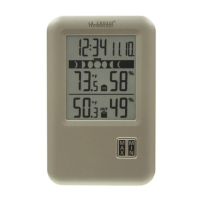
The display unit features a clear layout with dedicated sections for forecast, outdoor conditions, and indoor conditions.

  • Forecast: The forecast section displays one of six icons (Sunny, Partly Sunny, Cloudy, Rain, T-Storm, Snow) based on barometric pressure. The "Snow" icon specifically appears when the outdoor temperature is below 32°F and the forecast indicates rain or a storm. Forecast Tendency Arrows indicate whether pressure is rising (improving weather) or falling (worsening weather).
  • Seasonal Trees: A unique visual feature is the "Seasonal Trees," where the trees and foliage color on the display change automatically according to the programmed dates for Spring (March 20th – June 20th), Summer (June 21st – Sept. 20th), Autumn (Sept. 21st – Dec 20th), and Winter (Dec 21st - Mar 19th).
  • Outdoor Conditions: This section shows the outdoor temperature in °F or °C, outdoor humidity, and trend arrows for both. The trend arrows update every 15 minutes, reflecting changes (2°F and 3% humidity) over the past hour. A sensor strength indicator and a low battery icon for the outdoor sensor are also present.
  • Indoor Conditions: Similarly, the indoor section displays indoor temperature, indoor humidity, and their respective trend arrows. A low battery icon for the display unit is also included.
  • Time and Date: The station features Atomic Time, which automatically sets the time and date for accuracy. Users can select their time zone and choose between 12-hour or 24-hour formats. Daylight Savings Time settings are also configurable. The month, date, and weekday are clearly displayed.
  • HI/LO Records: The device tracks and displays the highest and lowest indoor and outdoor temperatures and humidity levels. These records automatically reset at midnight. Additionally, it calculates and shows the outdoor Heat Index and Dew Point.
  • Temperature & Humidity Alerts: Users can set customizable HI/LO alerts for outdoor and indoor temperature and humidity. When an alert value is reached, the display will beep for 5 seconds each minute until the conditions are out of the alert range. The alert sound can be silenced by pressing any button.
  • Backlight: The display unit has an adjustable backlight (HI-LOW-OFF) when operating with the power cable. When running on batteries only, the backlight will briefly illuminate when the LIGHT button is pressed.
  • Sensor Search: A dedicated SEARCH button allows users to manually initiate a search for the outdoor temperature/humidity sensor. The signal strength icon animates during the search until a signal is received or after 3 minutes if no signal is available.

Setup and Configuration:

Initial setup involves powering up the outdoor sensor with 2-AA batteries and plugging the power cable into the display. Optional 3-AA batteries can be inserted into the weather station for backup. Basic settings like time, date, time zone, and temperature units (°F/°C) are configured through a step-by-step menu accessed by holding the SET button. The outdoor sensor should be placed in a shaded location after 5 minutes of power-up, ideally on a north-facing wall, under an eave, or on a deck rail, mounted vertically to drain moisture. The maximum wireless transmission range for the sensor is over 300 feet in open air, without walls or floors obstructing the signal. For optimal Atomic time reception, the display should be oriented with the front or back facing Ft. Collins, Colorado, and placed at least 6 feet away from other electronics.

Maintenance Features:

  • Battery Replacement Indicators: The display shows low battery icons for both the outdoor sensor and the main display unit, prompting users to replace batteries when needed.
  • Battery Care: The manual provides guidelines for battery care, including not mixing old and new batteries, not mixing different battery types (Alkaline, Standard, Lithium, Rechargeable), purchasing the correct size and grade, replacing all batteries in a set at the same time, and promptly removing expired batteries.
  • Cleaning: While not explicitly detailed in the provided text, general care for electronic devices typically involves cleaning with a soft, dry cloth and avoiding harsh chemicals.

The La Crosse Technology Color Weather Forecast Station is designed for user-friendliness and provides a wealth of environmental data to help users stay informed about their local weather and indoor conditions.

La Crosse Technology L78571 Specifications

General IconGeneral
Display TypeLCD
Forecast IconsYes
Time Display12/24 hour format
Temperature Range-40°F to 140°F
Power Source (Display)2 x AA batteries (not included)
Power Source (Remote Sensor)2 x AA batteries (not included)

Related product manuals