WIRELESS TEMPERATURE & HUMIDITY STATION COMBO PACK
3 | PAGE
POWER UP
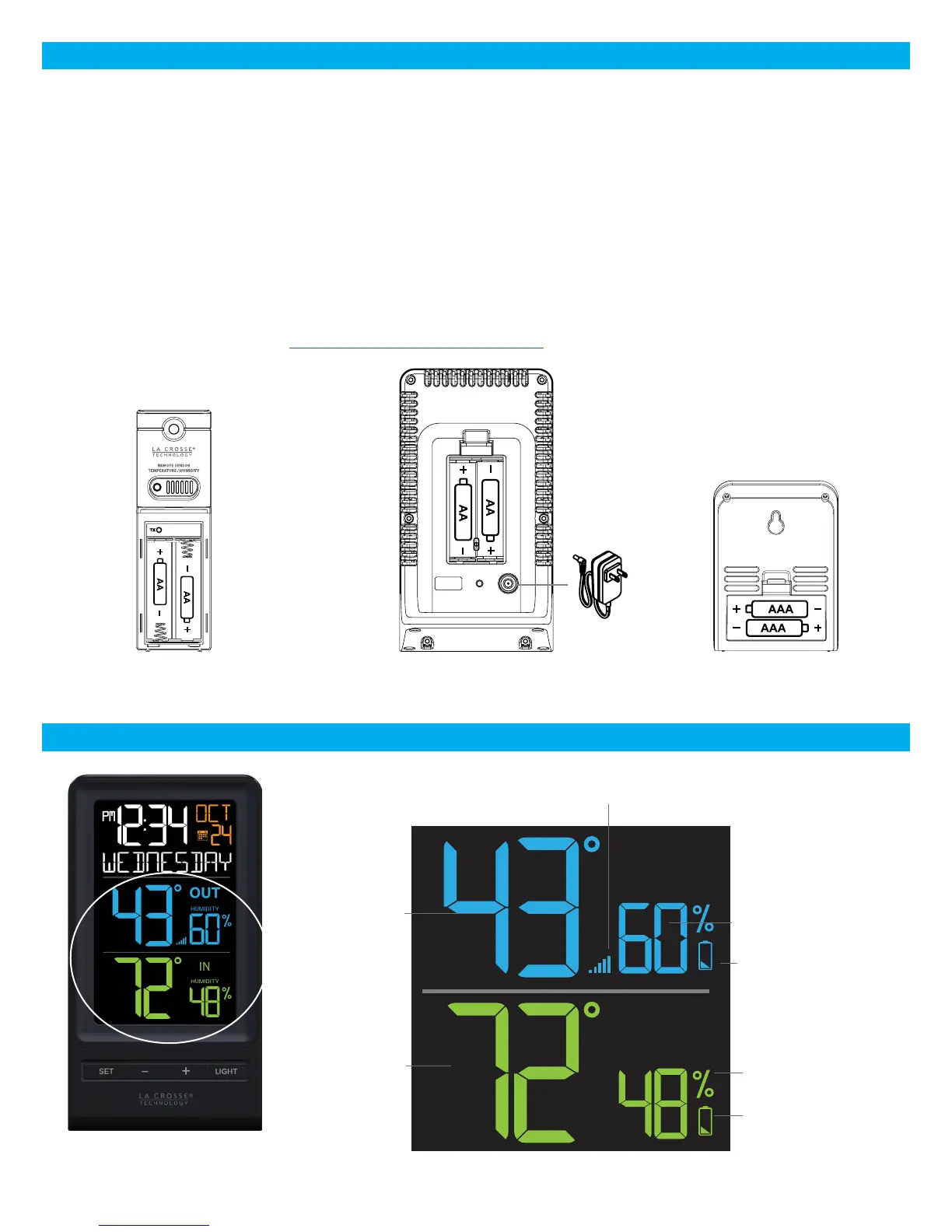
1. Insert 2-AA batteries into your Outdoor Sensor.
2. Insert the 5 volt power cord into an outlet, then into your Color Display. Optional: Insert 2-AA batteries for
backup.
3. Insert 2-AAA batteries into your Mini Display.
4. Adjust time and date settings on each display.
5. Once the Outdoor Sensor is reading to each of your displays, place it outside in a shaded location.
Watch sensor mounting video: http://bit.ly/TH_SensorMounting
COLOR DISPLAY: LCD FEATURES
Sensor Reception
Indicator
Sensor Low
Battery Indicator
Outdoor
Temperature
Percent Relative
Humidity (RH)
Indicator
Outdoor Sensor
TX141TH-Bv2
Color Display
308-1415TH
Mini Display
308-1409TH
OUT
HUMIDITY
IN
HUMIDITY
Station Low
Battery Indicator
Percent Relative
Humidity (RH)
Indicator
Indoor
Temperature



 To Next Page