(P/N)759.128 Rev D
EN
06/10
•
© copyright 2009-2010 Kaba Mas LLC
Page 1 of 4
MANAGER INSTRUCTIONS
AUDITGARD
66E (LGA) Electronic Combination Lock
AuditGard locks are shipped from LA GARD in Factory Default
state without Users or features enabled. Refer to the AuditGard
Setup Instructions (742.049) if Lock settings have not already
been programmed.
Factory Default: The Lock must be in the Factory Default state to
be programmed by the PC software.
Factory mode functions as follows:
• 1 key – When pressed, will open the Lock.
• 0 key – When pressed, prompts the AuditGard Setup software
to send the configuration settings to the Lock.
• All other keys perform no function.
Setup: AuditGard locks must be programmed using the AuditGard
Setup Software. Once programmed, Manager Combination is
enabled, and MUST be changed to activate
the Lock.
Active: The Manager combination must be changed before any
Manager commands are available.
PROGRAMMABLE LOCK FEATURES
MODES (Multiple Modes may be selected.)
• Silent Alarm (Alarm Box Required)
If enabled, this option will send a signal to an outside alarm
system through the LA GARD Alarm Box.
• DualMode
If enabled, two combinations will be required to operate
the Lock.
The Manager and one additional User must be active.
• TimeDelayOverride
If enabled, User 9 can override delay period.
User 9 must be active.
EXTERNAL SIGNALS (Alarm Box Required. Only one External
Signal type may be selected.)
An external input signal to the Alarm Box will either Disable
Opening Only or Disable All Access depending on the selection
programmed for External Signals.
• External Signal disables Lock opening with valid combination.
• OR External Signal disables Lock opening with valid
combination and all Lock commands.
TIME DELAY
• Delay Period 1 - 99 minutes
• Open Period 1 - 19 minutes
COMBINATION LENGTH
A combination length from six (6) to nine (9) digits may
be selected.
NOTE: To maintain the VdS Class 2 and EN 1300 Class B
certification when the duress alarm feature is used, a combination
length of 7 digits or longer must be selected.
LOCK USERS
Manager (ID #1)
• Open Lock
• Change Combination
• Enable/Disable Users
• Delete Users
• Set Time Delay Values
• Audit Lock
Users (ID# 2-9)
• Open Lock
• Change Combination
STANDARD LOCK FEATURES
Wrong Try Penalty
• Entry of four (4) consecutive invalid combinations initiates a ve
(5) minute delay penalty.
Lock responses during the penalty period are as follows:
- The LED will flash every ten (10) seconds.
- If any key is pressed, the Lock will ash the LED and beep
three times.
• Once the penalty period has ended, two (2) consecutive invalid
combinations will initiate another five (5) minute penalty period.
Low Battery Warning
• Repeated audio/visual signals (LED ashes/beeps) during Lock
opening indicate the battery is low and should be
replaced immediately.
• If the battery level becomes too low to safely operate the Lock,
pressing any key will initiate the low battery warning.
The battery must be replaced before the Lock will operate.
Dual-Handed
Swing Bolt
Dead Bolt
3750-K
Round Entry
3125
Round Entry
LOCKS
ENTRY DEVICE OPTIONS
8130
(Optional)
3190 Privat
II
(Optional)

 Need help?
 General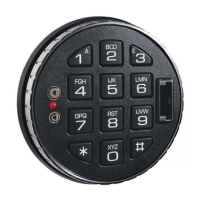

 To Next Page

