!
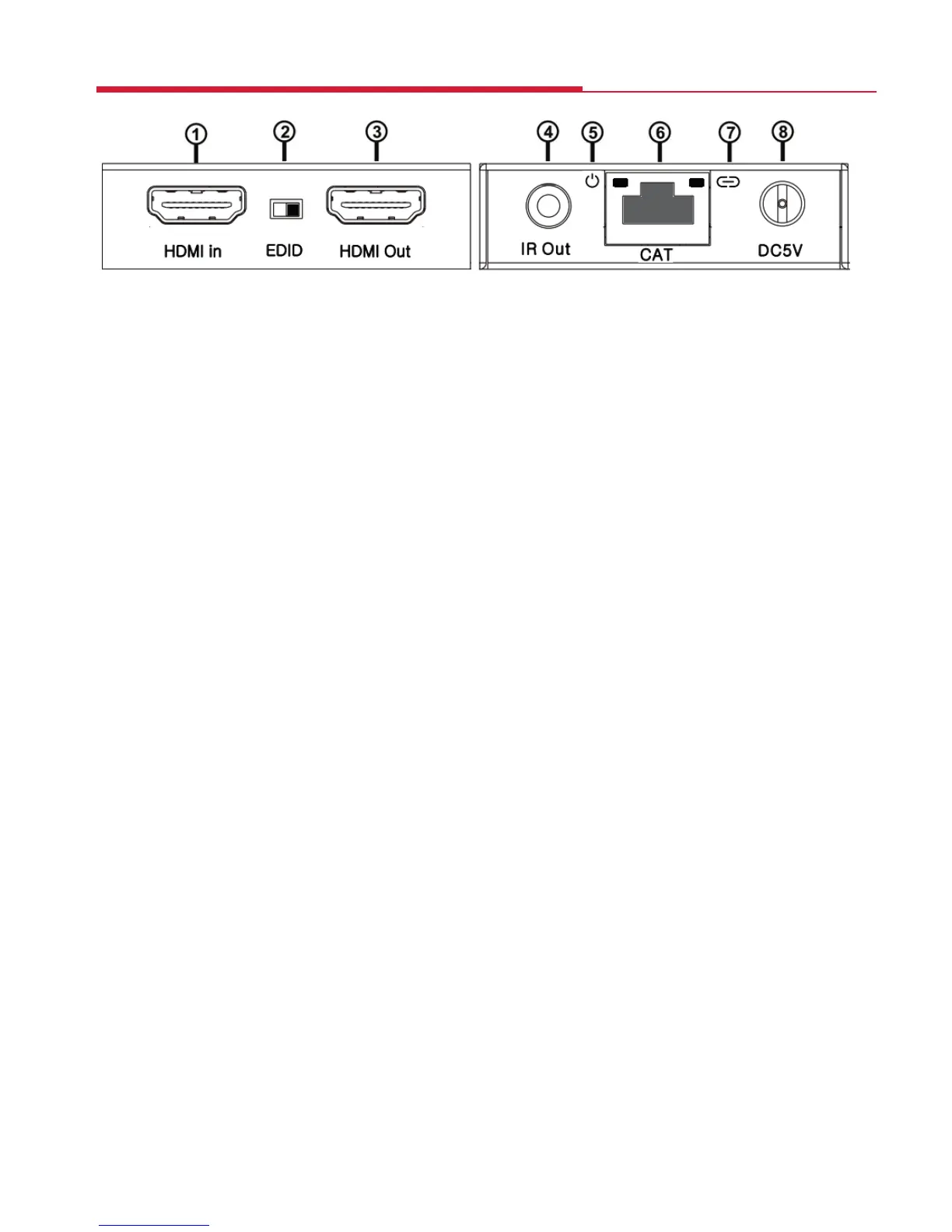
① HDMI IN: Via an HDMI cable connects to the HDMI output port of your
source equipment such as DVD/Blu-ray players or set top box.
② EDID SWITCH: Switched to the right, the extender will copy the EDID
information for the display connected to the HDMI loop out to the
source equipment. Switched to the left, the extender will copy the EDID
information of the display connected to the Receiver to the source.
③ HDMI OUT: Via an HDMI cable connects to the HDMI input of a local
display such as an HDTV.
④ IR OUT: Connection for the IR Blaster cable included in the pack for IR signal
transmission. Place the IR Blaster in direct line-of-sight of the equipment to
be controlled. Use the sticky pad to attach to a suitable surface.
⑤ POWER LED: Indicates when the device is connected to a power supply.
⑥ CAT: Via CAT 5e/6/7 Ethernet cable connects the transmitter with the CAT
input of the receiver.
⑦ LINK LED: Indicates when the device is connected to an HDMI source.
⑧ DC 5V: Connection for 5V DC power adaptor which is plugged into a
mains socket.
Transmitter - Sockets and Switches
4


 To Next Page